Skip to main content ↓

AI in CRM: The 3 types of AI powering modern sales tools, and what each one actually does


Written by
jewell july copywriting specialist at Nutshell
Jewell July Marketing Specialist
Last updated on: July 24, 2026
A salesperson working at a laptop with icons representing the three types of AI in CRM software

Quick answer: What does AI do in a CRM?

AI in CRM does three types of work to help you save time with your administrative tasks and sales tasks. Generative AI helps you write your emails and notes, while predictive AI recommends next action steps for your pipeline, and conversational AI helps with voice conversations and chats with clients.

Are you still doing manual work when it comes to logging important customer conversations? Scoring leads based on what you’re feeling? Or spending countless hours drafting outreach and follow-up emails? Then CRM AI is what you need.

AI in CRM has moved from simple automation to analyzing customer behavior, predicting lead prioritization, and generating customized content. With your first party data, AI can provide valuable insights that would take your team days and weeks to discover.

The results speak for themselves. Companies using AI in CRM have reported: 

But the CRM data plays a big role in determining the quality of results (more on that below).

This guide breaks down the three types of AI in your CRM, what they excel at, and how to differentiate real AI capacity from the gimmick.

What is AI in CRM, really?

AI in CRM is artificial intelligence tools either built into or integrated with your CRM to help streamline workflows and save teams time. A CRM with AI built in is able to read customer emails, personal notes, call logs, and other mission-critical data stored in your CRM. The AI uses this data to provide outputs such as writing emails, conducting lead research, delivering next sales actions, designing email campaigns, and predicting deal outcomes.

A 2024 Forrester study found that 92% of business leaders claimed that a strong data strategy is critical for AI success, but that only 34% actually had one. AI can close the gap here, but what it does next depends on which type of AI is used.

Supercharge your CRM with the power of AI!

Work smarter, not harder. Nutshell’s AI features summarize timelines and call or meeting transcriptions, take speech-to-text notes, help you craft emails, and generate insights so your team closes deals faster.

The 3 types of AI in your CRM (and a real example of each)

AI capabilities marketed by vendors as “AI in CRM” can be split into three core categories: Generative AI, predictive AI, and conversational AI. Knowing which category your system uses tells you what to expect from it.

What is generative AI?

Generative AI is the tool that writes things for you. In a CRM, that typically translates to drafting follow-up emails, call notes, meeting summaries, and contact record summaries. These are usually based on what’s already in your pipeline, so reps spend less time writing and more time selling.

Nutshell’s AI Email Sequence Writer is a great example: This AI tool drafts a follow-up email sequence based on your notes and the lead’s current pipeline stage, so the email follows on naturally from what transpired on the last call.

What is predictive AI?

Predictive AI is the type of AI that parses your deal history, engagement, and activity data, then makes a prediction about what’s likely to happen next, as well as what your next best action should be. It’s the type of AI capability most people imagine and desire when they ask about AI in CRM.

For example, when it comes to lead scoring, CRMs typically assign a conversion probability score to potential customers based on their behavior, market segment, and engagement. It’s useful, but it only highlights what’s a priority. 

On the other hand, predictive AI tools go further, telling you the specific next step to take with a deal, and why. That’s far more useful than a lead score number alone.

Nutshell’s AI Lead Recaps & Next Actions agent handles this differently: When a deal goes quiet, it recommends the specific next step and shows the activity that led to that recommendation.

Short video showing an AI recommendation for a stalled sales deal, including the suggested next action and reasoning

What is conversational AI?

Conversational AI is generally the type of AI that your customers interact with directly, through tools like chatbots, voice assistants, outbound call notifiers, or call transcription. In a CRM, it usually shows up as a chatbot that qualifies leads on your website, or a notetaker that turns a sales call into searchable text automatically.

Nutshell’s AI Sales Chatbot and AI Note Transcriber both fall into this category, handling the conversation-capture work reps used to do manually.

Why does clean CRM data matter?

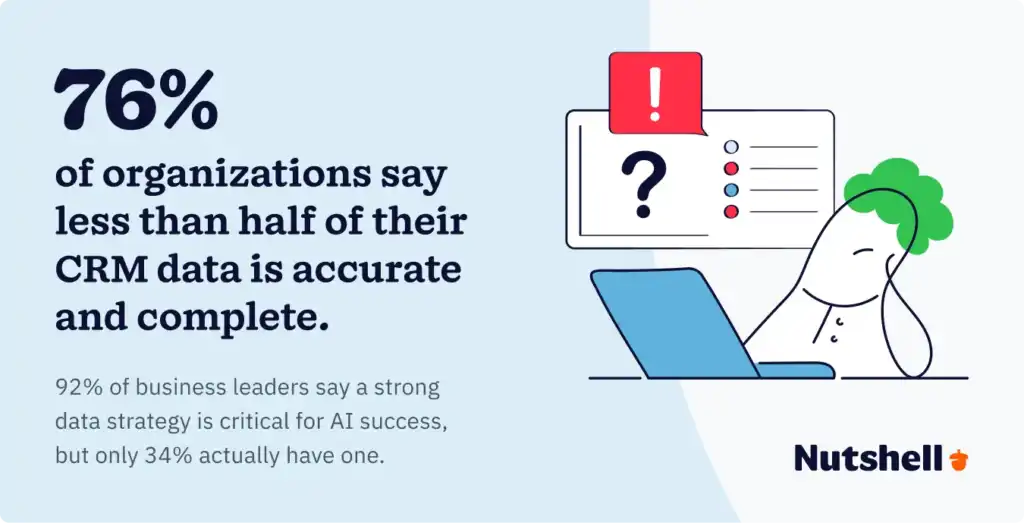
Statistic showing 76% of organizations say less than half of their CRM data is accurate

Clean CRM data matters because your CRM data is the source of every AI recommendation, and when that data is inaccurate or incomplete, there’s a chance the output could be incorrect. The real risk is that the AI will recommend your next steps with complete confidence regardless of the data quality behind them.

The research indicates that poor data quality is a widespread issue. Validity’s State of CRM Data Management report found that companies lose an average of 16 sales deals per quarter purely due to poor-quality data, and that 76% of organizations say less than half their CRM data is accurate and complete.

Over and above standard data cleaning practices, Nutshell’s CompanyIQ AI agent pulls information from trusted data sources to enrich contact records automatically, so the predictive AI built on top of it has something real to work with.

How do businesses evaluate AI claims when choosing a CRM?

To evaluate a CRM vendor’s AI claims before committing to a specific system, check for these three things:

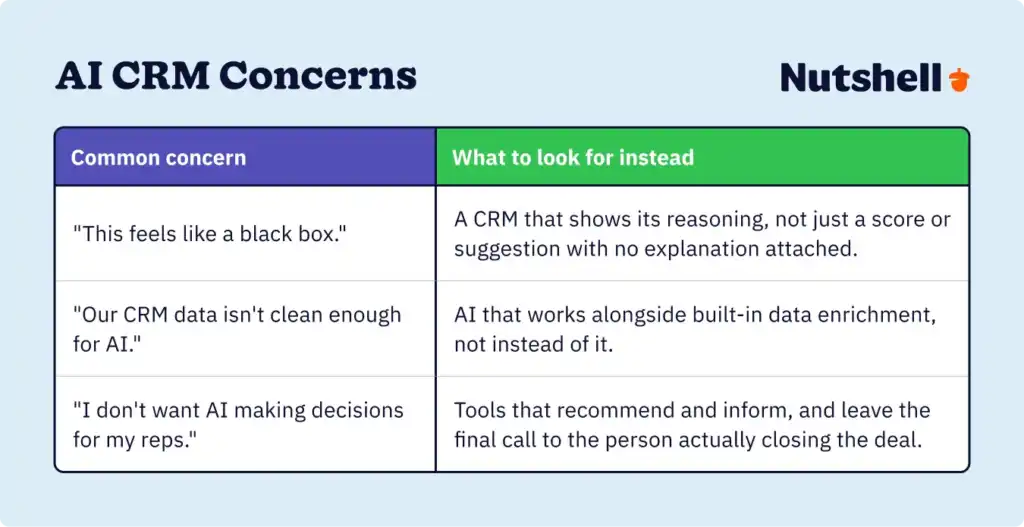
  1. Is it explainable? It needs to tell you why, not just what.
  2. Does it live in your workflow? A separate dashboard you have to remember to check is a dashboard you’ll stop checking.
  3. Does it suggest, or does it execute? A recommendation you still have to act on manually is only half the job.
A table addressing three common concerns about AI in CRM: black-box reasoning, messy data, and loss of human touch, with guidance on what to look for instead

Some CRM systems are already past the suggestion stage. Nutshell’s AI Agent Marketplace gives its customers access to a host of AI agents that act on their own, automatically logging and summarizing calls, enriching company records, surfacing a lead’s next action, and more, without you opening the record.

Here’s how six CRMs stack up on workflow fit and suggest-vs-execute, based on their published AI features:

CRMWhere it shows upSuggests, or executes?
NutshellIn the sidebar, as you work a dealBoth: the Sales Coach recommends, and AI Agents can act on it
Salesforce (Einstein GPT)Within the Salesforce platformMostly suggests that Agentforce is moving toward autonomous execution
HubSpot (Breeze Assistant)Via prompt inside HubSpotMostly suggests and executes specific actions when prompted
Zoho (Zia)Built into Zoho CRMSuggests
Freshworks (Freddy AI)Primarily in support/ticketing workflowsSuggests
Pipedrive (AI Sales Assistant)Within Pipedrive’s pipeline viewSuggests, with notifications to prompt action

I like Nutshell’s capability for researching contacts and leads through their AI research

Mike K. – Enterprise Account Executive

Skip the blank template—generate email campaigns with AI

Go from prompt to polished first draft in minutes with the 1-click AI email campaign builder!

AI is only as good as the actions it leads to

Every type of AI detailed in this guide (generative, predictive, and conversational) is designed to deliver an answer to the question: What should happen next with this lead? The CRM platforms that hit the mark make that answer clear, deliver it to where you already work, and help you take the next best action instead of just displaying it on another dashboard.

Nutshell brings all three types of AI together in one place, through its AI Email Sequence Writer, AI Lead Recaps & Next Actions agent, AI Sales Chatbot, AI Note Transcriber, CompanyIQ AI agent, and many other AI agents in its marketplace. That way, you’re not piecing together five separate tools to get there. 

Want to see how Nutshell’s AI agents can help your team save time? Try Nutshell free for 14 days, no credit card required.

Want to keep learning? See AI CRM Use Cases That Move the Revenue Needle for the ROI data behind these use cases, or How to Use AI in Your CRM for a step-by-step walkthrough of each task.

Frequently asked questions about AI-powered software

  • What’s the difference between AI CRM and traditional CRM?

    Traditional CRMs are essentially a well-organized filing cabinet: they store your contacts, deals, and activity history, but extracting insight or deciding what to do next is on you. An AI CRM analyzes that same data and surfaces a recommendation, like next-best-action, without you having to go dig for it.

  • How is AI CRM different from basic CRM automation or rules?

    Rule-based automation runs on fixed logic: if a deal sits in a stage for a set number of days, send an email. Predictive AI weighs multiple signals together, engagement, activity history, deal stage, and recommends the specific action most likely to move that particular deal forward, along with the reasoning behind it.

  • Is AI in CRM the same as lead scoring?

    Not quite. A lead score tells you priority, how likely a deal is to close. Predictive AI goes a step further and tells you what to do about it, and why. As with any AI-driven scoring, outputs are only as unbiased as the data behind them, so look for a CRM that explains its reasoning rather than treating it as a black box.

  • Are there any drawbacks to using AI in your CRM?

    The two most common ones are data bias (an AI system is only as fair as the data it learns from) and over-reliance on automation at the expense of the personal touch that closes deals. Both are manageable: look for a CRM that explains its reasoning and treats AI as an assist, not a replacement for the rep.

  • What should I look for in a CRM with AI integration?

    Start with the three criteria above: Can it explain its reasoning, does it live inside your daily workflow, and does it help you take action instead of just displaying a score? A CRM that checks those three boxes is doing more for you than one with a longer feature list.

See Nutshell in action!

Try Nutshell free for 14 days or let us show you around before you dive in.

BACK TO TOP
Join 30,000+ other sales and marketing professionals. Subscribe to our Sell to Win newsletter!