What Is Automated Data Collection and How Can It Benefit You?

-

Quick answer: What is automated data collection?
Automated data collection uses software tools to capture, organize, and sync customer and sales data like email activity, call notes, and contact information without manual input. Instead of sales reps spending hours typing notes into spreadsheets or updating CRM fields, automation handles these tasks in the background. The result is a CRM that stays up to date in real time, fewer data entry errors, and teams that spend more time selling instead of doing administrative busywork.
Your sales team is drowning in busywork. Every email, every phone call, every meeting generates data that someone needs to log manually. While your reps are typing notes into spreadsheets and updating CRM fields, deals are slipping through the cracks and opportunities are going cold.
The numbers tell the story: sales representatives spend nearly 32.7 hours per month on manual data entry and CRM management—time that could be spent actually selling. That’s roughly 23 selling days lost every year, per rep. And the cost? Manual data entry errors range from 0.1% to 1% depending on your industry, with each error costing your business between 50 to 150 once it flows through your systems.
Automated data collection solves this problem. It’s the process of using software tools to capture, organize, and sync customer and sales data—like email activity, call notes, and contact information—without manual input. It reduces busywork, improves data accuracy, and ensures your CRM stays up to date in real time.
For small to mid-sized businesses, the transformation is immediate: teams spend less time on administrative tasks and more time building relationships that close deals. In a business environment where 74% of employees using automation say it helps them work faster, automated data collection isn’t just a nice-to-have—it’s how you stay competitive.
Summarize this content with AI:
What is automated data collection?
Automated data collection is the process of using software tools to capture, organize, and sync customer and sales data—like email activity, call notes, and contact information—without manual input. Instead of sales reps spending hours typing meeting notes into spreadsheets or manually updating contact records, automation handles these tasks in the background.
Think of it as a digital assistant that never sleeps. When a prospect opens your email, the system logs it. When a rep completes a call, the system captures the details. When a deal moves to the next stage, the system updates all relevant records automatically. The result is a CRM that reflects reality in real time, without anyone lifting a finger.
The business case is compelling. According to research, automation frees up 82% of sales teams to focus on building stronger client relationships rather than updating databases. That shift from administrative work to strategic selling is what drives revenue growth.
How automated data collection works:
At its core, automated data collection automation connects data sources to your central system through integrations and APIs. Here’s the typical flow:
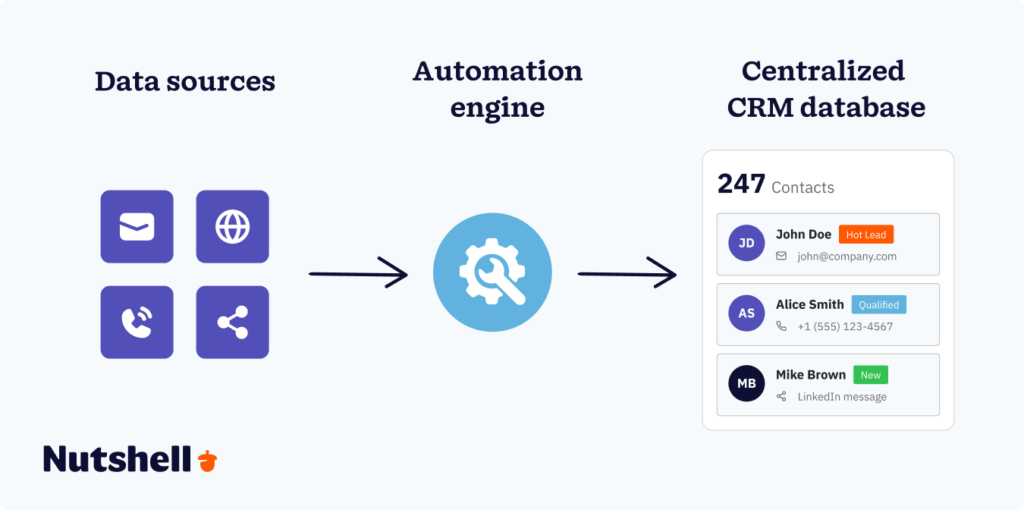
Step one—Data capture: Information enters your system from multiple touchpoints—web forms, email interactions, phone calls, social media messages, calendar events, and third-party platforms. Modern systems can capture both structured data (like form fields and database entries) and unstructured data (like email body text and call recordings).
Step two—Data processing: The automation engine processes this incoming information, extracting relevant details, categorizing data types, and applying business rules. AI-powered systems can even analyze unstructured content to pull out key insights like customer sentiment, action items, and deal risk factors.
Step three—Data routing: The processed information flows to the right place in your CRM. Contact details go to contact records, deal updates go to pipeline stages, tasks get assigned to the right team members, and reports update automatically.
Step four—Continuous sync: The system maintains data integrity across all connected platforms. When information changes in one system, it updates everywhere else automatically. No duplicate entries, no outdated records, no manual reconciliation.
This automation layer transforms your CRM from a static database into a living system that grows smarter with every interaction.
Manual vs. automated data collection: Understanding the shift
The difference between manual and automated data collection isn’t just about speed—it’s about what becomes possible when your team stops acting as data entry clerks and starts acting as strategic sellers.
Manual data collection: The old way
In a manual system, every piece of customer information requires human intervention. A sales rep finishes a discovery call and must immediately type up notes, update the deal stage, schedule a follow-up task, and log the activity.
The problems compound quickly:
- Human error is inevitable: Even the most diligent teams make mistakes. Research shows that manual data entry error rates range from 0.5% to 1% in most industries, with manufacturing achieving 0.1% to 0.3% and healthcare targeting 0.3% or less. At a 1% error rate, a team processing 5,000 orders monthly creates 50 incorrect entries every single month.
- Data becomes stale immediately: By the time a rep finishes logging yesterday’s interactions, new conversations have already happened. Your CRM reflects the past, not the present.
- Follow-up falls through the cracks: Without automated reminders, 74% of teams struggle to turn meeting insights into consistent follow-up, even when they record every conversation. The execution gap—the distance between knowing what to do and actually doing it—kills deals.
- Scaling requires linear headcount growth: Want to double your sales volume? You’ll need to double your team. Manual processes don’t scale efficiently.
Automated data collection: The modern approach
Automated systems flip this model. Instead of reps entering data, the system captures it as interactions happen. Email opens, call recordings, form submissions, calendar events—all flow into your CRM without manual intervention.
The advantages are measurable:
- Accuracy improves dramatically: Automated systems eliminate human transcription errors. According to industry research, 66% of organizations report that automation has improved data accuracy, and 88% of employees using automation tools trust their accuracy and reliability.
- Time savings are substantial: A 35-person digital agency using AI-powered CRM automation reduced weekly CRM time per rep from 8 hours to 2 hours—a 75% reduction. That’s 6 hours per week per rep redirected to selling. At scale, one company freed up over 500 hours annually in their finance department through payment automation alone.
- Follow-up becomes systematic: With automated task creation and reminders, follow-up completion rates jump exponentially. Nothing falls through the cracks because the system ensures every commitment gets tracked and every opportunity gets nurtured.
- Data becomes a strategic asset: When your CRM updates in real time, you can make decisions based on current reality. AI-powered insights can predict which deals are most likely to close, identify at-risk customers before they churn, and recommend next-best actions based on historical patterns.
The shift from manual to automated data collection isn’t just operational—it’s strategic. Teams that automate gain the competitive advantage of speed, accuracy, and intelligence that manual processes simply cannot match.
How does automating data capture benefit you?
Automated data collection software transforms how your business operates, delivering benefits that compound over time. Here’s what changes when you stop manually entering data and let automation handle the heavy lifting:
Save time and redirect focus to revenue-generating activities: The average sales representative spends 32.7 hours per month on manual data entry and CRM management. AI automation recovers approximately 70% of that time, translating into roughly 23 additional selling days annually per representative. Payment automation allows businesses to free up over 500 hours annually in their finance departments. That time doesn’t disappear—it shifts to strategic work that actually drives revenue.
Improve data accuracy and reduce costly errors: Manual data entry error rates typically range from 0.5% to 1% across industries, with each error costing between 50 to 150 depending on how far it flows through your systems before being caught. Automated systems eliminate human transcription errors at the point of entry. According to Salesforce, 88% of employees using automation tools trust their accuracy and reliability—a level of confidence that manual processes simply cannot achieve.
Increase team productivity and job satisfaction: Salesforce reports that 74% of employees using automation say it helps them work faster. More impressively, 88% of employees report higher job satisfaction, and 84% report greater company satisfaction as a result of using automation to streamline tasks and reduce workload. When people spend less time on tedious administrative work and more time on meaningful activities, both performance and morale improve.
Scale operations without linear headcount growth: Manual processes require adding people to handle increased volume. Automation breaks this linear relationship. One 12-person SaaS startup reduced sales admin time from 22 hours per week to 4 hours per week while growing revenue by 156% in six months. The automation enabled growth without proportional hiring.
Enable data-driven decision making: With real time data flowing into your CRM automatically, you can make decisions based on current reality rather than outdated snapshots. Companies integrating AI into forecasting have seen their forecast accuracy improve by 40%, enabling better strategic decisions. When 76% of organizations say data-driven decision-making is a top goal for their data programs, automated collection becomes the foundation that makes it possible.
Stay competitive in an AI-driven market: The shift to automation isn’t optional anymore. Roughly 60% of companies currently use automation tools in their workflows, and 90% of IT organizations plan to increase automation spending in the next year. Teams that embrace automated data collection gain the competitive advantage of speed, accuracy, and intelligence that manual processes cannot match.What is structured data collection?
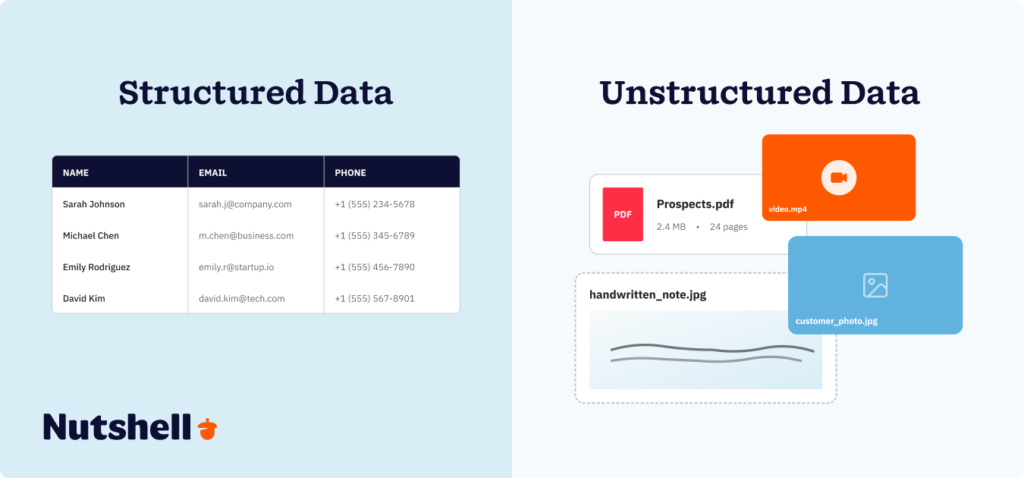
Structured data collection involves capturing information that’s already organized in a predictable, standardized format—think spreadsheets, databases, and web forms where every piece of information fits into a defined field with a specific data type.
In structured data, each piece of information has a clear label and a designated place. A contact form collects “First Name,” “Last Name,” “Email Address,” and “Phone Number” in separate fields. A sales pipeline tracks “Deal Stage,” “Deal Value,” “Expected Close Date,” and “Assigned Rep” in distinct columns. Everything has structure, which makes it easy for systems to read, process, and analyze.
Common sources of structured data include:
Web forms and landing pages: When a prospect fills out a contact form or downloads a resource, their information flows directly into structured fields in your CRM. Name goes to the name field, email to the email field, company to the company field. The structure is built into the form design.
Database entries: Customer relationship management systems, enterprise resource planning platforms, and marketing automation tools all store information in structured formats. Each record follows the same template with consistent field names and data types.
Transactional systems: E-commerce platforms, payment processors, and order management systems generate structured data with every transaction—customer ID, order number, item SKU, quantity, price, and timestamp all captured in standardized formats.
API integrations: When systems connect via APIs, they exchange structured data in formats like JSON or XML. A marketing platform might send lead information to your CRM with standardized field mappings that both systems understand.
Spreadsheet imports: CSV files and Excel spreadsheets contain structured data as long as they follow consistent column headers and data formats. This makes them easy to import into CRM systems with proper field mapping.
The key advantage of structured data is predictability. Because the format is consistent, automated systems can process it reliably without human interpretation. Your CRM knows exactly where to put each piece of information, how to validate it, and how to connect it to related records.
Which data collection system is best for structured data?
For structured data collection, customer relationship management (CRM) systems are purpose-built to capture, organize, and activate customer information at scale. A modern CRM acts as the central hub that connects all your structured data sources, creating a unified view of every customer interaction.
Here’s why CRM systems excel at structured data collection:
Native integration with data sources: Modern CRMs connect directly to the platforms where structured data lives—marketing automation tools, email platforms, calendar systems, web forms, e-commerce platforms, and payment processors. These native integrations ensure data flows automatically from source to CRM without manual exports or imports.
Real-time data synchronization: When a prospect fills out a web form, that information appears in your CRM instantly. When a rep schedules a meeting, it syncs to the contact timeline automatically. When a deal closes, every connected system updates simultaneously. Real-time sync eliminates the lag and manual reconciliation that plague disconnected systems.
Intelligent field mapping and validation: CRM systems map incoming data to the right fields automatically, apply validation rules to ensure data quality, and flag potential duplicates before they pollute your database. This automation ensures that structured data maintains its structure and integrity as it flows through your systems.
Cross-platform data enrichment: Your CRM doesn’t just collect data—it enriches it. When a new contact enters the system, automated enrichment tools can append company information, social media profiles, technographic data, and firmographic details from third-party data sources. One contact record becomes a comprehensive profile without any manual research.
Automated workflow triggers: Structured data enables sophisticated automation. When a lead score reaches a threshold, the system assigns it to a rep automatically. When a deal stage changes, the system triggers the appropriate follow-up sequence. When a contract renewal date approaches, the system creates a task for the account manager. The structure makes these automations reliable and precise.
The CRM integration ecosystem
Think of your CRM as the central nervous system of your sales and marketing operations. It connects to:
Marketing platforms: Capture lead information from landing pages, email campaigns, social media ads, and content downloads. Track engagement behavior and automatically sync lead scores and campaign attribution.
Communication tools: Log emails, calls, and text messages automatically. Sync calendar events and meeting notes. Capture conversation intelligence from recorded calls and video conferences.
E-commerce and payment systems: Track purchase history, transaction values, payment methods, and order fulfillment status. Automatically update customer lifetime value and identify upsell opportunities.
Sales enablement tools: Connect proposal software, digital signature platforms, and sales content libraries. Track what materials prospects engage with and how long they spend reviewing proposals.
Customer support platforms: Sync support tickets, response times, resolution rates, and customer satisfaction scores. Give sales teams visibility into customer health and potential churn risk.
Data enrichment services: Automatically append company information, contact details, social profiles, technology usage, and intent signals to every record without manual research.
For small to mid-sized businesses, the right CRM transforms structured data collection from a manual chore into an automated advantage. When 67% of organizations actively manage more than 500 applications, the CRM’s ability to act as a central integration hub becomes essential for maintaining data integrity and enabling intelligent automation.Is your business ready for a CRM?
Download our helpful guide and find out today!
What is unstructured data collection?
Unstructured data collection involves capturing information that doesn’t fit neatly into predefined fields or tables. This is the messy, varied content that makes up the majority of business information—emails, PDFs, images, videos, audio recordings, social media posts, handwritten notes, and free-form text. Unlike structured data where everything has a designated place, unstructured data requires interpretation before it can be organized and used.
The challenge with unstructured data is that machines can’t immediately understand it. An image of a business card contains contact information, but a standard database can’t read it. A PDF contract includes important terms and dates, but traditional systems can’t extract and categorize them. A recorded sales call contains customer objections and buying signals, but without processing, it’s just an audio file.
Common sources of unstructured data include:
Handwritten notes: Meeting notes, sticky notes, sketches, and annotations on printed documents. These represent human thinking and decision-making processes but are the most challenging unstructured data to digitize and interpret.
Document files: PDFs, Word documents, presentations, and spreadsheets that contain text, images, and formatting. Some PDFs are machine-readable with selectable text, while others are essentially images of documents that require optical character recognition (OCR) to extract information.
Communication content: Email body text, chat transcripts, social media messages, and text message conversations. The information is valuable, but it’s buried in conversational language rather than structured fields.
Audio and video recordings: Sales calls, customer support interactions, webinars, product demos, and video meetings. These contain rich information about customer needs, objections, and sentiment, but require transcription and analysis to extract insights.
Images and scans: Business cards, receipts, invoices, forms, whiteboards, product photos, and screenshots. The information is visual rather than textual, requiring computer vision technology to interpret.
Social media and web content: Customer reviews, forum discussions, blog posts, news articles, and website content. This public information provides context about customers, competitors, and market trends, but it’s unstructured and distributed across countless platforms.
Handwritten notes: Meeting notes, sticky notes, sketches, and annotations on printed documents. These represent human thinking and decision-making processes but are the most challenging unstructured data to digitize and interpret.
Modern AI and machine learning transform unstructured data collection
The technology for handling unstructured data has advanced dramatically in the past few years. What once required expensive manual processing can now be automated with AI-powered tools:
Natural language processing (NLP): AI systems can now read and understand text content, extracting key entities (names, companies, dates, monetary values), identifying sentiment (positive, negative, neutral), and summarizing lengthy documents into concise insights. When a customer sends a 500-word email describing their pain points, NLP can identify the three most important issues and automatically create tasks for your team.
Optical character recognition (OCR): Modern OCR technology can extract text from images and scanned documents with near-perfect accuracy. A photo of a business card becomes structured contact information in your CRM. A scanned invoice becomes line items in your accounting system. Even handwritten notes can be digitized and made searchable.
Speech recognition and conversation intelligence: AI-powered transcription services convert audio and video recordings into searchable text automatically. More advanced conversation intelligence platforms analyze sales calls to identify competitor mentions, track talk-to-listen ratios, flag objections, and score calls based on effectiveness. The insights from a 45-minute discovery call flow into your CRM without manual note-taking.
Computer vision: AI can now interpret images, identifying objects, reading text, and extracting information from visual content. A photo of a damaged product can trigger a warranty claim. An image of a retail display can verify compliance with merchandising standards. A whiteboard sketch from a planning session can be converted into actionable task lists.
Generative AI for summarization: Large language models can process lengthy unstructured content—meeting transcripts, email threads, customer reviews—and generate concise summaries that highlight key points, action items, and next steps. This transforms hours of content into minutes of focused insights.
The combination of these AI capabilities means unstructured data is no longer a barrier to automation. What your systems couldn’t understand five years ago, they can now process, interpret, and act on automatically.
Which data collection system is best for unstructured data?
Collecting unstructured data requires specialized tools that can translate messy, varied formats into organized, actionable information. The right system depends on what type of unstructured data you’re working with and what you want to do with it.
Document processing and OCR platforms
For PDFs, images, and scanned documents, optical character recognition (OCR) platforms extract text and structure it for your CRM or database. Modern OCR services like Google Cloud Vision, AWS Textract, and Microsoft Azure Form Recognizer go beyond simple text extraction—they understand document layouts, identify fields automatically, and can process handwritten content.
Use case: A professional services firm receives client contracts as PDF scans. An automated OCR workflow extracts key information (client name, contract value, start date, end date, payment terms) and creates a new deal in the CRM with all relevant fields populated. No manual data entry required.
Conversation intelligence and call analytics
For audio recordings and video calls, conversation intelligence platforms like Gong, Chorus.ai, and native CRM call analysis features transcribe conversations automatically and extract insights. These systems identify customer objections, competitor mentions, pricing discussions, and commitment language—then surface this intelligence to sales managers and update CRM records with key talking points.
Use case: After every sales call, the conversation intelligence platform automatically logs the call in the CRM, creates a transcript, identifies action items, scores the call quality, and flags deals that show risk signals. Sales managers get alerts when reps need coaching, and follow-up tasks get created automatically.
Email and communication parsing
For email content and messaging platforms, modern CRMs use AI to parse incoming messages, identify important information, and update records automatically. Systems can detect when a prospect requests pricing, when a customer signals dissatisfaction, or when a partner proposes a collaboration—then trigger appropriate workflows without manual review.
Use case: A customer sends an email saying they’re considering canceling their subscription. The AI system detects the churn risk, automatically creates a high-priority task for the account manager, flags the account as “at risk” in the CRM, and sends an alert to the customer success team—all before a human reads the email.
Web scraping and social media monitoring
For public web content and social media, scraping tools and social listening platforms collect unstructured data from websites, review sites, forums, and social networks. These systems can monitor brand mentions, track competitor activity, identify potential leads based on keywords, and gather market intelligence from public conversations.
Use case: A B2B software company monitors LinkedIn for posts where people mention frustrations with competing products. When someone posts “struggling with [competitor name],” the system automatically creates a lead in the CRM, enriches the contact with company information, and adds them to a targeted outreach sequence.
CRM platforms with built-in AI
The most practical solution for small to mid-sized businesses is a CRM that has AI-powered unstructured data processing built in. Modern CRM platforms increasingly include:
Automatic email logging and parsing: The system reads incoming and outgoing emails, identifies which contacts and deals they relate to, extracts action items, and updates records automatically.
Meeting transcription and summarization: When you connect your video conferencing platform, the CRM transcribes calls automatically, generates summaries, and creates follow-up tasks based on commitments made during the conversation.
Document intelligence: Upload a contract, proposal, or requirements document, and the CRM extracts relevant information—project scope, timeline, budget, key stakeholders—and associates it with the appropriate deal.
Sentiment analysis: The system analyzes the tone of customer communications, flagging accounts that show signs of dissatisfaction before they become churn risks.
For businesses already using a CRM, leveraging these built-in AI capabilities is often more practical than adopting separate tools for each type of unstructured data. The key is choosing a CRM platform that treats AI-powered data collection as a core feature, not an expensive add-on.
The integration approach
The most effective strategy combines specialized tools with your CRM as the central repository. Your conversation intelligence platform transcribes calls, but the insights flow into your CRM. Your document processing tool extracts information from contracts, but the data populates CRM fields. Your social listening platform identifies leads, but they’re automatically created as contacts in your CRM.
This integration approach gives you best-in-class capabilities for each data type while maintaining a single source of truth for all customer information.
Real-world results: How automated data collection transforms sales operations
The business case for automated data collection isn’t theoretical—it’s proven by companies that have made the shift from manual to automated processes.
How SkySpecs eliminated scattered data and built customer advocates
SkySpecs, a B2B company serving the wind energy industry, faced a challenge familiar to many growing businesses: their customer interactions were scattered across spreadsheets, phone conversations, emails, and text messages. Without a centralized system, their sales approach was reactive rather than strategic. Complex deals with large organizations fell through the cracks because follow-ups were forgotten and opportunities went untracked.
After implementing Nutshell’s automated data collection capabilities, SkySpecs consolidated all customer interactions into one centralized system. Automated task reminders ensured no follow-ups were missed. The systematic engagement tracking transformed their sales process from reactive to proactive.
The results were striking. Their first customer—a local wind farm—became one of their most vocal advocates because consistent, automated engagement reminders kept SkySpecs top of mind throughout the relationship. The sales cycle efficiency improved dramatically as the team gained structure and visibility into their long, complex B2B sales processes.
“I think Nutshell has grown with us internally, and that’s been huge for us, especially for startups where things are constantly changing,” the SkySpecs team noted. The automation didn’t just save time—it fundamentally changed how they built and maintained customer relationships.
The measurable impact of CRM automation
Beyond individual success stories, the aggregate data shows consistent patterns across industries:
- Time reclaimed: A 35-person digital agency reduced weekly CRM time per rep from 8 hours to 2 hours through AI-powered automation—a 75% reduction. That’s 6 hours per week per rep redirected from data entry to actual selling.
- Follow-up completion rates: Automated systems improve follow-up completion from 45% to 92%. When the system creates tasks automatically and sends reminders, nothing falls through the cracks.
- Lead response time: Automated lead routing and enrichment reduces response time from 4 hours to 12 minutes—a 95% improvement that dramatically increases conversion rates.
- Revenue growth: A 12-person SaaS startup reduced sales admin time from 22 hours per week to 4 hours per week while growing revenue by 156% in six months—proving that automation enables growth without proportional headcount increases.
- Data accuracy: Organizations implementing automated data collection report 66% improvement in data accuracy, with 88% of employees trusting the reliability of automated systems compared to manual processes.
These results aren’t outliers—they’re the expected outcome when businesses stop treating data collection as manual busywork and start treating it as automated infrastructure.
How to choose the right automated data collection system
If you’re wondering how to automate data collection, the first step is evaluating your specific needs, existing technology stack, and growth plans. Here’s a practical framework for making the decision:
Step 1: Audit your current data collection pain points
Start by documenting where manual data collection is costing you time, accuracy, or opportunities. Ask your team:
- Where do we spend the most time on data entry? Identify the highest-volume manual tasks—logging emails, updating deal stages, researching prospects, creating follow-up tasks.
- Where do errors occur most frequently? Look for places where manual entry leads to typos, duplicates, missing information, or outdated records.
- What opportunities are we missing? Find gaps where deals fall through because follow-ups don’t happen, leads go unresponsive, or customer signals get overlooked.
- What data lives outside our CRM? Identify information trapped in email inboxes, spreadsheets, messaging apps, or individual reps’ notebooks.
This audit reveals your automation priorities. If your team spends 10 hours per week manually logging emails, email automation should be your first target. If follow-up completion is below 50%, automated task creation and reminders should be prioritized.
Step 2: Evaluate integration capabilities
Your automated data collection system needs to connect with the platforms your team already uses. Check for native integrations with:
- Communication platforms: Email clients (Gmail, Outlook), calendar systems (Google Calendar, Microsoft 365), messaging apps (Slack, Microsoft Teams), and video conferencing tools (Zoom, Google Meet).
- Marketing tools: Your website forms, landing pages, email marketing platform, social media management tools, and advertising platforms.
- Sales enablement: Proposal software, digital signature platforms, sales content libraries, and sales engagement tools.
- Support and success: Your help desk, ticketing system, customer health monitoring tools, and feedback collection platforms.
- Data sources: Third-party data enrichment services, intent data providers, social media networks, and industry-specific platforms.
A system with strong native integrations reduces implementation complexity and ensures data flows smoothly without custom development work.
Step 3: Assess AI and automation capabilities
Not all “automated” systems are equally intelligent. Evaluate:
- Data capture breadth: Does it automatically log emails, calls, calendar events, and web activity—or does it require manual triggers?
- Enrichment depth: Does it append firmographic data, social profiles, technographic information, and intent signals automatically?
- Intelligence level: Does it use AI to extract insights from unstructured data (call transcripts, email content, meeting notes), or does it just move data between fields?
- Workflow sophistication: Can it trigger multi-step workflows based on complex conditions, or is automation limited to simple “if this, then that” rules?
- Learning capability: Does the system get smarter over time by analyzing historical patterns, or does it rely entirely on rules you define manually?
Systems with advanced AI capabilities deliver compounding returns—they become more valuable as they learn from your specific business patterns.
Step 4: Consider scalability and cost structure
Automated data collection systems should grow with your business without requiring platform migrations or cost explosions. Evaluate:
- User licensing: Does pricing scale linearly with users, or are there volume tiers that make growth more affordable?
- Feature accessibility: Are automation features available at entry-level pricing tiers, or do you need enterprise plans to access basic automation?
- Data limits: Are there restrictions on contact volumes, email sends, or API calls that could constrain growth?
- Add-on costs: What costs extra—additional integrations, increased automation volume, premium support, or advanced features?
For small to mid-sized businesses, the goal is a system that offers sophisticated automation capabilities at accessible pricing, with a clear path to scale as your team grows.
Step 5: Validate with a proof-of-concept
Before committing to a new system, run a focused proof-of-concept with a subset of your team:
- Define success metrics: Choose three to five measurable outcomes—time saved per rep per week, follow-up completion rate, lead response time, or data accuracy.
- Test core workflows: Implement automation for your highest-priority pain points identified in Step 1.
- Measure actual impact: After 30 to 60 days, compare your success metrics before and after automation.
- Gather user feedback: Survey the team about ease of use, reliability, and whether automation actually reduces their workload or just adds complexity.
A successful proof-of-concept should demonstrate measurable time savings, improved data quality, and positive user sentiment. If it doesn’t deliver within 60 days, the system likely isn’t the right fit.
Common challenges in implementing automated data collection (And how to overcome them)
Implementing automated data collection isn’t always smooth. Understanding common obstacles—and their solutions—helps you avoid pitfalls that derail adoption.
Challenge 1: Data quality issues in legacy systems
The problem: You can’t automate bad data. If your existing CRM contains duplicates, incomplete records, outdated information, and inconsistent formatting, automation will just propagate the mess faster.
The solution: Before automating, invest in data cleanup. Use deduplication tools to merge duplicate contacts, validation tools to standardize formatting, and enrichment services to fill gaps. Start with a clean foundation, then use automation to maintain quality going forward.
Challenge 2: Integration complexity with existing tech stack
The problem: Your team uses a dozen different tools, and getting them all to communicate requires custom development work, API keys, middleware platforms, and ongoing maintenance.
The solution: Prioritize systems with pre-built native integrations for your existing tools. Choose a CRM platform that acts as a central hub with broad integration capabilities rather than trying to connect point solutions directly to each other. Use integration platforms like Zapier or Make for connections that aren’t natively supported.
Challenge 3: Team resistance to new workflows
The problem: Sales reps resist changing how they work, especially when new systems feel like “more work” rather than less work. Adoption stalls when the team bypasses automation and returns to familiar manual processes.
The solution: Involve reps in the implementation process. Let them identify the manual tasks they hate most, then automate those first. Demonstrate immediate time savings with quick wins. Provide hands-on training and make champions of early adopters who can evangelize results to skeptics. Make sure automation truly reduces workload rather than adding new steps.
Challenge 4: Over-automation that removes human judgment
The problem: Automating everything can backfire when systems make decisions that require human context. Automated responses that feel robotic, deals that move to the wrong stage, or tasks assigned to the wrong people erode trust in automation.
The solution: Automate data collection and routine administrative tasks, but keep humans in the loop for judgment and relationship decisions. Use automation to surface insights and recommendations, then let reps decide what action to take. The goal is augmented intelligence, not artificial replacement.
Challenge 5: Privacy and compliance concerns
The problem: Automated data collection raises questions about GDPR compliance, CCPA requirements, data residency, consent management, and customer privacy. Violating these regulations carries serious legal and financial consequences.
The solution: Choose systems with built-in compliance features—consent tracking, data retention policies, right-to-be-forgotten workflows, and audit trails. Document what data you collect, why you collect it, how you use it, and how long you retain it. Implement clear opt-in mechanisms and honor opt-out requests immediately. When in doubt, consult legal counsel before automating personal data collection.
Challenge 6: ROI measurement difficulties
The problem: Leadership wants proof that automation delivers value, but measuring ROI is challenging when benefits are distributed across multiple teams and workflows.
The solution: Establish baseline metrics before implementing automation—average time spent on data entry per rep per week, follow-up completion rate, lead response time, and data accuracy rate. After implementation, measure the same metrics and calculate the time savings in hours. Multiply those hours by the average labor cost to demonstrate dollar value. Track secondary benefits like increased deal velocity, higher win rates, and improved customer satisfaction.Frequently asked questions about automated data collection
-
1. How much does automated data collection cost?
The cost varies significantly based on system sophistication, user count, and feature requirements. Entry-level CRM platforms with basic automation start around 15 to 25 per user per month. Mid-tier systems with advanced AI capabilities and extensive integrations range from 50 to 100 per user per month. Enterprise platforms can exceed $150 per user per month but include dedicated support, custom workflows, and unlimited automation.
For most small to mid-sized businesses, expect to invest 30 to 60 per user per month for a CRM with robust automated data collection capabilities. The ROI typically becomes positive within 6 to 12 weeks once you factor in time savings and reduced error costs.
-
2. Is automated data collection secure and compliant with privacy regulations?
Reputable CRM systems include security and compliance features as standard capabilities. Look for platforms that offer data encryption (both in transit and at rest), role-based access controls, audit logs, GDPR compliance tools, CCPA compliance features, and regular security audits.
Your responsibility is to use these features properly—implement appropriate access controls, document your data processing activities, obtain proper consent before collecting personal information, honor data subject requests, and establish data retention policies. The technology can support compliance, but you must configure it correctly and follow best practices.
-
3. How long does it take to implement automated data collection?
Implementation timelines depend on system complexity and data migration requirements. For a straightforward CRM setup with pre-built integrations, basic automation can be operational within 1 to 2 weeks. More complex implementations involving custom workflows, extensive integrations, and data migration from legacy systems typically take 4 to 8 weeks.
The key is starting small with high-impact automation (like email logging and contact enrichment), proving value quickly, then expanding to more sophisticated workflows once the foundation is solid.
-
4. Will automation replace our sales team?
No. Automation replaces administrative tasks, not relationship-building and strategic selling. The goal is to free your sales team from data entry, research, and repetitive follow-ups so they can spend more time on high-value activities—discovery conversations, solution design, negotiation, and relationship development.
Research consistently shows that automation increases sales team effectiveness rather than making them obsolete. Sales reps spend only 28% of their time actually selling, with the remaining 72% consumed by administrative work. Automation targets that 72%, redirecting it to revenue-generating activities.
-
5. What happens if the automated system makes a mistake?
All automated systems should include human review points for critical decisions. Modern CRM platforms provide:
Audit trails: Complete logs of what automation changed and when, allowing you to trace any error back to its source.
Undo capabilities: The ability to reverse automated changes if they’re incorrect.
Exception handling: Rules that flag unusual situations for human review rather than proceeding automatically.
Confidence scores: AI-powered features that indicate certainty levels, allowing you to set thresholds for automatic versus manual review.
The best practice is to start with automation that has high accuracy and low risk (like email logging), build confidence through successful operation, then gradually expand to more complex workflows as your team develops trust in the system.
-
6. Can automated data collection work for small businesses, or is it only for enterprises?
Automated data collection delivers disproportionate value for small businesses. While large enterprises have the resources to hire teams for manual data entry, small businesses cannot afford that luxury. Automation levels the playing field, giving small teams capabilities that previously required large headcount.
Modern CRM platforms offer tiered pricing that makes automation accessible to businesses of all sizes. Many systems provide robust automation features even at entry-level pricing tiers specifically to serve the small business market.
-
7. How do we prevent automated systems from overwhelming our team with notifications and alerts?
Over-notification is a common problem with poorly configured automation. The solution is thoughtful alert design:
Prioritize ruthlessly: Only send alerts for situations that require immediate human action, not just for informational updates.
Batch where possible: Instead of individual notifications throughout the day, batch non-urgent updates into a daily digest.
Use channels appropriately: Urgent alerts go to messaging apps like Slack; important but non-urgent updates go to email; routine information stays in the CRM for review during normal workflow.
Make alerts actionable: Every notification should include what happened, why it matters, and what action the recipient should take—no vague “something changed” alerts.
Refine over time: Monitor which alerts get ignored versus which drive action, then adjust notification rules to eliminate noise.
-
8. What's the difference between automation and AI in data collection?
Automation follows rules you define—”when a form is submitted, create a contact.” AI makes decisions based on patterns it learns from data—”based on this prospect’s behavior, they’re 73% likely to convert, so prioritize them.”
The most effective systems combine both. Automation handles predictable, rule-based tasks reliably. AI handles interpretation, prediction, and recommendation for situations that require pattern recognition. Together, they create systems that are both reliable and intelligent.
Use Nutshell for your automated data collection
Automated data collection transforms how your sales team operates—eliminating busywork, improving accuracy, and freeing up time for the activities that actually close deals. The question isn’t whether to automate, but which system will deliver results without adding complexity.
Nutshell makes automated data collection simple. Our CRM automatically captures email activity, logs sales interactions, enriches contact records, and keeps your pipeline up to date—all without requiring your team to become data entry clerks.
Here’s what sets Nutshell apart:
- Quick setup, immediate value: Most teams are fully operational within days, not months. Our onboarding process focuses on getting your highest-impact automations working first, so you see time savings immediately.
- All-in-one platform: Unlike fragmented point solutions, Nutshell combines sales automation, pipeline management, reporting, and email sequences in one unified platform. No complex integration projects, no middleware headaches, no data silos.
- Built for small to mid-sized businesses: We designed Nutshell specifically for teams that need enterprise-grade automation without enterprise-level complexity or cost. You get sophisticated capabilities at pricing that makes sense for growing businesses.
- Automation that actually works: Our customers report spending significantly less time on administrative tasks and more time building customer relationships. When automated reminders ensure no opportunities fall through the cracks, you close more deals without working longer hours.
- Grows with your business: Whether you’re a five-person startup or a 50-person sales organization, Nutshell scales seamlessly. Our customers consistently highlight how the platform “grows with us internally”—adapting as your processes evolve without requiring platform migrations.
Ready to stop drowning in data entry and start focusing on what matters? Try Nutshell free for 14 days and experience how automated data collection should work.
See Nutshell in action!
Try Nutshell free for 14 days or let us show you around before you dive in.
 BACK TO TOP
 Written by
Will Gordon Sr. Director of MarketingEdited by
Andy Fowler Co-FounderReady to try
Nutshell for Free?Thank you! Your submission has been received!Oops! Something went wrong while submitting the form.





How to Authentically Acknowledge LGBTQ+ Experiences During Pride Month
Published on: December 8, 2022

Highly Effective Strategies for Elevating Sales Team Performance
Published on: November 10, 2022Introducing Nutshell Forms Spam Prevention
Published on: April 22, 2024Curing the Tension Between Sales and Marketing: A Q&A With Nutshell Co-Founder Guy Suter
Published on: November 10, 2022Join 30,000+ other sales and marketing professionals. Subscribe to our Sell to Win newsletter!










