12 Creative Sales Email Ideas to Instantly Catch a Prospect’s Attention

-
Key Takeaways
Creative sales emails stand out by using humor, personalization, multimedia, and unexpected subject lines to break through inbox noise and spark curiosity.
But while gimmicks can grab attention, relevance and value are what keep prospects engaged and lead to actual conversations.
The takeaway? B2B reps should blend creativity with strategy—crafting emails that entertain, inform, and connect with real buyer needs to boost open rates and responses.
Cold emailing is hard. And it’s getting harder.
With spam filters stricter than ever, inboxes more cluttered, and prospects more skeptical, the days of generic templates are officially over. But here’s the good news: creative sales emails still work—and they work really well when done right.
In fact, research shows that timeline-based email hooks deliver 10.01% reply rates compared to just 4.39% for standard problem statements—that’s a 2.3x difference. Even more impressive? Those timeline emails drive 3.4x more actual meetings than traditional approaches.
The challenge isn’t getting attention anymore. It’s getting the right kind of attention—the kind that leads to genuine interest, not just curiosity clicks.
That’s why we’ve compiled 12 creative sales email tactics that go beyond gimmicks. These are proven strategies used by top sales teams to cut through the noise, build rapport, and actually get responses. Whether you’re personalizing with video, leveraging psychology in your subject lines, or timing your sends strategically, this guide shows you what works in 2026 and why it works.
Let’s dig in.
Table of Contents
- Why creative emails matter in 2026
- Creative sales email ideas using video
- Creative sales email ideas featuring images
- Creative text-based sales email ideas
- Know your buyer – and adjust your approach
- Subject links that spark opens and replies
- One email isn’t enough – here’s how to follow up
- How to A/B test your creative tactics
- Getting creative emails into the inbox (not spam)
- Case study: How personalized creative emails moved real deals
- FAQs

Summarize this content with AI:
Why creative emails matter in 2026
The sales landscape has shifted. Here’s what’s changed.
- Email remains the preferred contact channel: Despite the rise of LinkedIn, calls, and other tactics, 77% of B2B buyers still prefer to be contacted by email. That’s your advantage—but only if your email stands out.
- Generic emails are being ignored: With the average prospect receiving dozens of sales emails daily, a standard “Hi [name], I thought you’d be interested in…” gets lost instantly. Your email has about 3 seconds to prove it’s worth reading.
- Personalization drives real results: Teams that personalize emails for each prospect see 10% higher open rates and double the reply rates compared to generic sends. Even better? Personalized campaigns increase open rates by 26% and can boost revenue by up to 171%.
- Timing and targeting matter as much as creativity: Recent research shows that sending emails on Thursday generates a 6.87% reply rate—the highest of any weekday. But tactics alone don’t win: relevance + timing + creativity = conversions.
Your prospects aren’t ignoring creative emails. They’re ignoring emails that don’t feel relevant to them. Creativity is the delivery mechanism for relevance. That’s what makes these 12 tactics so powerful.
Creative sales email ideas using video
A personalized video is basically the highest level of personalization you can bring to an email. It takes some time to set up, but it rarely fails to get a response.
You can leverage these video sales tips in your cold emails through the following methods:
1. Screen recordings
If you’re targeting internet companies, a screen recording can work wonders.
Sending your prospect a video that includes their website is sure to catch their attention. Also, it’ll show that you’ve done your research. It can be as simple as this email I received a while ago.
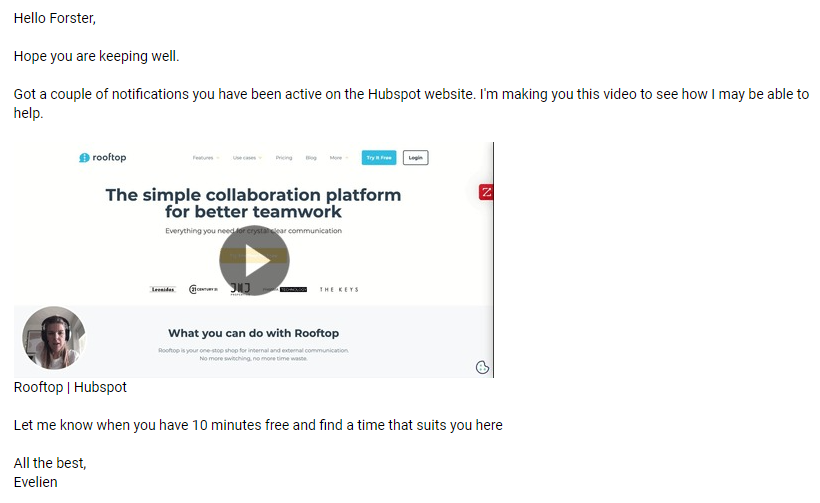
The video itself was quite generic, but HubSpot is a big enough name that I knew who they were anyway. The goal is to catch your prospect’s attention and generate a response.
2. Webcam
Another approach is to directly address the prospect directly without any props or video production tricks.
This is especially effective when it comes to CEOs.
In many cases, the CEO won’t be the one to choose which solution to implement. They might be the ones to sign off on it, but the sales manager will be the one choosing a CRM. The accountant will choose the accounting software. And so on.
With a personalized message to the CEO, you focus on the values rather than the product. This is your opportunity to convey a message that resonates on a deeper level. To cut through the noise and get them to put you in touch with the appropriate person.
This is how Rooftop’s salespeople do it:
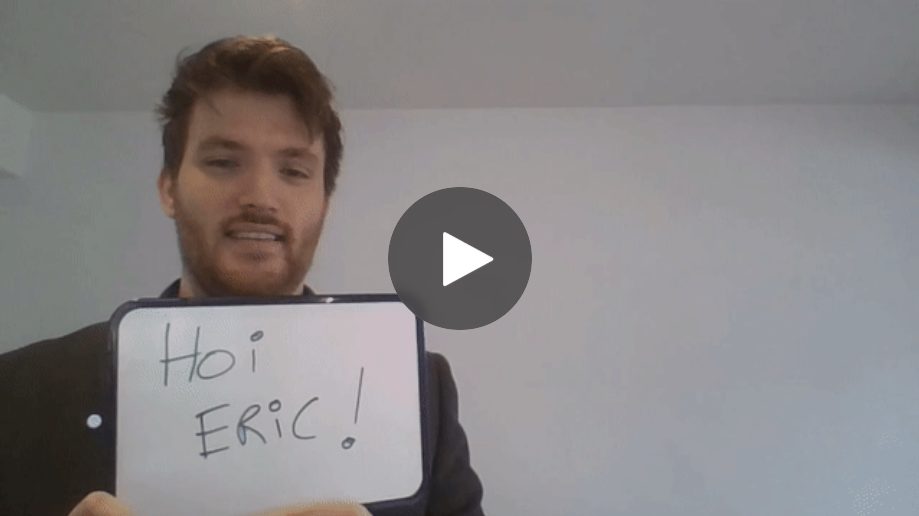
An easy and cheap way to catch the recipient’s eye is to write their name on a little board or on a piece of paper.
Writing a prospect’s name by hand is one of those “one weird tricks” for building a connection in a cold email that actually works. (See point #5…you don’t need to use video to make this happen.)
3. Short personalized demo
A good way to get through to a prospect who doesn’t respond is to offer a short personalized demo.
The idea is to show the value of your product to your prospect in just a couple of minutes:
- Let them know in the email that you made the video precisely because you know they’re busy.
- Keep it short, under two minutes.
- Personalize the use case; make it relevant to their situation.
- If possible, personalize the demo environment with their logo and products.
- Personalize the video thumbnail so it catches their eye immediately.
4. Short feature demo
This is a variation of the previous point. Except that instead of preparing a full overview demo, you focus on key features.
Here’s an example:
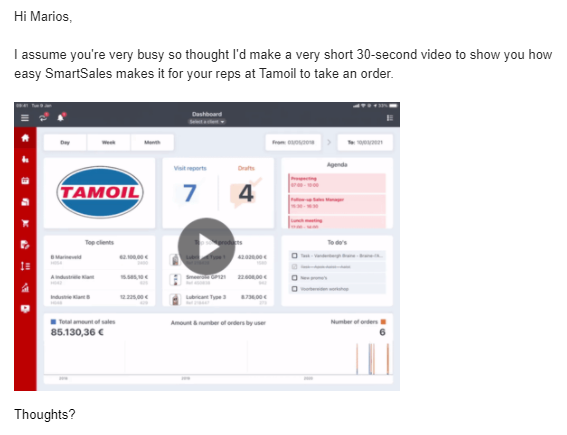
And again, adding your prospect’s logo in the video is an ideal way to get their attention.
Write fewer emails, get more replies.
Are you falling off your prospects’ radars? With Nutshell’s personal email sequences, we’ll remember the follow-up for you.
Creative sales email ideas featuring images
Personalized images are another great way to build rapport with your prospect.
They’re more scalable than videos, but still bring a high level of personalization. And they’re great to use in follow-ups as well as initial emails.
Here are a few ways you can lean on the images in your email to catch your reader’s attention.
5. “Write” their name in a creative context
If there’s one thing that catches people’s attention, it’s their own name. If you incorporate their name into a picture of yourself, you’re really making things personal.
Here’s what lemlist CEO Guillaume Moubeche does when he emails his prospects:
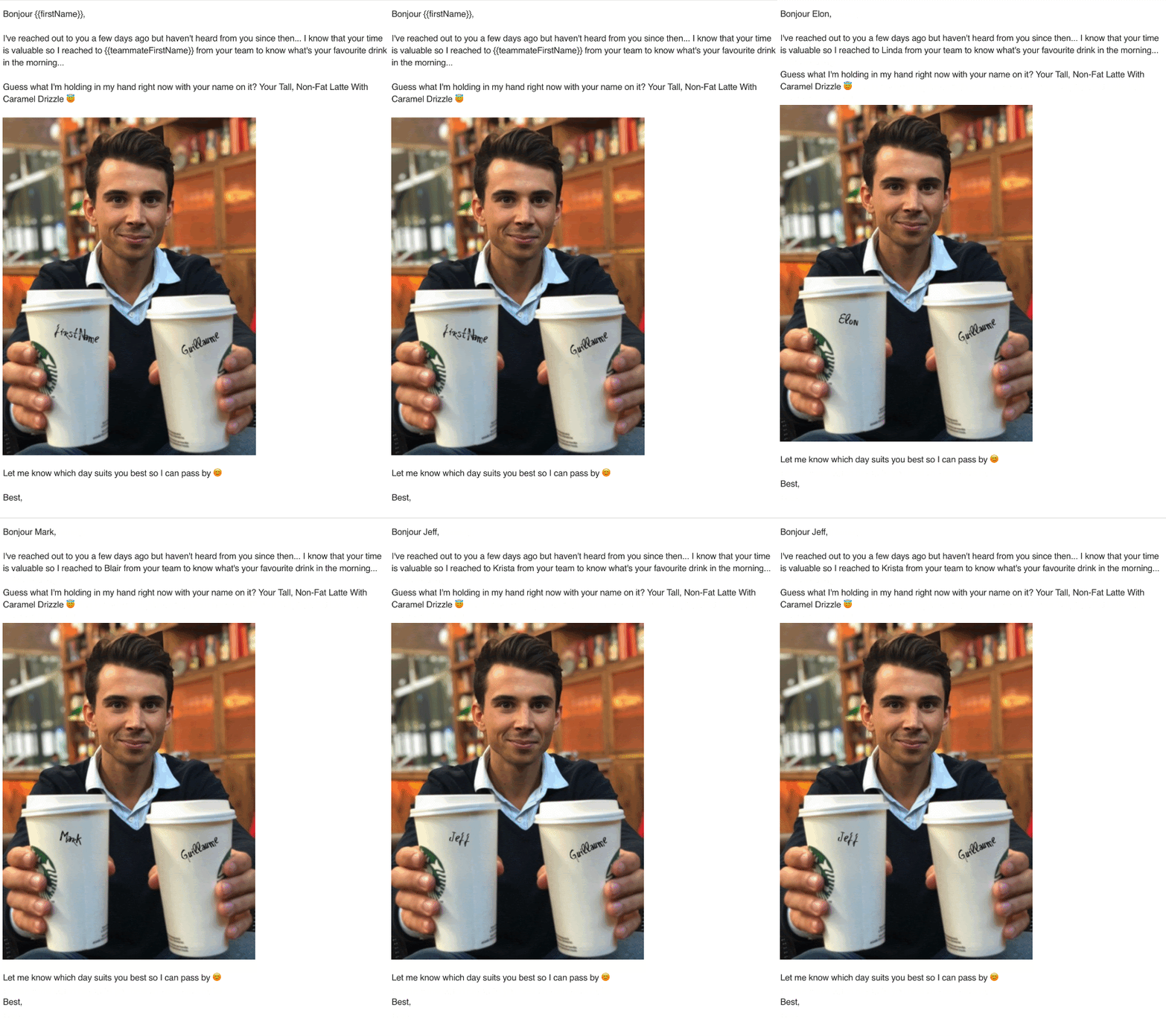
It works because it’s funny, personal, and personalized.
6. Use their logo
Another way that’s sure to catch your prospect’s attention is using their logo.
This creative example also comes from Guillaume at lemlist.
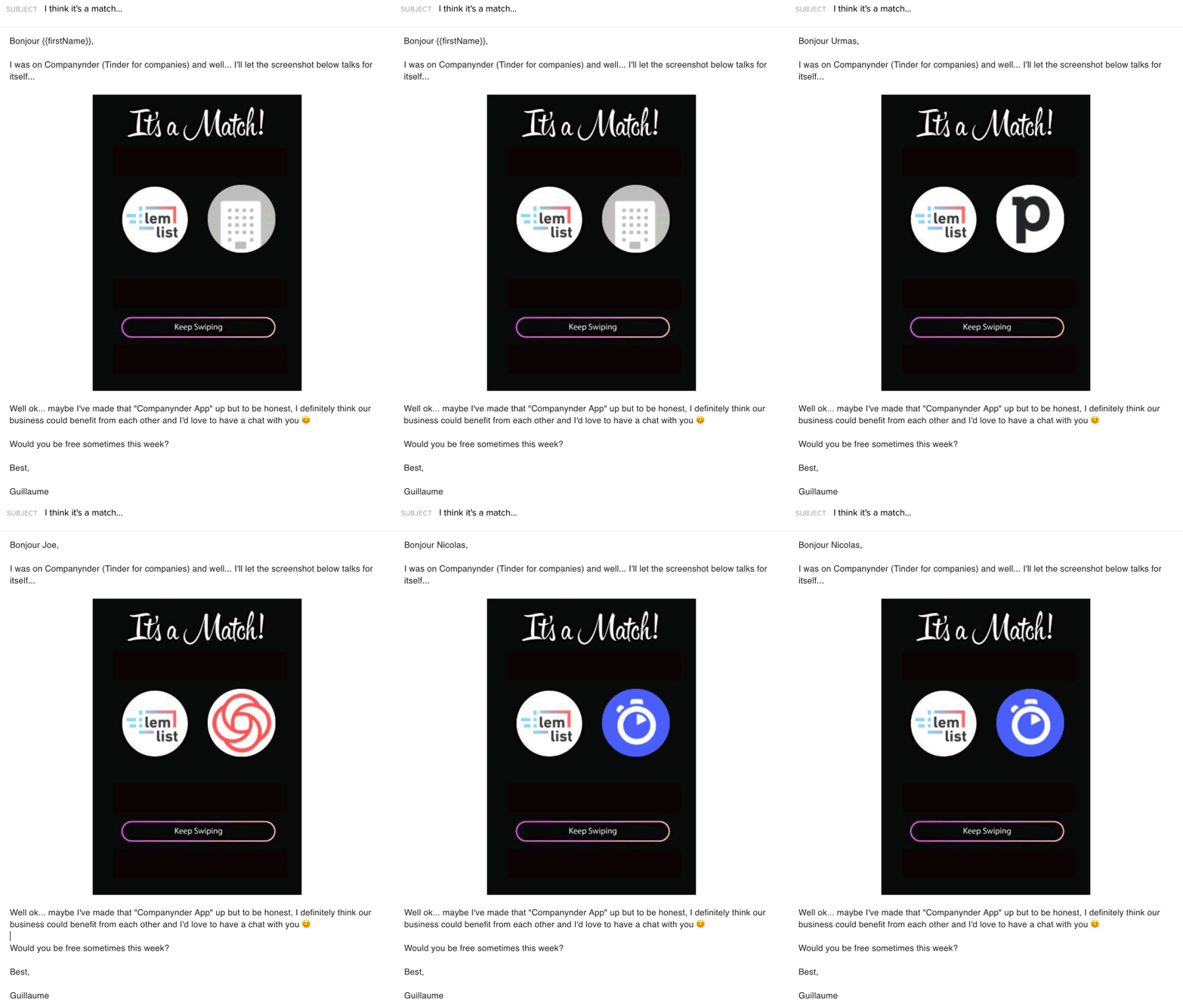
Using humor on top of personalization definitely makes this email stand out.
7. Use their website/app
Whether you’re offering to improve their design, copy, positioning, product offer—anything you can make out from their website—be sure to include their website.
Seeing their own website will catch their attention, and you pointing out areas of improvement will pique their interest.
Then offer to set up a short meeting to go over it.
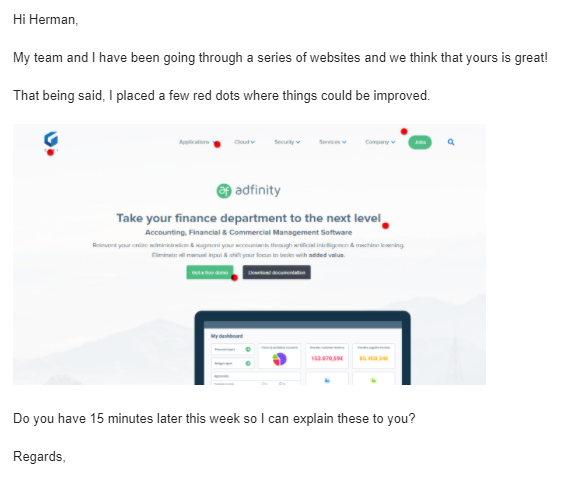
This is a great format because it’s 100% focused on offering value. And it takes only a small amount of your prospect’s time.
8. Use GIFs
GIFs are an easy and fun way to liven up a cold email.
Sales is an emotions game, and GIFs are a good way to convey emotions. They’re especially great at making people smile.
And you make your prospect smile, you’ve already gotten through to them in some way.
Here’s an example from Natalie Blardony at Crunchbase:
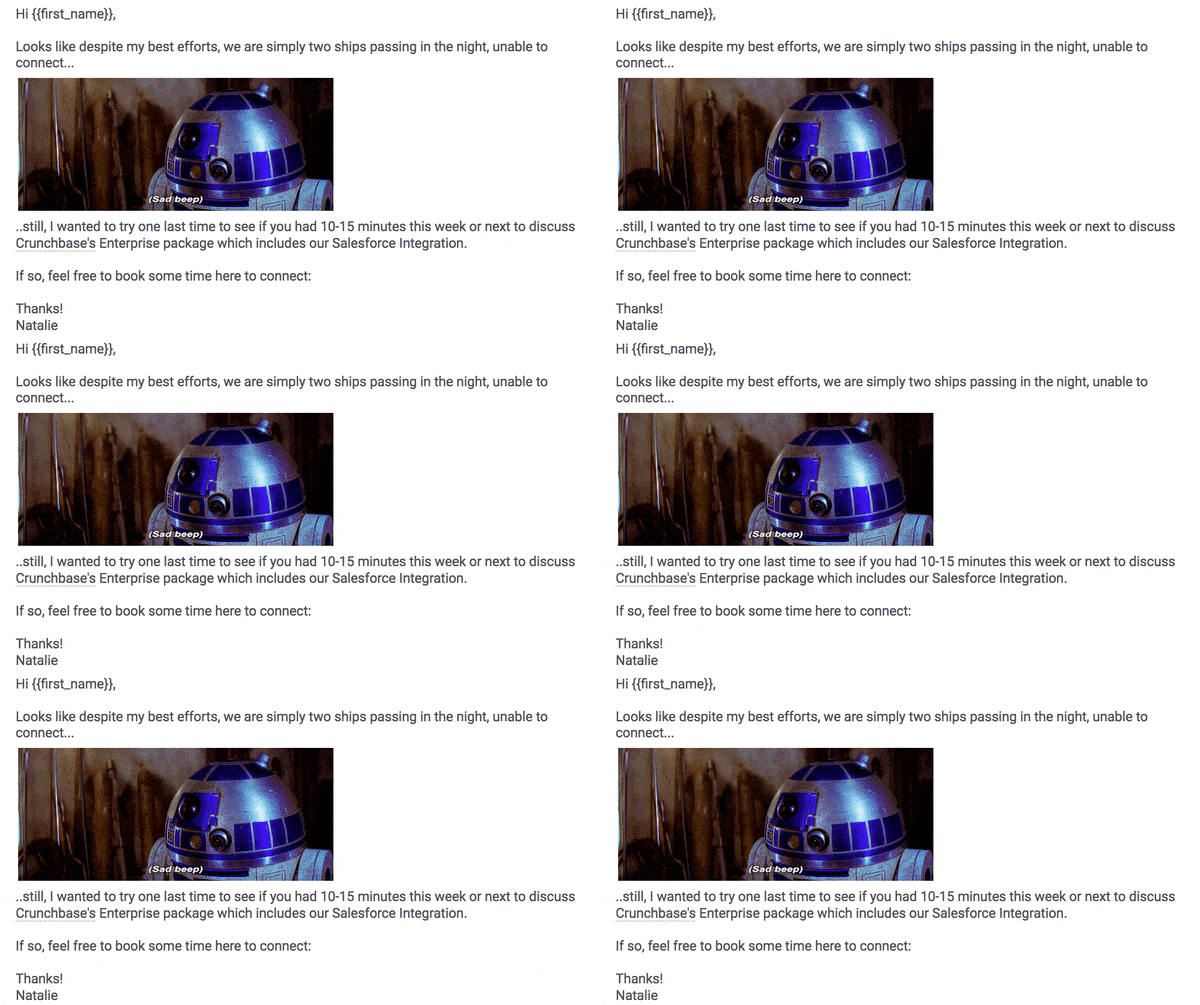
However, be mindful of best practices when using GIFs in a cold email:
- Make sure the GIF doesn’t contain any offensive content
- Make sure it doesn’t contain any foul language (depending on the target audience)
- Pick/make a GIF that’s consistent with your brand and tone of voice
- Keep the file size under 1MB
- Make sure it’s properly embedded
- Think about accessibility—include alt text
16 Cold Email Templates That Sales Experts Swear By
Learn the email tactics that B2B sales pros use to hook their customers.

Creative text-based sales email ideas
If you’re not in a position to create visual content, or if it doesn’t suit your target, text still works!
It’s all about finding the little things that are going to catch your prospect’s eye.
Here are a few.
9. Congratulations
Everyone likes getting some recognition. What better way to do that than by congratulating your prospect? Keep your eyes peeled for noteworthy news from your prospects, such as:
- Starting a new job
- A new round of funding
- A recent acquisition
- A product update
You can then start telling them how you’d like to be part of that story.
10. Common ground
Finding common history with a prospect is a great way to build rapport.
If you used to work in the same niche or went to the same school, use that!
I used to work in sales automation. It’s a small industry.
This is my go-to opener when pitching guest posts to sales automation companies:
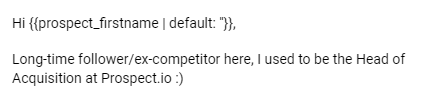
It works wonders, especially coupled with the credibility of having worked at that company.
11. Referencing their content
Content marketing is not just a way to improve SEO, authority, and lead generation. It’s also a way to build and engage with an audience.
If you’re a part of that audience, reaching out and mentioning that content is only natural.
Here’s what it could look like:
Hi [first name],
I just read your article about [topic]. I specifically enjoyed the section about [subject] because [reasons].
Make sure it’s sincere and specific enough, and you’ve got yourself a conversation.
12. Referencing your content
Alternatively, you can open your email by letting them know they’ve been mentioned in a piece of content on your website.
If you decide to target a specific niche, just publish an article about that niche on your website. From there, mention specific companies (or people at those companies) you’re planning on reaching out to.
Know your buyer—and adjust your approach
Visual and creative content is the same as every other type of content. That is, you need to adapt it to your audience.
For example, people will react differently to the same content depending on their position in the company.
A CEO might not react to content about the specifics of what you’re selling. But they might react positively to big-picture talking points
A sales manager might not react to a comment about a piece of content they have nothing to do with. But they might react to content about their sales performance.
Take the time to identify who your recipients are going to be and tailor your creative approach by role, like this:
For CEOs/Founders
What resonates: Big-picture value, peer credibility, time-efficient formats
Best tactics: Short personalized video (webcam, no fancy production), timeline hook subject lines, peer social proof
What doesn’t work: Feature-focused demos, long-form emails, overly casual tone
Timing: Early morning (7-8 AM) or evening (after 6 PM)—when they’re checking personal emailEmail example:
Hi [CEO Name],
I noticed [Company] just announced [expansion/funding/new market]. Quick thought from working with 3 other founders doing something similar in 2026.
Worth 10 min to compare notes?
For Sales Managers/VPs of Sales
What resonates: Revenue impact, sales metrics, proof of reply rate improvements
Best tactics: Comparison images (before/after), GIFs, statistics callouts, demo videos
What doesn’t work: Abstract concepts, vague value propositions
Timing: Tuesday-Thursday, 9-11 AM (when they’re planning the week)Email example:
Hi [Manager Name],
We just ran an A/B test on [Company]’s follow-up sequences. Here’s what surprised us: [specific stat].
Want to see the breakdown?
For Marketing Directors
What resonates: Creative tactics, data-driven approaches, engagement metrics
Best tactics: Creative email design, animated GIFs, interactive elements, case studies
What doesn’t work: Overly sales-focused messaging
Timing: Wednesday-Friday (when they have time to evaluate new approaches)Email example:
Hi [Marketing Director],
I noticed [Campaign/Initiative]. We’ve been testing a new approach to cold email that’s been getting [specific result] for B2B companies.
Curious what you think?
For Operators/Individual Contributors
What resonates: Easy implementation, time savings, tools that integrate with their workflow
Best tactics: Step-by-step how-tos, screenshots, personalized video demos
What doesn’t work: Manager/leadership-level selling
Timing: Mid-day (when they take a break from execution)Email example:
Hi [Name],
I was watching how you use [Tool/Platform] and thought of a workflow that might save your team 2-3 hours a week.
Worth a 10-minute call to walk through it?
The core buyer-centric principle
Tailor your creative approach to their priorities, time constraints, and how they make decisions. What works for a CEO (short, peer-to-peer) bombs for an individual contributor (detailed, practical). What works for a sales manager (revenue metrics) falls flat with marketing (engagement metrics).
Subject lines that spark opens and replies
Your subject line determines whether someone opens your email. Period.
But not all subject lines will yield the results you desire. Some inspire curiosity. Others inspire trust. A few do both—and those are the ones that drive opens.
Here are the subject line formulas that top sales teams use.
Formula 1: The timeline hook
Pattern: “[Prospect name], did you see [timeline]?”
Example: “Eric, did you see the new privacy changes in Q4?”
Why it works: Timeline-based subject lines signal urgency and newsworthiness. They make the prospect think, “Wait, what did I miss?” This curiosity gap triggers opens.
Data: Timeline hooks are the highest-performing subject line type in 2026, driving the strongest reply rates and meeting rates.
Formula 2: The personalization play
Pattern: “[Specific insight about their company/role]”
Example: “Your recent Series B just changed the game for you”
Why it works: Specificity proves research. When a prospect sees you’ve done homework on their situation (funding round, new product launch, hire), they believe you have something relevant to say.
Data: Emails with personalized subject lines see 10% higher open rates than generic ones.
Formula 3: The value promise
Pattern: “[Specific benefit] for [their role/industry]”
Example: “How enterprise teams are cutting sales cycle time in half”
Why it works: You’re leading with the benefit, not the ask. The prospect immediately understands “this is relevant to me.”
Data: Subject lines highlighting specific benefits outperform vague curiosity-based subject lines by 3x among B2B professionals.
Formula 4: The Curiosity-With-Context Hybrid
Pattern: “[Curiosity hook] + [context tag]”
Example: “One stat about [industry] caught us off guard—thought you should see it”
Why it works: You’re combining intrigue with credibility. The phrase “thought you should see it” signals peer-to-peer value, not a sales pitch.
Formula 5: The Question They’re Asking
Pattern: “Quick question: [pain point/challenge]?”
Example: “Quick question: Is your pipeline suffering the same gap we’re seeing in 2026?”
Why it works: Questions naturally compel responses. They also suggest you understand their world, not just pushing a generic product.
Subject line pro tip
Test these formulas with your audience. Different industries respond differently. SaaS buyers might respond to Formula 1 (timeline hooks). Agencies might respond to Formula 2 (specific insights). B2B services might prefer Formula 4 (peer credibility). The best subject lines are tested, measured, and refined.
What NOT to do with your subject lines
- Avoid ALL CAPS (looks like spam, triggers filters)
- Skip emojis unless they match your brand voice (and even then, test first)
- Don’t oversell with exclamation marks (!!!) or artificial urgency (URGENT!!!)
- Never mislead—if your subject line promises something, deliver in the email
One email isn’t enough—here’s how to follow up
Creative first emails get opens. But sequences close deals.
The problem most sales reps face: they send one good email and disappear. They don’t realize that most prospects need multiple touchpoints before responding. And when they do follow up, it’s generic: “Just checking in…”
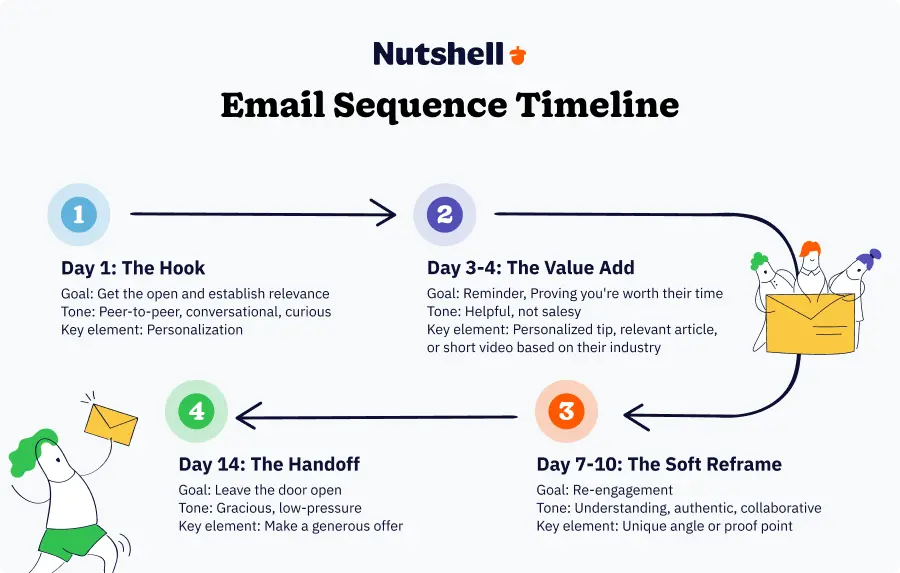
Here’s how top sales teams structure their sequences:
Email 1: The Hook (Day 1)
Goal: Get the open and establish relevance
Your task: Lead with something specific to them. Use one of the subject line formulas above. Keep it short—3-4 sentences max. End with a single clear ask: “Can I send you a quick thought on this?”
Creative element: Personalization (could be a video, could be a specific insight about their situation).
Tone: Peer-to-peer, conversational, curious.
Example:
Hi Sarah,
I noticed you recently moved into the Director of Marketing at TechCorp—congrats on the promotion.
I saw you’re planning to expand into EMEA next quarter. We work with 3 other companies in your space doing the same thing right now, and there are 2-3 things that surprised us about the process.
Worth a quick sync to compare notes?
Best, [Your name]
Email 2: The Value Add (Day 3-4)
Goal: Remind them you exist, and prove you’re worth their time
Your task: Don’t ask again. Provide value. Share a resource, insight, or perspective that’s genuinely useful—even if they never reply.
Creative element: Could be a personalized tip based on their industry, a relevant article, or a short video.
Tone: Helpful, not salesy.
Example:
Hi Sarah,
I realized I sent you a cold email without giving you anything useful first—my bad.
I came across this article on EMEA hiring strategies for growth teams. You probably haven’t read it, but the section on retention (page 4) is relevant to what we were discussing.
No pressure to respond. Just thought it might help.
[Your name]
Email 3: The Soft Reframe (Day 7-10)
Goal: Re-engage without feeling like spam
Your task: Acknowledge the silence. Reframe your value from a different angle. Show you’re not desperate—you’re just genuinely curious if this is worth exploring.
Creative element: A different angle or proof point (testimonial, case study, different use case).
Tone: Understanding, authentic, collaborative.
Example:
Hi Sarah,
I get it—you’re busy. Two things probably happened:
- My first email wasn’t compelling enough, or
- It just got lost in the noise.
No hard feelings either way. But if there’s any chance the EMEA expansion could benefit from comparing notes with teams doing it successfully right now, I’m here.
If not, I genuinely hope this works out great for TechCorp. You’re doing cool stuff.
[Your name]
Email 4: The Handoff (Day 14)
Goal: Leave the door open without being pushy
Your task: Final email. Make a generous offer (no expectation of response). Truly leave it at that.
Tone: Gracious, final, low-pressure.
Example:
Hi Sarah,
Last one from me, I promise.
If you ever want to grab 15 min to talk through EMEA strategy, I’m here. No pitch—just a peer conversation.
If not, all the best with the expansion.
[Your name]
Key principles for email sequences
- Space them out: Don’t send emails on consecutive days. Space them 3-7 days apart.
- Change your angle: Each email addresses a different reason they might reply (relevance, value, curiosity, final offer).
- Make each one stand alone: Don’t assume they read your previous emails. Each should make sense on its own.
- Track what works: Which email gets the most replies? Which subject lines drive opens? Measure, learn, iterate.

Nutshell tip
With Nutshell’s email automation and personal email sequences, you can set these sequences to send automatically while you focus on other prospects. The platform remembers the follow-up for you, so you never leave deals hanging.
How to A/B test your creative tactics
Creative is great. But creative without testing is just guessing.
Here’s the hard truth: A tactic that works for one sales rep might bomb for another. A subject line that resonates in SaaS might fall flat in manufacturing. Your job is to figure out what works for your audience.
What to test
- Subject lines (highest impact): This is where most variation happens. Test two different subject line formulas against each other (50/50 split). Send at the same time, to similar prospects, using the same email body. Measure opens and replies. The winner becomes your control. Keep testing new variations against it.
- Best to test: Timeline hooks vs. personalization plays. Timeline hooks vs. value promises. See which resonates with your prospect pool.
- Email body length: Some teams see better results with short, punchy emails (under 50 words). Others see better results with longer, story-based emails (100-150 words). Test both. Track reply rates and meeting rates, not just opens.
- Send day and time: Test Thursday at 9 AM vs. Tuesday at 2 PM. See which gets better reply rates. (Hint: Thursday mornings tend to outperform, but your audience might be different.)
- Creative element: Test personalized video vs. personalized image vs. text-only. Which gets the most replies? Which gets the most meetings? (Video usually wins on engagement, but text sometimes converts better.)
- Opening line: Test different hooks on the first sentence. Some teams see better results with questions (“Do you…?”), others with statements (“I noticed…”), others with stories (“We were working with another team in your space…”).
How to structure your tests
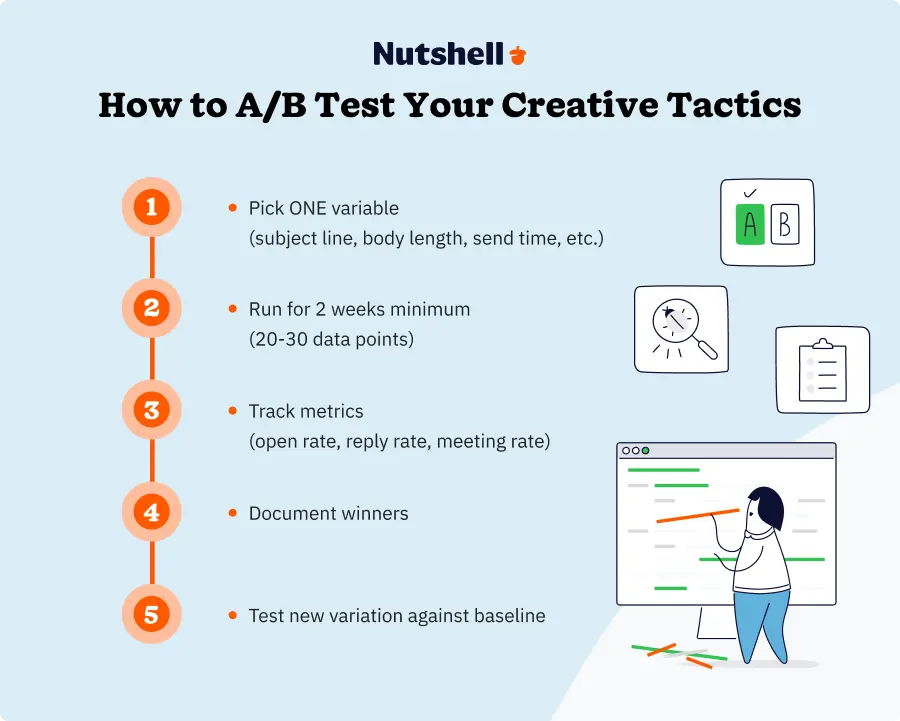
- Pick ONE variable: Only test one thing at a time. If you test subject line + email length + send time simultaneously, you won’t know which drove the difference.
- Run it for 2 weeks minimum: You need 20-30 data points per test to draw conclusions.
- Track the right metrics:
- Open rate (subject line impact)
- Reply rate (email body impact)
- Meeting rate (overall effectiveness)
- Response quality (did they seem genuinely interested?)
- Document winners: When you find a winner, make it your baseline. Test new variations against it.
- Segment by audience: If you sell to multiple buyer personas, test separately. The best subject line for CEOs might be terrible for directors.
Getting creative emails into the inbox (not spam)
Your creative email is worthless if it lands in spam.
Here’s what’s changed in 2026: Gmail and Google Workspace have significantly tightened their spam filters. Authentication requirements are stricter. Domain reputation matters more. And one mistake can tank your deliverability.
The non-negotiables
1. Set up SPF, DKIM, and DMARC
These are authentication protocols that tell receiving servers, “This email is really from us.” Without them, you’re at high risk for spam filtering.
- SPF (Sender Policy Framework): Authorizes which mail servers can send from your domain
- DKIM (DomainKeys Identified Mail): Digitally signs your emails
- DMARC (Domain-based Message Authentication): Sits on top of SPF and DKIM, tells servers what to do if emails fail authentication
The setup is technical. Work with your email provider or IT team. It’s non-negotiable.
2. Warm up new sending domains
New domains start with zero reputation. If you suddenly start sending 500 emails a day from a new domain, Gmail will be suspicious.
Here’s a better approach—Start with 10-20 emails on Day 1. Gradually increase volume over 2-3 weeks. This “domain warming” builds reputation.
Improper domain setup and a lack of warmup can cause cold email campaigns to land in spam.
3. Keep your list clean
Bad email addresses hurt your reputation as a sender. Every bounce damages your credibility with Gmail, Outlook, and other providers.
Follow these best practices:
- Validate emails before sending (use a tool like ZeroBounce or Kickbox)
- Remove hard bounces immediately
- Monitor soft bounces (try-again-later bounces)—if someone soft bounces 3 or more times, remove them
- Clean your list monthly
4. Monitor your sending volume
Don’t send 10,000 emails in one day from a new account. Gradual, consistent volume signals legitimate business. Sudden spikes signal spam.
Best practice: Cap daily sends at 50-100 per domain until you have established a reputation. Then gradually scale.
5. Avoid spam trigger words
Certain words and phrases trip spam filters. Avoid ALL CAPS, excessive punctuation, words like “FREE,” “URGENT,” “ACT NOW,” and financial claims (“Earn $$$”).
It’s best to use natural language. Write like you’re talking to a peer, not trying to convince them of a get-rich-quick scheme.
6. Include a real unsubscribe link
CAN-SPAM law requires an unsubscribe mechanism. If you don’t include one, spam filters will catch you. But here’s the thing: if your email is genuinely relevant, most prospects won’t unsubscribe.
Include a simple footer: “[Your name] | [Company] | [Phone] | [Unsubscribe]”
7. Monitor your metrics
- Bounce rate: Aim for under 2%
- Unsubscribe rate: Under 0.5% is healthy
- Spam complaint rate: Should be under 0.1%
- Inbox placement rate: Aim for 95%+ (use a tool like MailReach or 250ok to test)
If your metrics are poor, stop sending, investigate the issue, and make the necessary fixes. Then resume with a smaller volume to rebuild reputation.
Case study: How personalized creative emails moved real deals
Trinity Motors, an authorized Mercedes-Benz dealership, faced a common challenge: driving attendance and genuine engagement for high-value luxury vehicle launch events.
Rather than sending generic email invitations, they decided to test personalized video emails with localized event details—each video greeting included the recipient’s name and specific event information (date, time, venue, and RSVP details customized for their location).
The results exceeded expectations across every metric. The campaign achieved a 19% email open rate (strong for transactional emails), and 30% of recipients actually played the personalized video.
Even more impressive, 57% of those who started the video watched it all the way through—a clear signal of genuine interest. By the end of the campaign, 38% of recipients registered for the event, proving that personalization drove real conversions.
The reason this worked comes down to a simple principle: the video greeting combined with locally relevant details made each prospect feel like the invitation was created specifically for them.
Luxury buyers are particularly responsive to exclusivity and personal touch, and this approach delivered both. Instead of a one-size-fits-all email, Trinity Motors made each recipient feel valued.
The key takeaway? When you combine video personalization with relevant, localized details, you can achieve engagement rates that are 3x higher than industry standards. It’s not just about the creative element—it’s about making the creativity serve genuine relevance to the recipient.
Get creative and get prepared
Whatever approach you choose, using creative content in your sales emails requires some level of preparation.
But if you’re willing to put in the initial effort, it’ll take your sales process to a whole new level!
With Nutshell’s ProspectorIQ, you can reach more prospects with your email marketing. Find prospects based on industry, company size, job title, and more. And since ProspectorIQ works from within your CRM platform, you can use it with your sales automation and Nutshell Campaigns to start reaching out right away.
Try Nutshell free for 14 days – no credit card required – and discover how you can get your prospects’ attention with sales automation, customized sales pipelines, native email marketing, and more! Contact our team to learn more and find the plan that works for you!
FAQs on Email Marketing Templates
-
What are creative ways to catch a prospect’s attention in a sales email?
Use personalized video (screen recordings, webcam), short personalized or feature demos, personalized images (name, logo, website), and tasteful GIFs—always tied to relevant value.
-
Do personalized videos in cold emails work?
Yes. Videos deliver high personalization and often prompt responses—record their site, speak directly via webcam, or share a brief demo tailored to their use case.
-
How long should a personalized demo video be in a cold email?
Keep it under two minutes. Tell them you made it because they’re busy, personalize the use case, and customize the thumbnail and, if possible, the demo environment with their logo/products.
-
Is it okay to email a CEO directly?
Yes—focus on values and earning a referral to the right contact rather than pitching features. A short, personal webcam message can cut through the noise.
-
How can I personalize images in sales emails?
Write the prospect’s name in a creative context, incorporate their logo, or include annotated screenshots of their website/app with constructive, relevant suggestions.
-
Are GIFs appropriate in sales emails?
Yes, when used thoughtfully. Avoid offensive content, match your brand tone, keep files under 1MB, embed properly, include alt text, and consider your audience.
-
What matters more in cold email—creativity or relevance?
Creativity grabs attention, but relevance and value sustain engagement and lead to conversations. Blend both to improve opens and responses.
-
What subject line approach helps sales emails stand out?
Use unexpected, curiosity-sparking subject lines aligned to real buyer needs. Avoid gimmicks that don’t deliver value in the email body.
-
How should I propose a meeting after sharing personalized insights?
Offer a brief meeting to review your tailored suggestions and keep the time ask small. Make the value explicit and specific.
-
Can I use a prospect’s logo or website in outreach?
Yes—respectfully and to demonstrate research and relevance. Including their logo or site in a video/image increases attention when it’s used to provide helpful, specific value.
Find your ideal customer from your CRM: Connect with your future buyers and spend less time doing it!
Define your ideal customer and ProspectorIQ does the heavy lifting, so you can add new contacts to your CRM and start making more sales!
 BACK TO TOP
 Written by
Ready to try
Nutshell for Free?Thank you! Your submission has been received!Oops! Something went wrong while submitting the form.




The ‘Mom Jeans’ of Sales Tactics: 3 Old-School Strategies That Still Work
Published on: November 10, 2022
CRM for Small Business vs. Enterprise: Which Is Right for Your Business?
Published on: March 9, 2026Sales Performance Reviews: 9 Tips to Make Them Valuable
Published on: November 10, 2022Email Personalization: The SMB Guide to Turning Data Into Revenue
Published on: January 19, 2026Join 30,000+ other sales and marketing professionals. Subscribe to our Sell to Win newsletter!










