Salesforce Contracts, Explained: 7 Things to Know Before Signing

-
Quick answer: What should you know before signing a Salesforce contract?
Before signing a Salesforce contract, know that costs can climb through renewal price increases and rigid seat-count policies, that Salesforce can terminate your contract with limited notice and discontinue integrations without a refund, and that you’re often locked into paying for users and features you may not need. To protect yourself, negotiate terms upfront—cap renewal increases, secure a longer data-retrieval window, and buy only the licenses you actually need.
Key takeaways
- Salesforce contracts can include unexpected costs due to subscription price increases upon renewal and a rigid seat count policy, where you’re locked into paying for the number of users and features initially purchased, even if your needs change.
- Salesforce can terminate your contract with limited notice, potentially leading to data loss, and integrations with third-party applications, which may be critical to your business, can be discontinued at any time without a refund.
- To protect your business, negotiate contract terms upfront, including a cap on price increases and a longer data retrieval period in case of termination, and carefully evaluate your actual needs to avoid overbuying licenses or features.
It always pays to read the fine print—especially when it comes to a Salesforce contract.
While Salesforce remains the most well-known name in Customer Relationship Management software, the Salesforce contract process, including its billing practices, one-sided contracts, and minimal user support, can make it a bad fit for small businesses.
Many Salesforce customers have encountered substantial financial hardships and unbelievable frustration simply because they didn’t know what they were getting themselves into. (We’ll share some real-life horror stories throughout this article.) That’s why it’s so crucial to inspect Salesforce’s user agreements and terms and conditions from every angle before committing to the deal.
To help you out, we took a close look at the Salesforce Master Subscription Agreement (MSA) and found seven spots in a standard Salesforce contract that could land you in hot water. We’ll also share some practical tips on what you can do to protect yourself should you decide to sign a Salesforce contract. And we’ll give you the lowdown on what Salesforce really costs.
Table of Contents
- Essential Salesforce Mcontract considerations
- Your subscription price can significantly increase on renewal
- Salesforce can terminate your contract (and delete your data) with only a few days’ notice
- Salesforce won’t let you change your seat count during a term
- Your integrations could be canceled at any time
- Your subscription price doesn’t include the cost for developers
- Salesforce uptime guarantees are below market standards
- If a sales rep sells you the wrong Salesforce product, there’s no warranty guaranteeing you can break the contract without paying out
- What’s a Salesforce user to do?
- Key features to look for in a CRM
- Frequently asked questions
Essential Salesforce MSA contract considerations
Here are 7 areas of a Salesforce subscription contract you should consider before signing on the dotted line.
1. Your subscription price can significantly increase on renewal
Have you ever been roped into a cable or internet package at a low introductory rate, only to get serious sticker shock when it’s contract renewal time? It’s an extremely effective method for attracting new customers while guaranteeing future business growth, so it’s no surprise to learn that some Salesforce customers have experienced similar situations.
Here’s what Salesforce’s subscription pricing looks like compared to Nutshell and HubSpot. But don’t expect these Salesforce prices to hold by the time your contract comes up for renewal.
What you’ll spend in the first year for an Enterprise CRM with Marketing
Annual license cost for a 10-person team
 Pricing gathered from Hubpost.com and Salesforce.com
Email Sequences & Campaigns
Implementation costs
Source: BacancyTechnology.com
Full-time admin salary
Source: Talent.com
Live phone and chat support
Source: Salesforce.com
Fully functional mobile app
Source: G2.com
Data storage
One-click dialing and call recording
Year 1 Total
Let’s assume the average of the optional fees and one level of overage for 6 months of the year.
Year 2 and Beyond Totals
This assumes you don’t grow as a company and add more records…

$18,000
($150/user/month)
$34,680/year
(For up to 50,000 contacts level)
$10,000
(“one price fits all”)
$6,000 to
$38,400/year
(available, but not required)
$0
$0
$1,100/month
for going over 1 million total records
$50/month for 1,000 minutes
(3,000 minute limit)
$91,580
$78,580

$9,480
($79/user/month)
$4,680/year
(For up to 50,000 contacts level)
$0-$1,500
(available but not required)
$0 to
$18,000/year
(available to customers, but in no way required)
$0
$0
$0
unlimited storage at no extra cost
$0
On Pro plans and above
$23,910
$23,160
$19,800
($165/user/month)
$19,800/year
(For up to 50,000 contacts level)
$75,000 – $200,000
(has many factors)
$96,687/year
(if you’re lucky)
$5,940/year
(30% of software license)
$3,000
($25/user/month of software license)
$1,500/year
for every 500MB after the first 10GB ($125/month)
$3,600+/year
($30/month/user and an additional $15/month for every 1,000 minutes logged)
$284,452
$146,952
See how Salesforce pulls a bait and switch with their pricing model. Check out the real price of Salesforce.
This is spelled out in Salesforce’s MSA (main services agreement) under section 11.2, “Term of Purchased Subscriptions”:
“Except as expressly provided in the applicable Order Form, renewal of promotional or one-time priced subscriptions will be at SFDC’s applicable list price in effect at the time of the applicable renewal.”
Research published by Jo Liversidge and Alexa Bona at Gartner offers some advice in this regard:
- Do not assume the price will not increase without prior negotiation.
- Negotiate a maximum net price increase of 3% to 5% for a renewal term.
- Define what your per-unit price metrics are, then negotiate to guarantee that those same metrics will be used for at least one renewal term.
In essence, negotiate, negotiate, negotiate. The good news here is that Salesforce is willing to discuss some terms of the contract, up front at least. But once you’ve signed, you’re at the mercy of Salesforce’s legal team.
2. Salesforce can terminate your contract (and delete your data) with only a few days’ notice
Suppose you’ve been in negotiations with Salesforce for weeks or months, trying to sort out a disagreement over Salesforce contract terms and conditions. If you’re behind on payments, perhaps because you believe your agreement has been infringed in some way, Salesforce can hand over a notice that terminates your contract—and all your data with it.
This is laid out in section 11.3 of the service agreement, “Termination”:
“A party may terminate this Agreement for cause (i) upon 30 days written notice to the other party of a material breach if such breach remains uncured at the expiration of such period…”
Unfortunately, Salesforce doesn’t always stick to its own “30-day notice” rule. Several complaints filed with the Better Business Bureau mention abrupt terminations that became effective in a matter of days.
Rigid terms combined with erratic customer service can leave a user especially vulnerable. To prevent such a situation from happening, Liversidge and Bona advise negotiating a 60-day term to retrieve your data in the event of termination.
Related: 5 reasons people don’t leave Salesforce—even when they want to
3. Salesforce won’t let you change your seat count during a term
Salesforce has a complex subscription pricing system that changes based on the functions made available and the number of users accessing the software, which gives their sales reps plenty of leverage to upsell you. But what happens if you find you’re paying for something you don’t need?
Section 5.1 of the Salesforce MSA, titled “Fees,” states:
“Customer will pay all fees specified in Order Forms. Except as otherwise specified herein or in an Order Form, (i) fees are based on Services and Content subscriptions purchased and not actual usage, (ii) payment obligations are non-cancelable, and fees paid are non-refundable, and (iii) quantities purchased cannot be decreased during the relevant subscription term.”
In other words, if you get locked into an agreement and find that you need fewer features or users than were originally sold to you, you’re stuck paying for them anyway.
“If you’re a new Salesforce customer, make sure you’re not overbuying at the start,” says Dan Kelly, President of SF Negotiator, a contract negotiation team specializing in Salesforce.com. “Adoption is always slower than you anticipate when introducing any new CRM platform, and it’s all too common for Salesforce’s sales team to overweight your first-year agreement as they’re solely focused on capturing as much revenue as possible from your account.”
Nutshell vs Salesforce!
Explore the key differences between Nutshell and Salesforce.

4. Your integrations could be canceled at any time
For some teams, software integrations are invaluable. It may even be the case that a business chooses Salesforce over a competitor because of how Salesforce integrates with certain third-party tools that are essential to the operation of their business.
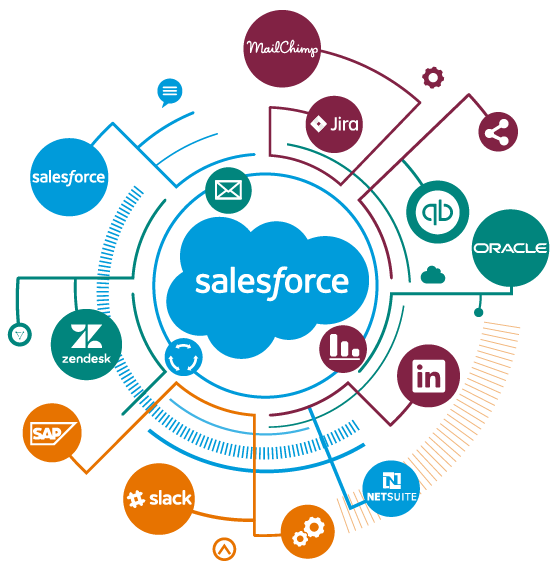
(Source) Before signing on the dotted line with Salesforce, know that those integrations could be discontinued at any time, according to section 4.2 of Salesforce’s user agreement. The section titled “Integration with Non-SFDC Applications” states:
“The Services may contain features designed to interoperate with Non-SFDC Applications. SFDC cannot guarantee the continued availability of such Service features and may cease providing them without entitling Customer to any refund, credit, or other compensation if, for example, and without limitation, the provider of a Non-SFDC Application ceases to make the Non-SFDC Application available for interoperation with the corresponding Service features in a manner acceptable to SFDC.”
This scenario would leave the customer up a creek and still paying out to Salesforce if the third-party app initiates the discontinuation of integration or if Salesforce initiated the discontinuation because the integration was no longer “acceptable” by their standards.
Note that this has already happened a couple of times, such as in the case of Eventbrite. Users who still need to use that app in tandem with Salesforce were forced to manually shuffle data around or use a tool like Zapier to bridge the gap.
5. Your Salesforce subscription price doesn’t include the cost for developers
It’s common to customize a Salesforce product to fit the exact solution your business needs to execute certain tasks. Salesforce typically farms out this customization process to third-party developers, which can quickly overtake your budget.
Salesforce also charges for deployment planning, requiring businesses to pay a subscription fee for technical support during implementation and deployment of the platform. And while some CRMs make their APIs open for developer use, Salesforce also lumps developer support into a pricing plan.
6. Salesforce uptime guarantees are below market standards
Cloud software has opened the business world to seemingly limitless possibilities as to what they can achieve. Having software hosted off-site, however, comes with one obvious con: downtime.
While no company can offer 100% uptime, most customers expect that they’ll be able to access their software and their data at least 99% of the time.
Denis Zhinko from ScienceSoft ran the numbers: 99.9% of guaranteed uptime means only eight hours and 42 minutes of downtime a year, while a guaranteed uptime of 99% means the average downtime would be 87 hours and 40 minutes. That’s 3.6 days that customers can’t access vital tools.
So, what’s Salesforce’s guaranteed uptime? Liversidge and Bona from Gartner allege that Salesforce’s uptime rate is only 98%—well below market standards. Given that a 99% uptime still means almost four days of downtime a year, 98% uptime could be crippling for a business, as it would put your team out of commission for more than a full week.
Unfortunately, Salesforce’s contract language makes no promises on this front. Section 2.1, “Provision of Purchased Services,” states that the company will “use commercially reasonable efforts to make the online Purchased Services available 24 hours a day, 7 days a week.”That’s little comfort to the countless Salesforce users who were affected by the platform’s near-apocalyptic day-long outage in May 2019, when Salesforce accidentally granted all of its users admin access and had to take their service offline while they rolled back the changes. If your business relied on Salesforce to operate, absolutely nothing got done that day—except for some good Twitter memes, of course.
7. If a sales rep sells you the wrong Salesforce product, there’s no warranty in the company’s cancellation policy guaranteeing you won’t pay for it
Salesforce seems to have a solution to almost every business need, from sales and marketing to finance. Such a huge line of products is a lot for any sales representative to know inside and out, though you certainly hope they do. Being sold the right solution at the right size for your business is the very least of what a customer should expect from a company.
Unfortunately, several complaints filed with the Better Business Bureau indicate that Salesforce sales representatives have, on more than one occasion, accidentally sold a customer the wrong product for their needs. The customer is then left paying for something that they can’t use.
The reality is that Salesforce has a disclaimer in section 8.3 of their contract to protect the sale, no matter what the sales rep said:
“CONTENT AND BETA SERVICES ARE PROVIDED “AS IS,” AND AS AVAILABLE EXCLUSIVE OF ANY WARRANTY WHATSOEVER.”
There are no warranties—express, implied, or otherwise. And with the Salesforce cancellation policy stating that an account cancellation only “cancels the auto-renewal at the next billing cycle, either next month (monthly billing) or next year (yearly billing),” you’ll have to wait a while before the changes you want will go into effect.
What’s a Salesforce user to do?
If Salesforce is the software your team needs to perform at their best, then there are a few steps you can take to protect yourself:
- Inspect the product. Don’t rely on the sales rep to know what’s best for you. Do your research to ensure you’re being sold the best solution for your needs.
- Dissect your Salesforce contract. Go over the agreement with a fine-toothed comb, consult your legal team, and do whatever it takes to know their terms inside and out.
- Negotiate! There are entire consulting firms devoted to negotiating contract terms with Salesforce, proving that contract negotiation is possible.
Key features to look for in a CRM
If you do decide that a Salesforce contract isn’t the right fit for your business, here are some important CRM features to keep in mind as you explore other options:
- Team adoption: Choose a CRM that’s intuitive and easy to use. It shouldn’t be overly complex or difficult for your team to navigate. The best CRM is one your team will actually embrace and use regularly.
- Integration compatibility: Identify the integrations that are crucial for your business and make sure the CRM you choose can seamlessly connect with those platforms.
- Task automation: Opt for a CRM that automates repetitive administrative tasks, freeing up your time to focus on what really matters—closing deals and driving growth.
- Customizability: Every business has unique needs. Make sure the CRM you select can be tailored to fit your specific requirements.
- No hidden costs: Ensure the CRM has transparent pricing with no hidden fees so you don’t end up exceeding your budget due to unexpected costs.
Need a user-friendly CRM to boost sales and team efficiency?
Take our guided tour to explore Nutshell’s incredible features!

Switch to a CRM that makes life easier
While your company may be able to negotiate certain terms in a Salesforce contract, many of the complications related to Salesforce are baked into their user agreement. Fortunately, there are several excellent CRM options available today. While Salesforce is a powerful tool, its steep pricing and rigid contracts may not be ideal for everyone. Alternatives like Nutshell, Zoho CRM, and Pipedrive offer similar competitive features at more flexible prices.
Pipedrive has a user-friendly interface with good automation, customization, and reporting capabilities. However, it can be complex to learn, and customer support isn’t always responsive. On the other hand, Zoho CRM is more affordable and offers impressive reporting features. Like Pipedrive, though, it comes with a learning curve, and its app integration is somewhat limited.
If you’re considering a Salesforce alternative, Nutshell is worth exploring. With easy-to-use automation, pipeline management, and a wide range of integrations, Nutshell allows you to handle everything you need in one platform without jumping between multiple tools. At Nutshell, we prioritize transparency and ease of use. We offer free live support to all users and automatic data imports (even during your free trial!). You’re always in control of your company’s data and the number of users on your plan, and when you need to adjust anything, our support team is ready to provide free and fast live support.Start a free 14-day trial of Nutshell and see what our sneakily powerful CRM and sales automation platform can do for you!
Frequently asked questions
-
1. Can you negotiate Salesforce contract terms?
Yes, Salesforce contract terms are negotiable. You can negotiate pricing discounts, price increase caps, seat flexibility, data retrieval periods, and termination clauses. Salesforce reps have the most flexibility near quarter-end (especially January 31, their fiscal year-end). Don’t accept standard terms—everything is on the table if you ask.
-
2. How long are typical Salesforce contracts?
Most Salesforce contracts are one-year agreements that auto-renew annually. However, Salesforce often pushes customers toward multi-year contracts (typically 3-5 years) by offering deeper discounts. While longer terms may reduce costs upfront, they lock you into rigid commitments that are difficult to change if your business needs shift.
-
3. Can you cancel a Salesforce contract early?
No, Salesforce contracts don’t allow early cancellation without paying the full remaining balance. Their Master Subscription Agreement states fees are “non-cancelable” and “non-refundable.” You can negotiate a termination-for-convenience clause upfront, but Salesforce rarely grants this. You’re typically locked in for the entire contract term regardless of usage.
-
4. What happens to your data if Salesforce terminates your contract?
Salesforce gives you 30 days to retrieve your data after contract termination. After that window closes, they can delete everything. If you’re terminated for non-payment, you may receive as little as 5-7 days’ notice despite the contract stating 30 days. Always negotiate a longer data retrieval period (60-90 days) upfront.
-
5. What are the best alternatives to Salesforce for small businesses?
Nutshell offers transparent pricing, flexible contracts, and free live support—without Salesforce’s rigid terms. Unlike Salesforce, you can adjust your user count anytime, cancel without penalties, and keep full control of your data. Other alternatives include Zoho CRM and Pipedrive, though they have steeper learning curves and limited support compared to Nutshell.
Want to kick the tires a bit? (No credit card required)
No problem. To see if Nutshell is the right choice for your sales team, start a 14-day free trial today!
BACK TO TOP Written by
Cody Slingerland and Ben Goldstein ContributorsEdited by
Will Gordon Sr. Director of MarketingReviewed by
Andy Fowler Co-FounderReady to try
Nutshell for Free?Thank you! Your submission has been received!Oops! Something went wrong while submitting the form.



Automate Form Submission Workflows With Nutshell’s Form Answer Automations
Published on: June 17, 2025
Direct Mail Marketing Strategy: 15 Tips & Tactics That Still Work in 2026
Published on: November 10, 2022What Is Revenue Intelligence? An All-Encompassing Guide
Published on: January 24, 2024Highly Effective Strategies for Elevating Sales Team Performance
Published on: November 10, 2022Join 30,000+ other sales and marketing professionals. Subscribe to our Sell to Win newsletter!










