What CRM features do small businesses actually use? A guide backed by real results and expert analysis

-

Quick answer: What are the most important CRM features for small businesses?
The seven most important CRM features for small businesses are contact management (centralized customer database), pipeline tracking (visual deal progress), task automation (automatic follow-up reminders), email integration (automatic conversation logging), mobile access (CRM on phones), reporting and analytics (sales performance dashboards), and AI-powered assistance (predictive insights and automated data entry). Start with the first four features to build strong CRM habits, then expand into mobile access, advanced reporting, and AI capabilities as your team grows.
Key takeaways: Essential CRM features for small business
Before diving into the details, here’s what actually matters, and what small businesses actually use, once they move past the shiny feature list:
- Contact management: A centralized database that stores all customer information, interaction history, and relationship details in one searchable location.
- Pipeline tracking: Visual representation of your sales process showing where every deal stands and what needs to happen next to move it forward.
- Task automation: Automatic reminders, follow-ups, and workflow triggers that ensure nothing falls through the cracks without manual effort.
- Email integration: Two-way sync with your inbox that automatically logs conversations and lets you send tracked emails directly from your CRM.
- Mobile access: Full CRM functionality on phones and tablets so your team can update records, check customer history, and log activities from anywhere.
- Reporting and analytics: Dashboards that show sales performance, conversion rates, pipeline health, and other metrics that drive better decisions.
- AI-powered assistance: Intelligent features like predictive lead scoring, automated data entry, and suggested next actions that help teams work smarter.
These seven features form the foundation of effective customer relationship management for small businesses. The key insight for small businesses: you don’t need every feature on day one. Start with the first four (contact management, pipeline tracking, automation, and email integration), master those basics, then expand into mobile access, advanced reporting, and AI capabilities as your team grows.
When you start shopping for a CRM, it’s easy to feel overwhelmed. There are hundreds of options out there, and they all promise to do everything—contact management, sales automation, marketing automation, customer service, forecasting, analytics, and more.
94% of businesses report productivity surges after implementing CRM software, but many small business owners are overestimating what they actually need. This leads to expensive subscriptions, bloated systems that confuse team members, and adoption rates that never hit the mark. According to research from CSO Insights, fewer than 40% of companies see user adoption of their CRM above 90%—which means you’re paying for features nobody’s using.
You don’t need to be one of those statistics.
Small businesses actually thrive with CRM systems focused on seven core features:
- Contact management
- Pipeline tracking
- Task automation
- Email integration
- Mobile access
- Reporting and analytics
- AI-powered assistance
Feels like too much? Don’t worry: When you master these fundamentals using a timely phased approach, you build strong CRM habits across your team. Then—and only then—should you think about layering in more advanced features.
By keeping your initial CRM implementation lean and focused, your team gets up to speed faster, adopts the system more enthusiastically, and starts seeing real results within weeks instead of months.
Included in this guide is an exclusive Q&A with CRM expert Andrew Friedenthal (Software Advice), where he breaks down what small businesses actually need from CRM software—and why starting simple is the smartest long-term strategy.
Table of Contents
- How Nutshell delivers on each of these features
- 7 essential CRM features every small business needs
- How to prioritize CRM features: A phased approach
- Identifying which features solve your specific challenges
- Q&A from CRM expert Andrew Friedenthal
- 2026 industry trends & what they mean for your CRM choice
How Nutshell delivers on each of these features
Want the quick answer instead of the full breakdown below? Here’s exactly what Nutshell offers for each of the 7 features above, so you don’t have to dig for it.
- Contact management helps you centralize every contact and company record, with built-in data enrichment and custom fields, so nothing lives in a spreadsheet anymore.
- Pipeline tracking gives you a visual, fully customizable pipeline with weighted forecasting, so you always know what’s likely to close.
- Task automation handles reminders and follow-ups for you, with AI Agents picking up the ones a person would otherwise forget.
- Email integration syncs two-way with Gmail and Outlook, so every conversation logs itself while you keep working from your inbox.
- Mobile access comes through native iOS and Android apps, so your team can update records the moment they leave a meeting, not after.
- Reporting and analytics give you real-time dashboards and a custom report builder, so you see what’s actually working instead of guessing.
- AI-powered assistance covers everything from the Next Action AI Sales Coach to an AI Chatbot and automated data entry, so your team spends less time on admin and more time selling.
Want the full case for why each of these matters, not just what Nutshell does? Keep reading below.
7 essential CRM features every small business needs
Let’s break down what each of these seven features actually does, why small businesses need it, and how to evaluate whether a CRM delivers it effectively.
1. Contact management: Your single source of customer truth
Contact management is the foundation on which everything else is built. This feature creates a centralized database where every customer, lead, and contact lives with their complete history in one searchable place.
What it includes: Contact management goes far beyond storing names and email addresses. A proper contact management system captures job titles, company information, communication preferences, social media profiles, custom fields specific to your business, and the complete timeline of every interaction your team has had with that person.
Why small businesses need it: Before implementing a CRM, most small businesses scatter customer information across spreadsheets, email inboxes, sticky notes, business cards, and individual team members’ memories. This fragmentation costs you deals. When a customer calls, and you can’t immediately see their purchase history, previous conversations, or current status, you lose credibility and waste time hunting for information.
Real-world impact: Brothers Leather Supply, a wholesale and retail leather goods company, struggled with exactly this problem. Running on spreadsheets, they couldn’t keep up with customer emails, wholesaler inquiries, and vendor communications. Multiple employees would contact the same customer without knowing someone else had already reached out.
After implementing contact management through Nutshell, they achieved 40% month-over-month growth and scaled to a six-figure business with distribution in 25+ stores nationwide. Founder Adam Kail credits the system with preventing lost sales: “We definitely would’ve lost sales without it.”
What to look for when evaluating CRM contact management:
- Search speed: Can you find any contact in under three seconds?
- Custom fields: Can you add fields specific to your business without IT help?
- Duplicate detection: Does the system automatically flag or merge duplicate records?
- Contact linking: Can you connect multiple people at the same company and see the organizational structure?
- Activity timeline: Is every email, call, note, and meeting logged in chronological order?
- Data backup frequency: How often is your data backed up, and can you recover it quickly if something goes wrong?
2. Pipeline tracking: Visual clarity on every deal
Pipeline tracking turns your sales process from an invisible mystery into a visual workflow that shows exactly where every opportunity stands and what needs to happen next.
What it includes: Pipeline tracking gives you a visual representation of your sales process, typically shown as columns or stages (like “Initial Contact,” “Qualified Lead,” “Proposal Sent,” “Negotiation,” “Closed Won”). Each deal appears as a card that moves from left to right as it progresses. You can see deal value, probability of closing, days in the current stage, and who owns each opportunity.
Why small businesses need it: Without pipeline visibility, sales managers operate blind. You can’t answer basic questions like “How much revenue are we likely to close this month?” or “Which deals have stalled and need attention?” Pipeline tracking solves this by making your entire sales operation transparent at a glance.
Real-world impact: SkySpecs, a B2B wind turbine inspection company, faced this exact challenge. With a long, complex sales cycle involving large organizations, they struggled with a reactive approach where they didn’t know “what the next steps were going to be.” After implementing Nutshell’s pipeline tracking and sales process structuring tools, they significantly improved their sales cycles by providing structure and visibility. The company successfully scaled from startup to established business by having a clear view of every deal’s status and next required action.
What to look for when evaluating CRM pipeline tracking:
- Drag-and-drop simplicity: Can sales reps move deals between stages with one click?
- Customizable stages: Can you define stages that match your actual sales process?
- Weighted forecasting: Does it calculate likely revenue based on stage probability?
- Stalled deal alerts: Does it flag opportunities that haven’t moved in X days?
- Multiple pipelines: Can you run different pipelines for different products or teams?
3. Task automation: Never miss a follow-up again
Task automation handles the repetitive work that typically falls through the cracks in busy sales teams—setting reminders, scheduling follow-ups, creating tasks, and triggering actions based on customer behavior.
What it includes: Automation in CRM ranges from simple (automatically creating a follow-up task when you mark a deal as “Proposal Sent”) to sophisticated (triggering a series of emails, tasks, and reminders based on how a lead interacts with your website). The key is that these actions happen without anyone remembering to do them manually.
Why small businesses need it: Small teams don’t have the luxury of dedicated operations staff to ensure nothing falls through the cracks. Automation makes a five-person team operate like a 10-person team by handling all the administrative work that doesn’t require human judgment.
When you need this feature: If your team regularly says “I forgot to follow up with that lead,” or if deals go cold because someone missed a scheduled touchpoint, automation isn’t optional—it’s essential. The moment you have more leads than one person can manually track, automation becomes the difference between revenue growth and missed opportunities.
What to look for when evaluating CRM automation:
- Triggered actions: Can you create “if this, then that” rules without coding?
- Email sequences: Can you build automated drip campaigns that send based on behavior?
- Reminder intelligence: Does it suggest optimal follow-up timing based on past patterns?
- Workflow templates: Are there pre-built automation templates you can customize?
- Multi-channel automation: Can it trigger tasks across email, calls, and other channels?
4. Email integration: Stop manually logging every conversation
Email integration creates a two-way connection between your CRM and your email inbox, automatically logging every conversation and letting you send tracked emails without leaving your CRM.
What it includes: True email integration means emails you send to contacts automatically appear in their CRM timeline, emails they send you get logged, and you can send new emails directly from the CRM interface with tracking to see when messages are opened and links are clicked.
Why small businesses need it: Manual data entry kills CRM adoption faster than any other factor. When sales reps have to copy-paste emails into a CRM or manually log every conversation, they simply stop doing it. Then your CRM data goes stale, and the system becomes worthless.
Email integration solves this by making logging effortless. The CRM captures communication automatically, so your database stays current without anyone remembering to update it. This is critical because 37% of users report revenue loss due to poor data quality—and poor data quality usually stems from incomplete logging.
What to look for when evaluating CRM email integration:
- Two-way sync: Does it log both sent and received emails automatically?
- Email templates: Can you save and reuse effective email templates?
- Open and click tracking: Can you see when prospects read your emails?
- Attachment handling: Are email attachments stored in the CRM timeline?
- Multiple email accounts: Can team members connect multiple email addresses?
5. Mobile access: Your CRM in your pocket
Mobile access gives your team full CRM functionality on phones and tablets, ensuring they can update records, view customer history, and log activities from anywhere.
What it includes: A proper mobile CRM isn’t just a shrunk-down desktop view—it’s a purpose-built mobile experience with touch-optimized interfaces, offline capabilities, and quick-action buttons designed for on-the-go use. Your team should be able to do everything in the mobile app that they can do on a desktop.
Why small businesses need it: The traditional office-bound workday is over. Sales reps work from coffee shops, customer sites, conferences, and home offices. If they can’t access the CRM from their phone, they won’t update it until they’re back at their desk—by which point they’ve forgotten the details.
The data is compelling: 70% of businesses now use mobile CRM, and companies leveraging mobile CRM are 150% more likely to exceed sales goals. Mobile access also improves productivity by 14.6%. This isn’t about convenience—it’s about competitive advantage.
When you need this feature: If your sales team ever leaves the office to meet customers, mobile access moves from “nice to have” to “absolutely essential.” Even if you don’t have field sales, remote work makes mobile access critical for team members working from home or traveling.
What to look for when evaluating mobile CRM:
- Native apps: Are there dedicated iOS and Android apps, or just a mobile website?
- Offline mode: Can team members access data when they lose connectivity?
- Voice notes: Can they dictate notes instead of typing on a small screen?
- Contact scanning: Can they scan business cards and automatically create contacts?
- One-tap calling: Can they call contacts directly from the app with one touch?
6. Reporting and analytics: Data-driven decision-making
Reporting and analytics transform your CRM data into actionable insights through dashboards showing sales performance, conversion rates, pipeline health, and the metrics that drive better business decisions.
What it includes: CRM reporting ranges from basic dashboards showing deal volume and revenue to advanced analytics tracking conversion rates by source, sales rep performance, average deal cycle length, win/loss reasons, and forecasted revenue. The best systems make this data visual and easy to interpret at a glance.
Why small businesses need it: You can’t improve what you don’t measure. Without clear metrics, you’re making decisions based on gut feeling rather than facts. Analytics reveal which marketing channels generate the best leads, which sales reps need coaching, which deal stages cause the most friction, and which products drive the most revenue.
The impact is measurable: businesses using CRM improve sales forecast accuracy and see a 34% boost in sales productivity. That accuracy comes from having real data about what’s actually happening in your sales process.
What to look for when evaluating CRM reporting:
- Pre-built dashboards: Does it include templates for common reports?
- Custom report builder: Can non-technical users create custom reports?
- Real-time data: Do dashboards update instantly or with a delay?
- Visual presentation: Are reports shown as charts and graphs, not just tables?
- Export options: Can you export reports to Excel or PDF for presentations?
- Segmentation: Can you segment contacts by behavior, life cycle stage, or source without exporting to a separate tool?
7. AI-powered assistance: Your intelligent sales copilot
AI-powered assistance uses machine learning and artificial intelligence to provide predictive lead scoring, automated data entry, suggested next actions, and intelligent insights that help teams sell more effectively.
What it includes: Modern AI in CRM handles tasks like automatically updating contact records after calls, predicting which leads are most likely to convert, suggesting optimal follow-up times, drafting email responses, cleaning duplicate data, and flagging deals at risk of going cold.
Why small businesses need it: This is the newest essential feature—and it’s rapidly moving from “advanced capability” to “table stakes.” AI doesn’t just save time; it makes small teams smarter by surfacing insights that would take hours of manual analysis to uncover.
The adoption numbers tell the story: 83% of companies now use AI features in their CRM workflows. Businesses using AI in their CRM are 83% more likely to exceed sales goals, with companies seeing 30% to 50% improvement in response times thanks to AI assistance.
When you need this feature: AI capabilities should be part of your core requirements, not an add-on you consider later. The competitive advantage it provides is too significant to ignore.
What to look for when evaluating AI-powered CRM:
- Predictive lead scoring: Does it automatically rank leads by conversion likelihood?
- Smart suggestions: Does it recommend next actions based on successful patterns?
- Automated data enrichment: Does it fill in missing contact information automatically?
- Natural language search: Can you find records by asking questions in plain English?
- Email intelligence: Does it suggest optimal send times and subject lines?
How to prioritize CRM features: A phased approach
Not all seven essential features need to be implemented on day one. Here’s how to think about feature prioritization based on your business maturity and team size.
Phase 1: Foundation features (weeks 1-4)
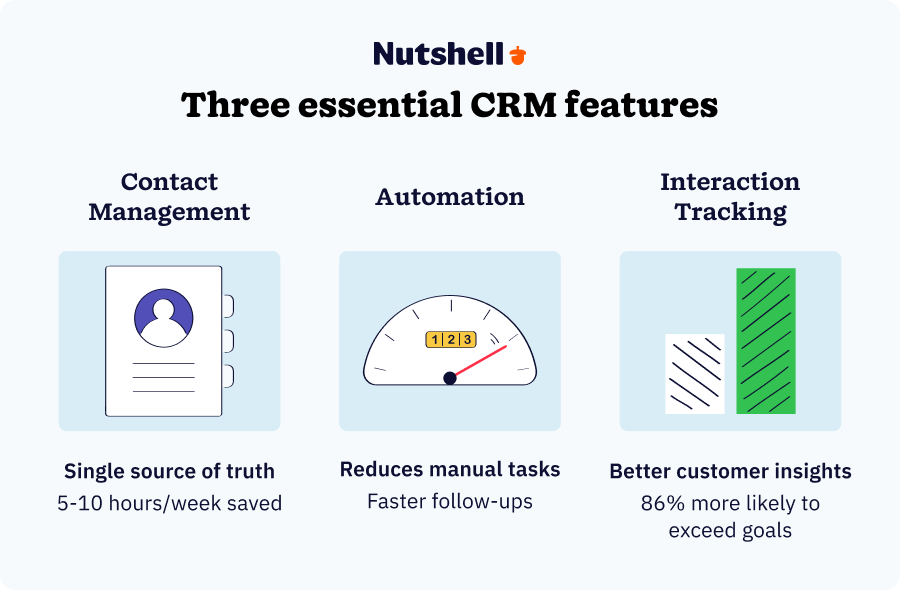
Start here regardless of business size or industry. These four features are non-negotiable:
- Contact management: This is a day-one essential. You cannot run a CRM without centralized contact storage.
- Pipeline tracking: Implement this in week one. You need visibility into your sales process from the start.
- Email integration: Link your email from the start. When communications log automatically, your data stays current, and your team actually uses the CRM.
- Task automation: Add basic automation in the first month—even simple reminders prevent deals from going cold.
Success metric for Phase 1: Your team can find any customer’s complete history in under 10 seconds, and no one is manually logging emails anymore.
Phase 2: Scaling features (months 2-6)
Once your team has adopted the foundation features and your CRM data is consistently accurate, add these capabilities:
- Mobile access: Implement when your team starts complaining they can’t update the CRM while traveling or working remotely.
- Reporting and analytics: Add when you have at least three months of data to analyze, and you’re making strategic decisions about sales process improvements.
Success metric for Phase 2: Sales reps use the CRM daily from their phones, and management reviews dashboard metrics in every weekly meeting.
Phase 3: Optimization features (month 6+)
After you’ve mastered the basics and have clean historical data, layer in advanced capabilities:
- AI-powered assistance: Implement when you have enough data (typically six months minimum) for AI to detect meaningful patterns.
- Advanced automations: Build sophisticated workflows once you understand which manual processes are slowing your team down.
Success metric for Phase 3: AI suggestions influence at least 25% of your team’s daily actions, and manual data entry has been reduced by 50% or more.
The 1-10-100 rule for small businesses
This framework—borrowed from data quality management—applies perfectly to CRM feature adoption:
One feature mastered is better than 10 features partially implemented and 100 features licensed but never used.
Choose the CRM that excels at the features you need today, not the one with the longest feature list. A simple system your team uses every day beats a sophisticated system they avoid.
Need a user-friendly CRM to boost sales and team efficiency?
Take our guided tour to explore Nutshell’s incredible features!

Identifying which features solve your specific challenges
Different business problems require different feature priorities. Use this guide to identify which features address your specific pain points.
“We’re losing track of customer conversations”
Primary feature needed: Contact management with email integration
Why it solves the problem: This combination ensures every conversation gets automatically logged and attached to the right contact record. No more digging through email to remember what you discussed.
Real-world example: Brothers Leather Supply faced this exact issue. Multiple employees contacted the same customers without knowing colleagues had already reached out. Implementing contact management with coordination capabilities solved the problem and contributed to their 40% month-over-month growth.
“Deals are going cold because we forget to follow up”
Primary feature needed: Task automation with reminder triggers
Why it solves the problem: Automated reminders ensure follow-ups happen on schedule without anyone having to remember. The system becomes your team’s external memory.
Warning sign you need this: If you regularly hear “I forgot to call that lead back” or find opportunities that haven’t been touched in weeks.
“We can’t forecast revenue accurately”
Primary feature needed: Pipeline tracking with reporting and analytics
Why it solves the problem: Visual pipeline tracking combined with stage probability gives you weighted forecasts showing likely revenue. As deals move through stages, your forecast updates automatically.
Impact when implemented: Businesses using CRM improve sales forecast accuracy, allowing for confident hiring, inventory, and investment decisions.
“Our sales team doesn’t keep the CRM updated”
Primary feature needed: Email integration plus mobile access
Why it solves the problem: Email integration removes the manual logging burden (the #1 reason reps abandon CRMs). Mobile access means they can update records immediately after customer meetings, when details are fresh.
Data point: 37% of users report revenue loss due to poor data quality. The root cause is almost always insufficient logging, which these two features solve.
“We’re spending too much time on repetitive tasks”
Primary feature needed: Task automation plus AI-powered assistance
Why it solves the problem: Automation handles the repetitive work; AI handles the intelligent work (prioritization, suggestions, data enrichment). Together, they can save 5 to 10 hours per week per employee.
Real-world example: SkySpecs used automation and structured sales processes to significantly improve their long B2B sales cycles, allowing them to scale from startup to established business.
“Field reps can’t access customer data at client sites”
Primary feature needed: Mobile access with offline capabilities
Why it solves the problem: Native mobile apps with offline mode ensure reps can pull up customer history, log notes, and update deal status even without internet connectivity.
Impact when implemented: Companies using mobile CRM are more likely to exceed sales goals compared to those without mobile access.
Q&A with CRM market analyst Andrew Friedenthal
Recently, Andrew Friedenthal, CRM market analyst for the technology comparison company Software Advice, released a new report that examined 200 in-depth conversations with SMBs over the last year to identify the top trends among CRM buyers.
Some of the key findings were that CRM systems are now offering more features and functionalities than ever before. Businesses with specific needs, such as manufacturing or real estate, are turning to CRM software, many times from pen and paper.
We had the opportunity to speak with Mr. Friedenthal to learn a little more about what his research uncovered.

Photo via @AJFriedenthal
Nutshell: Why are first-time SMB buyers overestimating their CRM software needs?
Andrew Friedenthal: Since these buyers are generally unfamiliar with CRM software in the first place, when they hear about the variety of functions potentially available to them, they get very excited. However, they may have a tendency to get over-excited.
Most SMBs are—at first—just looking for contact management and the ability to track interactions, and those other features, though they sound nice, can end up not getting used for quite some time, if ever.
Nutshell: What are the top three features SMBs are requesting within their CRM software?
Andrew Friedenthal: The top feature they are requesting is the basic bread-and-butter of CRM software—contact management. An accessible, constantly updated contact database software system of customer/client/contact information is vital to a growing company.
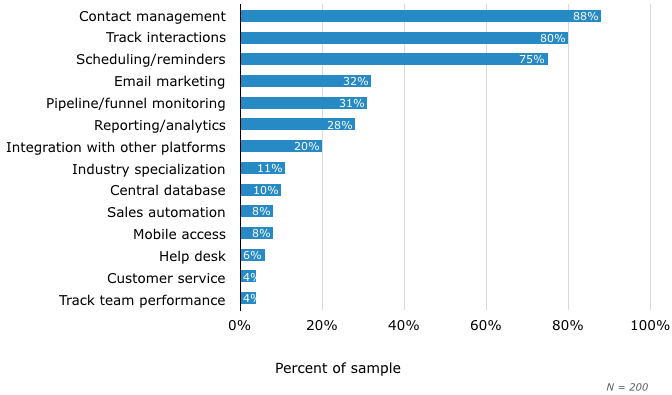
Image via SoftwareAdvice.com
Related to this are two other key features: tracking interactions (so that there is more than just basic contact information attached to each person) and greater automation (so that reminders are automatically set/attached to particular actions to ensure that the correct follow-up action is taken in the future).
Nutshell: Is basic CRM functionality ideal for first-time user SMBs?
Andrew Friedenthal: Absolutely. First-time SMB users should focus on the contact management side of CRM, getting in place a database of information that can be accessed by people across the company. Once they have that set, they should look into expanding their CRM functionality into areas that will be of benefit to them, like analytics/reporting or email marketing, but it’s best to get the basics under wraps first.
Nutshell: What is driving manufacturing businesses towards CRM?
Andrew Friedenthal: As the CRM market matures, it is also beginning to diversify. Whereas specialized manufacturing businesses may not have been well-served by first-generation, sales-focused CRM systems, newer software options are much more focused on the needs of these specific business segments.
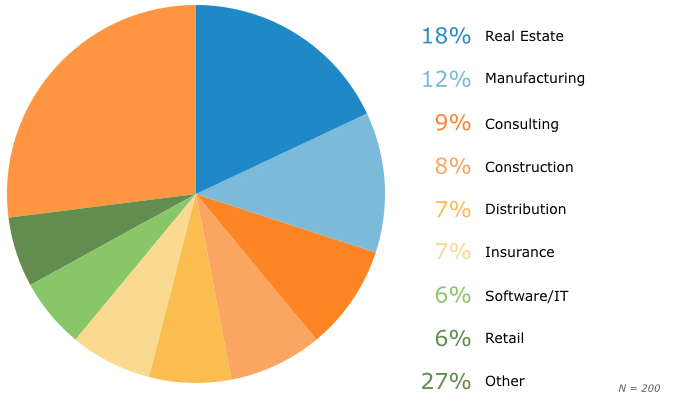
Image via SoftwareAdvice.com
Nutshell: In what ways can SMBs benefit from intuitive and automated CRM for small business?
Andrew Friedenthal: Since most SMBs are first-time CRM users, the easier and more intuitive the system is to use, the better. A CRM system is there to ease workflow and automate an already extant sales process, not to confuse people further. More complex systems are better for bigger businesses, particularly those with IT departments.
Related: 9 reasons why sales reps quit their CRMs
If you’re interested in learning more about these key findings, as well as some critical takeaways and next steps regarding CRM for small business solutions, check out the full report from Andrew Friedenthal, the CRM market analyst for the contact management consultancy Software Advice.
What 2026 industry trends mean for your CRM choice
As we enter 2026, the CRM landscape is shifting in ways that are especially good news for small businesses. Here’s what’s happening—and why it matters for you.
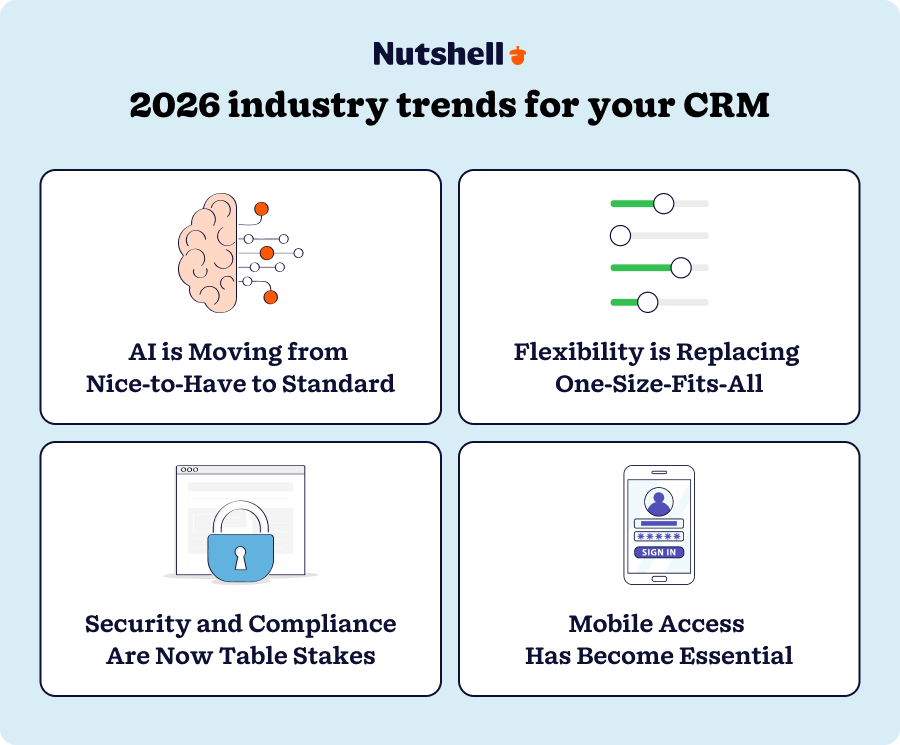
AI is moving from “nice-to-have” to standard
In 2024-2025, AI in CRM stopped being a premium feature reserved for expensive enterprise solutions. It’s now becoming standard across platforms of all sizes.
Why this matters: You no longer need to choose between simplicity and intelligence. Modern CRMs—even affordable ones—now include AI-powered features like:
- Automatic call and meeting summaries (no more manual note-taking)
- Lead scoring and prioritization (your CRM tells you which leads matter most)
- Predictive follow-up reminders (the system knows when it’s time to reach out)
- Email response suggestions (AI drafts replies so you type less)
According to recent data, businesses using AI within their CRM are 83% more likely to exceed sales goals due to AI’s support in lead scoring, predictive analytics, and personalized customer interactions.
What this means for you: When choosing a CRM, look for platforms that have built-in AI that works for your team without requiring configuration. You want the intelligence to be simple and automatic, not an add-on that requires a data scientist to set up.
Flexibility is replacing “one-size-fits-all”
For years, many SMBs felt forced to choose between two bad options: a rigid industry-specific CRM that didn’t fit, or a complex enterprise system that was overkill.
In 2025, flexible, general-purpose CRM platforms are winning because they adapt to how you actually work—not the other way around.
Why this matters: You want a CRM that can grow with you. As your business evolves, your CRM should adapt without requiring a costly migration to a different platform.
What this means for you: Choose a platform built on flexibility and customization, not rigid workflows. This means you start simple, but you’re never locked into that simplicity.
Security and compliance are now table stakes
As CRMs handle more customer data and automation, security has become a minimum expectation—even for small businesses.
Why this matters: Customers expect their data to be protected. Regulators increasingly require it. And frankly, a data breach can destroy a small business.
What this means for you: When evaluating CRM options, don’t skip the security questions. Look for:
- Regular security audits and certifications
- Data encryption in transit and at rest
- Role-based permissions so team members only see what they need
- Compliance with relevant standards (SOC 2, GDPR if serving EU customers, etc.)
The good news is that modern CRM platforms take security seriously as a competitive differentiator, so you don’t need to compromise on security to get an affordable, simple solution.
Mobile access has become essential
The pandemic normalized remote work, and it’s not going back. Your team needs access to customer information, whether they’re in the office, at a client site, or working from home.
Why this matters: Sales reps in the field need to pull up customer history mid-conversation. Customer success teams need to log interactions on the go. Remote workers need full CRM access from anywhere.
What this means for you: When choosing a CRM, test the mobile experience before committing. According to our research, 65% of sales reps with mobile CRM access hit their annual quota, compared to just 22% without mobile access. That’s not a nice-to-have—it’s a revenue driver.
Ready to implement CRM the right way?
If you’re a first-time CRM buyer, you now know the three essentials: contact management, interaction tracking, and automation. You also understand why simplicity beats complexity.
The hardest part isn’t choosing between features. It’s choosing a CRM vendor that gets what small businesses actually need—simple, intuitive, fast to implement, easy to use, and built to grow with you.
Here’s what to do next:
- Audit your current process. How are you managing contacts today? Spreadsheets? Email? Multiple systems? Write down the biggest pain point.
- Test a simple CRM. Most platforms offer free trials. Use it to test contact management, interaction logging, and basic automation. Don’t get distracted by advanced features yet.
- Get your team involved early. Have a sales rep or two try the trial. Does it feel intuitive to them? Would they actually use it?
- Plan to expand later. Choose a platform that can grow with you. You’ll want to be able to add users and more advanced features as you go.
The companies that succeed with CRM aren’t the ones that choose tools with the most features. They’re the ones that start simple, get their team to adopt, master the basics, and expand strategically.
Start there, and you’ll see results.
16 sales process templates for B2B pipelines
Whether you’re building your first sales process or overhauling an existing one, these Nutshell-approved templates will give you a great head start.
BACK TO TOP Written by
Will Gordon Sr. Director of MarketingEdited by
Andy Fowler Co-FounderReady to try
Nutshell for Free?Thank you! Your submission has been received!Oops! Something went wrong while submitting the form.





Announcing Nutshell Forms: Turn Website Visitors Into Instant Sales Leads. Really, It’s That Simple
Published on: November 10, 2022

Highly Effective Strategies for Elevating Sales Team Performance
Published on: November 10, 2022Establishing a System for CRM Data Entry and Management
Published on: April 11, 2023Introducing Nutshell Forms Spam Prevention
Published on: April 22, 2024Join 30,000+ other sales and marketing professionals. Subscribe to our Sell to Win newsletter!










