17 CRM Automation Examples & 5 Best Practices You Can Emulate

-

Quick answer: What is CRM automation, and what are some examples?
CRM automation uses your CRM to handle repetitive sales, marketing, and service tasks—like data entry, lead assignment, follow-up emails, and pipeline updates—so your team can spend more time selling. Common examples include automatically routing new leads to the right rep, triggering follow-up reminders, and generating real-time reports without manual work.
Done well, automation frees up several hours of admin time per rep each week and can deliver significant returns on what you invest in your CRM.
Key takeaways
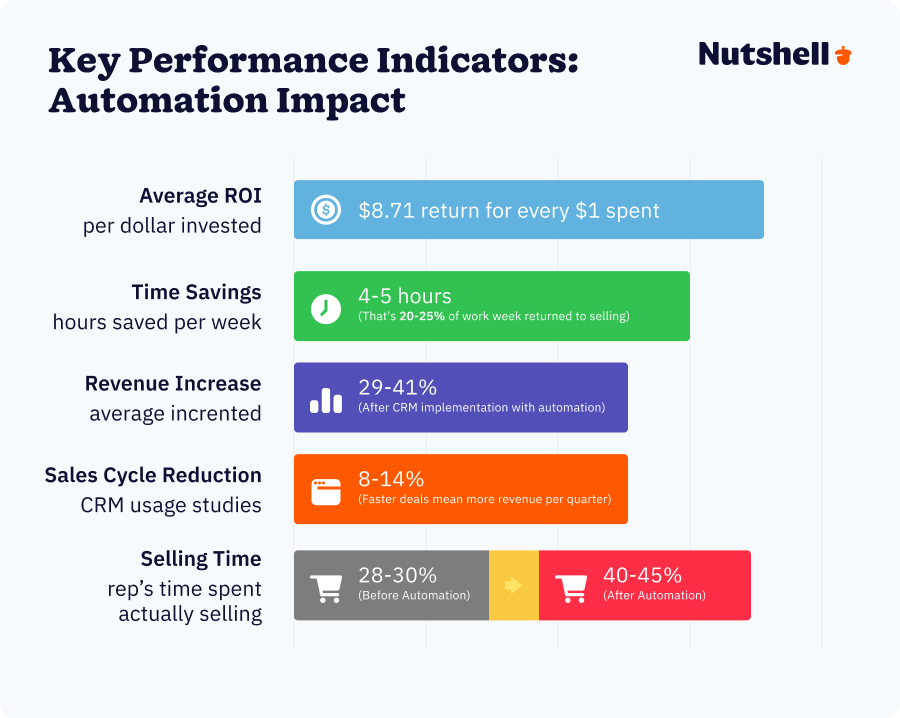
- CRM automation frees your team from 4-5 hours of weekly admin work so they can focus on selling
- Properly implemented automation delivers $8.71 in ROI for every dollar invested
- Sales cycles shorten by 8-14% when you automate the right tasks at the right time
Have you ever wondered if your business would benefit from customer relationship management (CRM) automation?
Fun fact: 82% of businesses use CRMs for sales reporting and process automation. Today’s customers expect frictionless journeys with brands, and one of the most cost-effective and easiest ways to improve your interactions with them is through CRM automation.
If you want to stay ahead of your competitors with CRM automation, keep reading. This blog post will go through 17 CRM automation examples and five best practices you can emulate to streamline your processes, increase your teams’ productivity, and grow your revenue.
Table of Contents
- How we selected these 17 CRM automation examples
- What is CRM automation?
- 5 Signs your business is ready for CRM automation
- What are the benefits of CRM automation?
- How can CRM automation improve sales?
- The ROI of CRM automation: Why you’ll actually save
- CRM automation examples at a glance
- 17 CRM automation examples
- Real-world example: How The CyberWire automated reporting and email workflows
- The role of AI in CRM automation
- 5 CRM automation best practices
- FAQs
How we selected these 17 CRM automation examples
Not every possible automation deserves your attention—some deliver massive ROI, while others are nice-to-haves that can wait.
We didn’t just compile a list. Instead, we evaluated hundreds of potential automations against five specific criteria to identify the ones that matter most for growing businesses.
- Business impact: Does this automation save significant time or drive revenue? We focused on examples where teams report saving 30 minutes to 2+ hours per week.
- Universal applicability: Can this work across industries and business sizes? We avoided niche use cases that only apply to specific verticals.
- Implementation feasibility: Can a small-to-mid-market team actually set this up and maintain it? We prioritized automations that don’t require a dedicated engineer or ongoing configuration.
- Alignment with Nutshell’s platform: Does this automation leverage Nutshell’s core capabilities? We selected examples that showcase what’s possible within Nutshell’s CRM and automation framework.
- Real-world demand: Are customers actually asking for this? We pulled from thousands of customer conversations to identify which automations move the needle for teams like yours.
These CRM automation examples represent proven automation opportunities—the ones that consistently deliver quick wins and strong ROI. They’re not theoretical or aspirational. Teams are implementing these automations right now and seeing measurable results.
Let’s dive in.
Put your sales process on autopilot!
Free your team from busy work. Nutshell’s sales automation handles lead assignments, pipeline updates, and follow-up reminders so your reps stay focused on selling.

What is CRM automation?
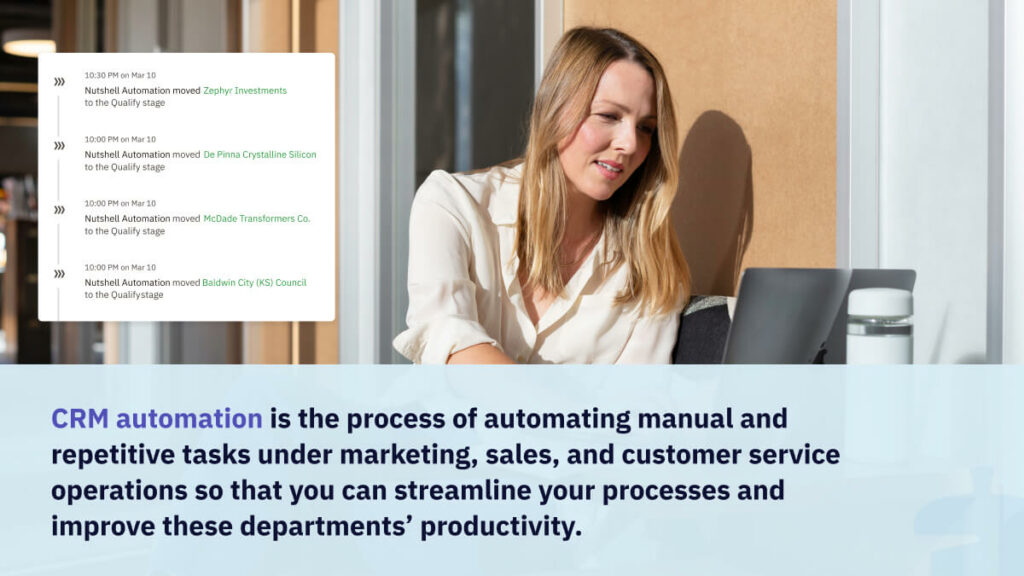
CRM automation is the process of automating manual and repetitive tasks under marketing, sales, and customer service operations so that you can streamline your customer relationship management processes and improve these departments’ productivity.
The main types of activities you can automate with CRM include:
- Entering and updating customer and lead data
- Sending emails and SMS messages
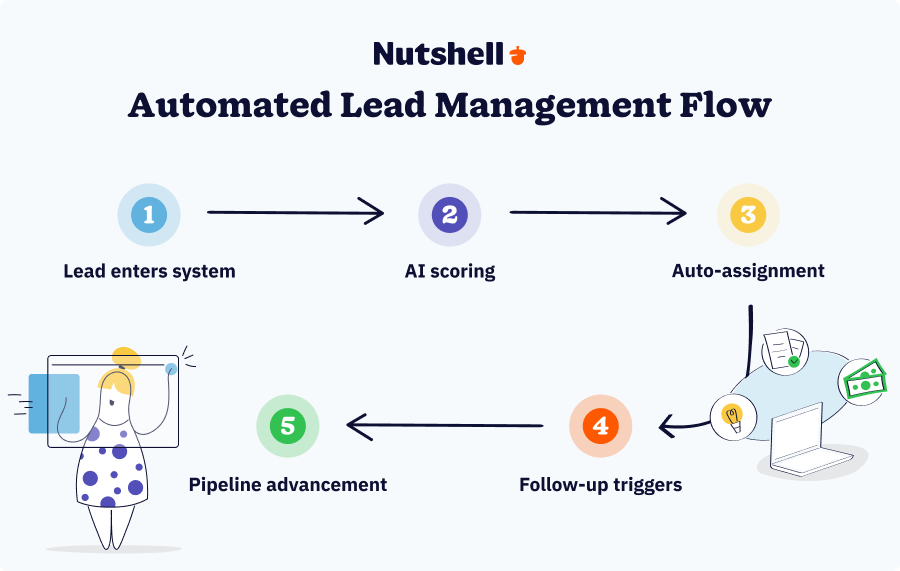
- Assigning leads to representatives
- Moving leads through your sales pipeline
- Tracking metrics for reporting and analytics
5 signs your business is ready for CRM automation
Not every business needs automation on day one. If you’re a solo founder still figuring out your sales process, you need a simple CRM more than you need complex workflows. But if any of these situations sound familiar, automation should be your next move:
1. Manual data entry is eating up valuable time
According to recent research, sales teams spend only 28% to 53% of their time on actual selling activities—the rest goes to data handling, preparation, and internal meetings. Automation will immediately free up capacity for sales reps stuck spending more time updating records than talking to customers.
2. You’re losing leads due to missed follow-ups
Leads that don’t get contacted within 48 hours are significantly less likely to convert. If your team can’t consistently follow up on time, automated reminders and sequences will close that gap.
3. Reports take hours to compile
If you’re manually pulling data from multiple sources to create pipeline reports, you’re wasting time that could be spent analyzing the numbers instead of gathering them. CRM automation delivers real-time reporting and analytics dashboards with zero manual effort.
4. Processes start breaking down when you need to scale
What worked when you had three sales reps stops working when you have ten. Automation ensures consistency across a growing team—everyone follows the same process, and nothing falls through the cracks.
5. Your customer data is inconsistent or incomplete
When different team members enter data differently (or don’t enter it at all), your CRM becomes unreliable. Automation standardizes data entry and fills in gaps automatically, keeping your database clean and trustworthy.
If at least two of these situations apply to your business, you’re ready for CRM automation. The question isn’t whether to automate—it’s what to automate first.
What are the benefits of CRM automation?
After learning about what CRM automation is, let’s see how it can make a difference for your business by learning some of the major benefits of CRM automation.
Here are some of the ways CRM automation can benefit your business:
- Automatically performing simple, mundane, and repetitive tasks
- Removing the possibility of human error
- Helping you handle a significantly larger quantity of data
- Segmenting and personalizing outreach and marketing campaigns
- Saving time and money through increased efficiency
How can CRM automation improve sales?
CRM automation can improve your sales by streamlining repetitive tasks. This includes tasks like lead nurturing, follow-ups, and data entry. It enables sales teams to prioritize high-quality leads, track customer interactions, and automate personalized communication. This lets your sales team focus on closing deals and improving conversion rates while the CRM system handles important but repetitive tasks.
The ROI of CRM automation: What you’ll actually save
Let’s put real numbers to what automation delivers.
Time savings
The average sales rep spends 17% of their week—roughly 6.8 hours—on CRM data entry and pipeline updates. That’s the equivalent of losing one full selling day every week to administrative work.
With automation handling data entry, lead assignment, and pipeline movement, teams report saving four to five hours per week per rep. For a team of ten reps, that’s 40 to 50 hours per week returned to revenue-generating activities. Over a year, that’s the equivalent of adding two full-time sales reps without increasing headcount.
Revenue impact
CRM automation delivers measurable revenue gains. Businesses implementing automation see a 29% to 41% average increase in revenue after CRM implementation, according to multiple industry studies. Lead conversion rates can increase up to 300% when CRM systems are used effectively with proper automation in place.
The sales cycle shortens by eight to 14% when you automate the right tasks at the right time. Faster cycles mean more deals closed per quarter, which compounds over time.
Cost calculation
Here’s how to calculate the cost of not automating:
Take your average sales rep’s hourly rate (let’s say $50 per hour) and multiply it by the hours they spend on manual CRM work each week (6.8 hours). That′s $340 per rep per week in labor costs dedicated to work a computer could handle.
Multiply that by the number of reps on your team and by 52 weeks. For a ten-person sales team, you’re spending $176,800 per year on manual CRM administration.
Now compare that to the cost of CRM automation. Most platforms (including Nutshell) charge between $30 to $60 per user per month for plans with automation features. For ten users, that’s
$300 to $600 per month, or $3,600 to $7,200 per year.
The ROI is obvious: spend $7,200 to save $176,800 in wasted labor. That’s $8.71 returned for every $1 invested in CRM technology—exactly what industry research shows.Accuracy gains
Manual data entry has an error rate. Even the best reps make typos, forget to log calls, or enter data inconsistently. These errors corrupt your database, which then produces unreliable reports, which leads to poor decisions.
Automation eliminates human error in repetitive tasks. Lead data entry, pipeline updates, and activity logging happen the same way every time. Clean data means accurate forecasting, which means better resource allocation and strategic planning.
The bottom line: CRM automation isn’t an expense. It’s an investment that pays for itself in weeks, not months.
CRM Automation Examples at a Glance
Whether you’re just exploring automation or ready to implement, here’s a quick overview of what’s possible. These examples span three core business functions—marketing, sales, and customer service.
Marketing automation
1. Lead data entry: Best for multi-channel lead collection (web, social, ads)
2. Marketing-to-sales lead handoff: Best for seamless hot lead transfer with auto-scoring
3. Welcome email: Best for new subscriber engagement (86%+ open rates)
4. Personalized marketing campaigns: Best for segmented messaging at scale
5. Lead attribution: Best for tracking which channels drive your best leads
Sales automation
6. Lead prioritization: Best for narrowing focus to most-likely-to-close prospects
7. Outreach to disengaged customers: Best for proactive churn prevention
8. Subscription renewal email send-out: Best for reducing involuntary churn
9. Moving leads to your pipeline: Best for streamlined deal progression
10. Automated sales guidance and reminders: Best for keeping teams aligned on next steps
11. Meeting scheduling and management: Best for reducing scheduling back-and-forth
12. Quote creation and tracking: Best for faster proposal turnaround and engagement tracking
13. Reporting and analytics: Best for data-driven forecasting and performance visibility
Customer service automation
14. Acknowledgment receipt send-out: Best for immediate customer reassurance
15. Appointment reminders: Best for reducing no-shows and reschedules
16. Follow-up email to provide further assistance: Best for post-resolution nurturing
17. Surveying your customers and analyzing your NPS: Best for understanding satisfaction trends
Ready to explore these in depth? Keep reading for the full breakdown.
17 CRM automation examples
You can automate various tasks with your CRM—from marketing and sales to customer service. Here are 17 CRM automation examples covering these three departments:
- CRM marketing automation examples
- CRM sales automation examples
- Customer service automation examples
CRM marketing automation examples
Among marketers using automation, 91% say it’s “very important” to their overall success. Here are some CRM marketing automation examples that will inspire you to get started:
1. Lead data entry
Best for: Marketing teams collecting leads from multiple sources (website forms, social media campaigns, email signups, webinars)
Quick summary: Automatically capture lead information from web forms, email submissions, and other channels directly into your CRM—eliminating the need for manual copy-paste or spreadsheet management.
How it works:
- Website visitor fills out a form or submits their information
- Data is instantly captured and stored in your CRM
- Lead appears automatically in your sales team’s queue with no manual entry required
- Information syncs across all connected channels (email, calendar, mobile)
Key benefits:
- Saves 2-3 hours per week on data entry work
- Eliminates human typos and duplicate entries that corrupt your database
- Gets leads into your sales pipeline instantly instead of days later
- Reduces friction between marketing and sales (hot leads aren’t stuck in a spreadsheet)
- Creates better lead data quality, which improves downstream automation and reporting
Implementation difficulty: Easy
Time to setup: 30 minutes – 2 hours
Tools & integration: Works with Nutshell forms, Zapier for third-party integrations, or native connectors to your web platform2. Marketing-to-sales lead handoff
Best for: Companies with distinct marketing and sales teams where lead quality and timing make or break conversions
Quick summary: Marketing automatically scores leads based on engagement level and transfers only the “hot” prospects to your sales team—eliminating the back-and-forth between departments and getting sales reps working qualified leads immediately.
How it works:
- Prospects engage with your content (email opens, website visits, form submissions, downloads)
- CRM scores each lead based on engagement activity and demographic fit
- When a lead reaches “sales-ready” threshold (hot lead), it’s automatically assigned to the right sales rep
- Sales rep receives notification and lead appears in their queue with full engagement history
Key benefits:
- Marketing and sales stay aligned on what “ready to sell” actually means
- Reps don’t waste time chasing leads that aren’t ready yet
- Prevents hot leads from falling through the cracks between departments
- Creates accountability—marketing knows reps will work what they send
- Improves both departments’ efficiency (marketing focuses on pipeline volume, sales focuses on conversion)
Implementation difficulty: Medium
Time to setup: 2-4 hours
Tools & integration:Nutshell Pro’s lead confidence feature, email engagement tracking, or third-party lead scoring tools3. Welcome email
Best for: Any business using email marketing or a mailing list (newsletters, webinars, event signups, free trials)
Quick summary: The moment someone joins your list or signs up for anything, an email automatically goes out welcoming them and setting expectations—capitalizing on peak interest when they’re most engaged.
How it works:
- Person opts in or signs up (for newsletter, webinar, trial, demo request)
- Welcome email triggers automatically within minutes
- Email includes personalized greeting, key information, and next steps
- Follow-up emails can be sequenced after welcome (if desired)
Key benefits:
- Welcome emails get 86%+ open rates vs. 20-30% for typical campaigns
- Starts your relationship on the right foot with immediate value
- Sets expectations early (what they’ll hear from you, how often, what to expect)
- Reduces unsubscribes because subscribers know what they’re getting into
- Opportunity to redirect people to the most relevant content immediately
Implementation difficulty: Easy
Time to setup: 30 minutes – 1 hour
Tools & integration: Any email platform (built into Nutshell email automation, Mailchimp, Kit, etc.)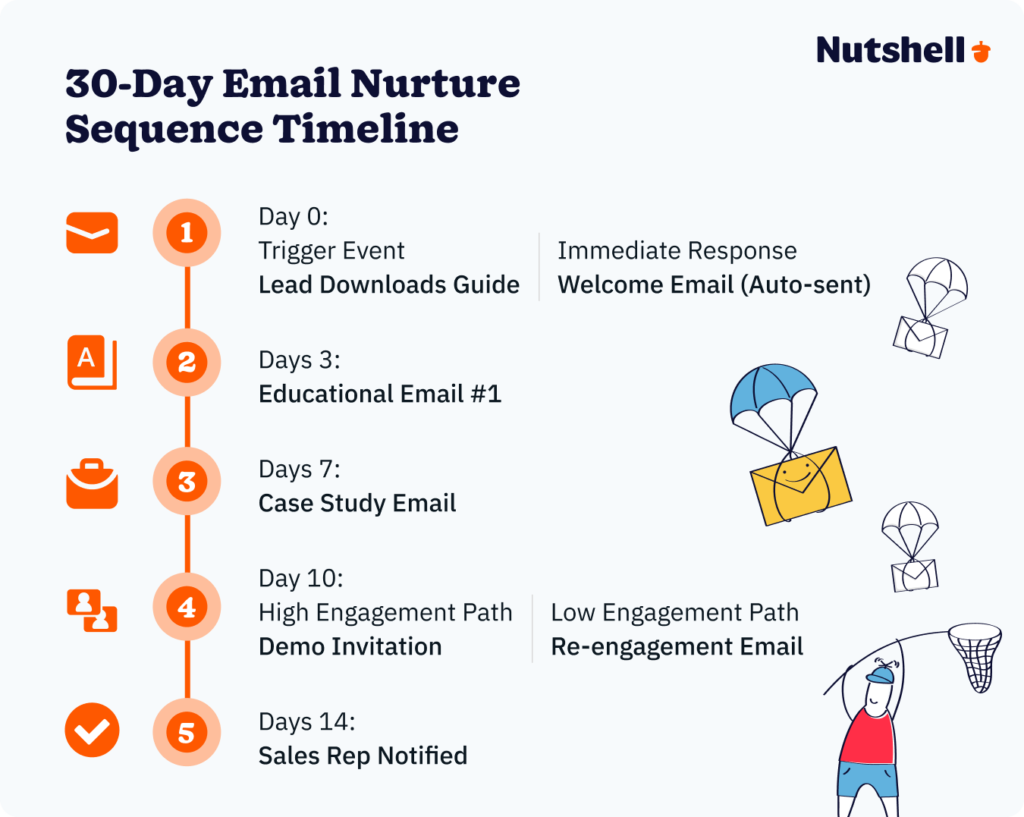
4. Personalized marketing campaigns
Best for: Marketing teams targeting different customer segments with different messages (SMBs vs. Enterprise, different industries, different pain points)
Quick summary: Segment your customer list by characteristics, behavior, or interest—then automatically send highly relevant messages to each group instead of one generic message to everyone.
How it works:
- Your CRM segments customers into groups (e.g., “Tech companies,” “Manufacturing,” “Overdue for renewal”)
- You create a campaign message tailored to that group’s specific pain points
- Message automatically sends to everyone in that segment
- Personalization tokens add names and company details for a custom feel
- Engagement is tracked by segment so you know what resonates with each group
Key benefits:
- 72% of customers only engage with personalized messaging—generic blasts get ignored
- Higher open rates and click rates because content is actually relevant
- Better revenue because you’re matching solutions to specific problems
- Faster feedback loop—you see immediately what each segment cares about
- Reduces unsubscribe rates because people get messages that matter to them
Implementation difficulty: Easy
Time to setup: 1-2 hours
Tools & integration: Nutshell segments & automation, or any email platform with segmentation5. Lead attribution
Best for: Any business spending on marketing and wanting to understand which channels actually drive results (so you can spend more on what works)
Quick summary: Your CRM automatically tracks which marketing channel brought in each lead—so you know exactly which campaigns, ads, or content pieces drive your best-quality business.
How it works:
- Each lead source is tagged when they first enter your CRM (organic search, paid ad, webinar, referral, etc.)
- Lead source data stays with the lead throughout their journey
- When they convert to customer, you know which channel brought them in
- Reporting shows which channels bring the highest-quality, fastest-converting leads
Key benefits:
- Stop guessing which marketing investments work—you have data
- Allocate budget toward channels that actually generate revenue
- Identify underperforming channels draining your budget
- Make fact-based decisions about where to invest in Q3, Q4, etc.
- Understand your true customer acquisition cost by channel
Implementation difficulty: Medium
Time to setup: 2-3 hours
Tools & integration: Nutshell’s lead attribution feature, UTM parameters, or third-party attribution tools like HubSpotCRM sales automation examples
Let your sales team focus on strategies and leave repetitive tasks to your CRM. Here are four sales automation examples a CRM can do for your business:
6. Lead prioritization
Best for: Sales teams drowning in leads and unsure where to focus their energy each day
Quick summary: Your CRM automatically scores and ranks leads by their likelihood to convert, so your team always knows which prospects to call first—the ones most likely to buy.
How it works:
- CRM analyzes each lead’s characteristics and behavior (company size, industry, engagement level, similar to past buyers)
- Leads get a score (out of 100) showing purchase probability
- Sales rep’s daily dashboard shows leads sorted by score—highest first
- Highest-scoring leads are flagged as “hot” for immediate follow-up
- As leads engage more, their scores update in real-time
Key benefits:
- Stops reps from wasting time on unlikely-to-convert leads
- “Hot leads” are identified instantly instead of being buried in a list
- New reps don’t have to guess—the system tells them who to prioritize
- Improves conversion rate by focusing energy on high-probability opportunities
- Reduces deal cycle length by getting to qualified leads faster
Implementation difficulty: Medium
Time to setup: 1-2 hours
Tools & integration: Nutshell’s lead confidence feature, or add-ons like HubSpot’s lead scoring
7. Outreach to disengaged customers
Best for: SaaS companies, subscription businesses, or service providers who want to prevent customer churn before it happens
Quick summary: Your CRM automatically identifies customers showing signs of disengagement (declining usage, missed logins, no recent activity), and triggers a re-engagement campaign to win them back before they cancel.
How it works:
- CRM tracks customer activity (logins, feature usage, support tickets, etc.)
- When activity drops below your threshold for X days, the customer is flagged as “disengaged”
- Automated email goes out offering help, resources, or a check-in call
- Options to schedule training, get support, or learn about new features
- Follow-up automation continues until they engage again or they churn
Key benefits:
- Catches churn risk early—before customers are already gone
- Shows customers you care by reaching out proactively
- Many churning customers just needed a nudge or training—this provides it
- Increases customer lifetime value when you save customers from churning
- Improves NPS by demonstrating responsiveness
Implementation difficulty: Medium
Time to setup: 4-8 hours
Tools & integration: Nutshell automation, event tracking, and email sequences8. Subscription renewal email send-out
Best for: Any subscription or recurring-revenue business (SaaS, memberships, subscriptions, managed services)
Quick summary: A few weeks before a customer’s subscription expires, an automated email goes out asking how they’re enjoying the service and reminding them about the upcoming renewal—no manual tracking needed.
How it works:
- CRM identifies customers whose subscriptions expire in 2-4 weeks
- Automated renewal reminder email sends automatically at the optimal time
- Email includes their renewal details, how to manage their account, and ways to upgrade
- Customer service is notified if they should reach out proactively
- Prevents the surprise of cancellation by keeping renewal top-of-mind
Key benefits:
- Reduces involuntary churn (customer forgets to renew and cancels by default)
- Gives you time to address any concerns before renewal decision is made
- Opportunity to upsell premium tiers or add-on services
- Saves customer service time from managing renewal inquiries
- Improves cash flow predictability (fewer surprise cancellations)
Implementation difficulty: Easy
Time to setup: 1-2 hours
Tools & integration: Nutshell automation, subscription management integration, or email platform
9. Moving leads to your pipeline
Best for: Sales teams managing multiple pipeline stages and wanting to reduce manual data entry around deal progression
Quick summary: Your CRM automatically moves leads from one pipeline stage to the next based on triggers you define—eliminating manual stage updates and keeping pipeline data current.
How it works:
- You define what moves a deal forward (email opened, meeting scheduled, proposal sent, etc.)
- When that trigger happens, the deal automatically moves to the next stage
- CRM updates the lead’s “next action” based on the new stage
- Sales rep gets a notification that a deal has progressed
- Pipeline stays accurate without manual clicking
Key benefits:
- Pipeline data is always current (not 3 days behind because reps didn’t update it)
- Reps spend less time in the CRM updating stages manually
- Forecasting is more accurate because deals move through stages automatically
- Reduces bottlenecks—you see immediately which stage is congested
- Managers can coach based on real progression data, not “gut feel”
Implementation difficulty: Medium
Time to setup: 2-4 hours
Tools & integration: Nutshell workflow automation, document tracking integration (like DocuSign or PandaDoc)10. Automated sales guidance and reminders
Best for: Sales teams (especially with newer reps) who need consistent guidance on what to do next at each pipeline stage
Quick summary: As deals move through your pipeline, your CRM automatically reminds reps of the next step they should take and any guidance or resources they need to complete it successfully.
How it works:
- Each pipeline stage has predefined next actions (call decision-maker, send proposal, schedule demo)
- When a deal enters a stage, a reminder appears on the rep’s dashboard
- Guidance links to relevant resources (proposal templates, objection-handling script, pricing sheet)
- Reminder repeats if action isn’t taken within X days
- Manager can see which reps are following the process and which are falling behind
Key benefits:
- New reps don’t have to ask “what’s next?”—the system tells them
- Consistent follow-up—deals don’t slip through because reps forgot
- Faster deal progression because everyone knows the expected timeline
- Reduces manager coaching burden (the system is coaching)
- Better outcomes when reps follow a proven process
Implementation difficulty: Medium
Time to setup: 2-3 hours
Tools & integration: Nutshell automation and task management11. Meeting scheduling and management
Best for: Sales teams and customer success teams spending too much time on meeting logistics instead of conversations
Quick summary: Stop the back-and-forth emails about scheduling. An automated meeting scheduler checks availability and sends calendar invites—freeing up your team to focus on deal conversations, not logistics.
How it works:
- You share your availability (connected to your calendar)
- Prospect clicks a link and sees your available times
- They select their preferred time
- Calendar invite and meeting details automatically populate
- Reminders send to both parties before the meeting
- Meeting appears in your CRM with notes and attendee details
Key benefits:
- Eliminates 5-7 email exchanges per meeting (and the time it takes)
- Reduces no-shows because reminders go to both parties
- Meetings appear in your CRM automatically—context is preserved
- Works across time zones automatically
- Reduces friction in the buying process—prospects appreciate easy scheduling
Implementation difficulty: Easy
Time to setup: 30 minutes – 1 hour
Tools & integration: Nutshell’s meeting scheduler, Calendly, or Acuity Scheduling12. Quote creation and tracking
Best for: Sales teams sending proposals—whether simple quotes or complex multi-page agreements
Quick summary: Instead of manually creating quotes in Word or Google Docs, your CRM generates them automatically from your product/service catalog, and then tracks whether prospects actually open and view them.
How it works:
- Sales rep creates a quote in your CRM (or it’s auto-generated from a template)
- CRM populates pricing, terms, and product details automatically from your database
- Quote is sent to prospect (via email or link)
- CRM tracks: Did they open it? How long did they spend looking at each section? Did they forward it?
- This engagement data helps reps know when to follow up and what to discuss
Key benefits:
- Quotes are accurate and consistent (no manual pricing errors)
- Saves 30-60 minutes per quote creation
- Engagement tracking tells you whether prospects are actually interested
- No need to follow up blindly—you know if they looked at it
- Faster turnaround time from quote request to delivery
Implementation difficulty: Easy
Time to setup: 1-2 hours
Tools & integration:Nutshell Quotes & Invoices feature, or connect to DocuSign/PandaDoc13. Reporting and analytics
Best for: Sales leaders who need real-time visibility into pipeline health, team performance, and forecast accuracy
Quick summary: Your CRM automatically generates sales reports and analytics dashboards showing pipeline status, win rates, deal velocity, and rep performance—no manual spreadsheets required.
How it works:
- CRM automatically calculates key metrics from your live pipeline data
- Dashboards update in real-time as deals progress or stage change
- Sales managers see: pipeline value by stage, win rate, average deal size, sales cycle length, etc.
- Can drill down to individual rep performance or specific deal details
- Reports can be automated (sent via email each week) or viewed on-demand
Key benefits:
- Pipeline visibility is real-time, not 3-day-old spreadsheet data
- Forecasting is data-driven instead of gut-feel based
- You see bottlenecks immediately (which stage is congested?)
- Managers can coach based on metrics (rep’s close rate is 18%, team average is 26%)
- Reduces time spent on reporting—no more building Excel files
Implementation difficulty: Medium
Time to setup: 2-3 hours
Tools & integration: Nutshell reporting and analytics built-inNeed a user-friendly CRM to boost sales and team efficiency?
Take our guided tour to explore Nutshell’s incredible features!

CRM customer service automation examples
Keep your customers satisfied with your service through the help of customer service automation in CRMs. Here are some CRM automation examples for customer service:
14. Acknowledgment receipt send-out
Best for: Customer service and support teams handling service requests, tickets, or inquiries
Quick summary: The moment a customer submits a support request or service ticket, an automated email goes out confirming you received it and setting expectations for response time.
How it works:
- Customer submits a support ticket or fills out a service request form
- Automated acknowledgment email sends immediately
- Email includes: ticket number, issue summary, expected response timeframe
- Customer can track their request in the CRM portal if desired
- Support team is notified for assignment and follow-up
Key benefits:
- Customers feel heard immediately—you’re not ignoring them
- Sets clear expectations (we’ll respond in 4 hours, not “sometime”)
- Reduces duplicate submissions (customer knows you got it)
- Prevents support team from being flooded with “did you get my email?” follow-ups
- Improves CSAT by showing responsiveness from the first moment
Implementation difficulty: Easy
Time to setup: 30 minutes
Tools & integration: Nutshell automation or ticketing system15. Appointment reminders
Best for: Customer service, field service, or support teams managing customer appointments (service calls, consultations, training sessions)
Quick summary: A day or two before a customer appointment, an automated reminder goes out so they don’t forget and leave your team with an empty calendar slot.
How it works:
- Appointment is scheduled in your CRM
- Automated reminder email/SMS sends 24-48 hours before
- Reminder includes: time, location (or video link), what to prepare, who to contact if they need to reschedule
- A second reminder can send 1-2 hours before for punctuality
- CRM tracks whether customer responded or confirmed
Key benefits:
- Reduces no-shows and reschedules by 30-40%
- Saves costly empty appointment slots
- Customers appreciate the reminder (it’s helpful, not annoying)
- Easy rescheduling reduces back-and-forth
- Improves customer satisfaction by reducing missed opportunities for service
Implementation difficulty: Easy
Time to setup: 1-2 hours
Tools & integration: Nutshell automation or scheduling integration16. Follow-up email to provide further assistance
Best for: Customer success teams and support departments wanting to ensure customers are actually satisfied after resolving their issue
Quick summary: After a support ticket or service request is marked complete, an automated email checks in with the customer asking if their issue was truly resolved and offering further help if needed.
How it works:
- Support ticket is marked as resolved
- Follow-up email automatically sends 24-48 hours later
- Email asks: Was this resolved? Do you need further help? Any additional questions?
- Includes links to relevant knowledge base articles or how-to resources
- If customer responds negatively, the ticket can be reopened automatically
Key benefits:
- Catches incomplete resolutions before customers become frustrated
- Shows customers you actually care (post-resolution check-in is unusual and appreciated)
- Reduces repeat tickets by catching issues early
- Opportunity to upsell additional services or resources
- Improves CSAT and NPS scores by demonstrating thoroughness
Implementation difficulty: Easy
Time to setup: 1-2 hours
Tools & integration: Nutshell automation17. Surveying your customers and analyzing your NPS
Best for: Any business wanting to understand customer satisfaction, identify at-risk customers, and celebrate your promoters
Quick summary: Automatically send your Net Promoter Score (NPS) survey to customers on a regular schedule, and automatically categorize responses so you can identify promoters, passives, and detractors without manual spreadsheet work.
How it works:
- Survey automatically sends to customer list on your schedule (quarterly, annually, after purchase)
- Customer clicks their score (0-10 rating: “How likely are you to recommend us?”)
- Response is automatically categorized: 9-10 = Promoter, 7-8 = Passive, 0-6 = Detractor
- Promoters might receive a message asking them to refer friends or leave a review
- Detractors could trigger a customer success follow-up to understand and resolve their concerns
- CRM automatically calculates your overall NPS score and trends over time
Key benefits:
- Understand how customers actually feel (don’t guess)
- Identify detractors early before they churn or leave negative reviews
- Celebrate and leverage promoters (they’re your best salespeople)
- Track NPS trend over time to see if satisfaction is improving
- Reduce manual survey administration and data entry
- Creates accountability for customer success team based on actual feedback
Implementation difficulty: Easy
Time to setup: 1-3 hours
Tools & integration: : Nutshell Forms, SurveyMonkey, Typeform, or Jotform integrated into CRMReal-world example: How The CyberWire automated reporting and email workflows
Here’s what CRM automation looks like in practice.
The challenge
The CyberWire, a leading cybersecurity news service, needed a systematic approach to manage sponsorship sales and editorial relationships across disconnected systems. Their team was manually compiling reports for board meetings, tracking email engagement in spreadsheets, and losing time to repetitive administrative tasks.
The automation implementation
The CyberWire implemented several key automations using Nutshell:
- Automated email engagement tracking: Every email sent to sponsors and editorial contacts is automatically tracked. Opens, clicks, and engagement data flow directly into the CRM without manual logging. Sales reps can see exactly which sponsors opened the proposal and which sections they spent time reading, allowing for perfectly timed follow-ups.
- Automated pipeline analysis reports: Instead of manually pulling data from multiple sources, The CyberWire set up automated reporting that tracks sales metrics, time to close, sales activity, and lead generation. These reports update in real time, giving the team instant visibility into pipeline health.
- Automated board-level reporting: Perhaps most importantly, they automated the creation of executive reports for board meetings. What used to take hours of manual data compilation now happens automatically, with metrics pulled directly from the CRM and formatted for leadership review.
- Lead recapture coordination: Automated workflows ensure that leads who go quiet don’t disappear. The system flags disengaged prospects and automatically assigns follow-up tasks to the appropriate rep, preventing lost opportunities.
The results
Bennett Moe from The CyberWire explains the impact: “Nutshell has enabled us to do much deeper analysis of our pipeline, our sales, our time to close, our sales activity, and our lead generation efforts, and create reports that support the metrics we need to track at the board level. The more information we put into Nutshell, the more valuable it becomes.”
The team now has complete visibility into which sponsors are engaging, which aren’t, and exactly where each opportunity stands. The director-level oversight that automation provides has become essential to how they run the business.
This is what effective CRM automation delivers: not just time savings, but strategic visibility that transforms how you make decisions.
The role of AI in CRM automation
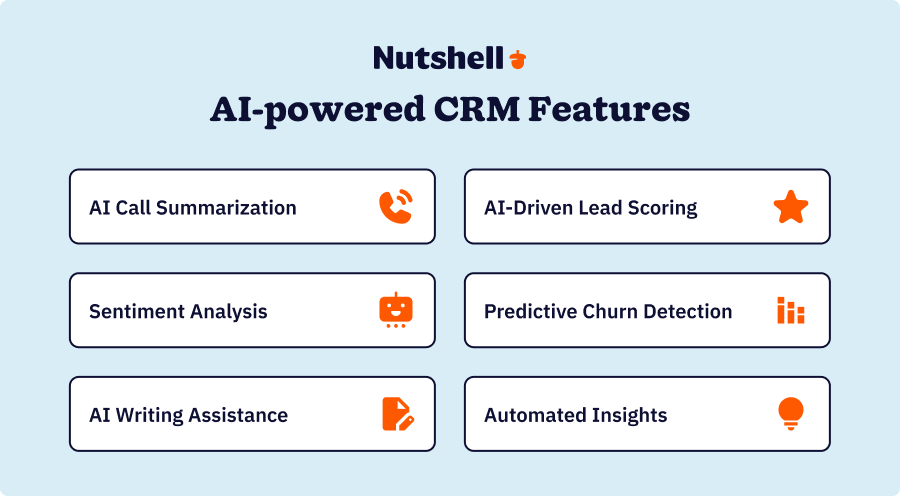
The biggest change in CRM automation in recent years is the increasing availability of artificial intelligence (AI). AI technology makes CRM automation faster and more powerful and even enables new automation capabilities.
With AI, CRMs can analyze large amounts of data, such as sales data, lead data, and past interactions with customers, and gather valuable insights from it.
For example, with Nutshell, you can summarize your timelines to get a summary of all your past interactions with a lead or customer, giving you the context you need to have more productive interactions with them. Nutshell can also generate summarizations of your Zoom calls so that your team can quickly catch up on what you accomplished in meetings.
AI can also assist with writing, and some CRMs, including Nutshell, have built-in AI writing tools to help with writing emails and other tasks.
Other uses of AI for CRM automation include audience segmentation, voice-to-text tools, and reporting.
Looking for a CRM with artificial intelligence to power growth?
Nutshell Business has what you’re looking for, with features to supercharge your team’s productivity.
5 CRM automation best practices
CRM automation should make your teams more efficient and productive. To ensure this effort doesn’t require too much work on your team members, here are four CRM automation best practices:
1. Create clear guidelines for data entry and updates
Use consistent formatting for your data. Create a document outlining your data entry and update guidelines, including how conversation logs are typed in. This ensures productivity across the board, so other team members can easily understand all the details saved in each customer profile.
2. Prepare employees with training for new automation workflows
After you’ve created your guidelines, it’s important to get everyone who uses the CRM on board. Minimize mistakes in early automated workflow adoption by providing training and demos on the new automation processes, guidelines, and what their role is in the process.
If your team is already familiar with automated customer relationship management, getting used to a new workflow should take no more than two or three weeks of practice. Provide as much hands-on help as you can, and be open to feedback and questions during this adoption phase.
3. Perform regular data cleansing and follow a maintenance schedule
Do you simply upload your customer data and call it a day? If you do, chances are some recipients have not received your emails.
Ensure you have a maintenance schedule for your CRM’s database to check in with your customers about their updated contact details. If your past emails bounced, make sure to edit or delete them. By regularly cleaning your data, your team members don’t have to deal with outdated customer data or customers who are no longer interested in your product or service.
4. Use a mobile-friendly CRM
Boost your productivity by having a CRM that you can access through a mobile device. Nutshell is an easy-to-use CRM that has a mobile app. It also lets you save your prospect’s data by taking a photo!
5. Make simple but effective workflows
CRM automation should help boost productivity among various teams within your organization by taking up repetitive tasks. If your automation workflows are too complex, some of your team members might not adopt the automated customer relationship management tool. The result is an investment that doesn’t help your business and doesn’t provide returns.
Keep your workflows simple and effective, so your team can maximize your CRM automation tools. It also helps to have a user-friendly CRM like Nutshell so that adoption won’t be a problem.
Leverage the power of CRM automation with Nutshell
CRM automation streamlines your processes and improves the productivity of your marketing, sales, and customer service teams. If you want to help your customer-facing teams with automation in CRM, consider Nutshell.
Nutshell is a flexible and user-friendly CRM with automation that can help you with marketing tasks, sales, and customer service automation. Try it for free for 14 days!
FAQs
-
1. How long does it take to see ROI from CRM automation?
Most businesses see initial ROI within 6-12 months, with some reporting time savings as early as 30 days. According to Forrester, companies using advanced CRM automation achieve 324% ROI over three years. Quick wins include reduced data entry time and faster lead response, while full benefits like improved conversion rates typically emerge after 6 months.
-
2. What’s the difference between CRM automation and marketing automation?
CRM automation focuses on streamlining sales processes and customer data management across all departments. Marketing automation specifically handles campaign execution, lead nurturing, and top-of-funnel activities. While marketing automation feeds qualified leads to sales, CRM automation manages the entire customer lifecycle. Nutshell combines both capabilities in one platform.
-
3. How difficult is it to set up CRM automation for small businesses?
Modern CRMs like Nutshell are designed for non-technical users, with most small teams completing basic setup in 1-3 days. The key is starting simple with core features like contact management and automated follow-ups, then gradually adding advanced automation. With Nutshell’s free support and pre-built templates, implementation is straightforward.
-
4. What CRM automation mistakes should I avoid?
Common pitfalls include over-automating and losing the human touch, implementing without proper team training, neglecting data quality, and creating overly complex workflows. Start with mapping your actual sales process, keep automation simple, maintain clean data, and always leave room for personal interaction when it matters most.
-
5. Can CRM automation integrate with my existing tools?
Yes, most modern CRMs offer extensive integration capabilities. Nutshell connects with popular tools like Google Workspace, Microsoft 365, QuickBooks, Mailchimp, and hundreds more through our AppConnect marketplace. Native integrations ensure seamless data flow between systems, eliminating duplicate entry and keeping all teams aligned.
See Nutshell in action!
Try Nutshell free for 14 days or let us show you around before you dive in.
 BACK TO TOP
 Written by
Will Gordon Sr. Director of MarketingEdited by
Andy Fowler Co-FounderReady to try
Nutshell for Free?Thank you! Your submission has been received!Oops! Something went wrong while submitting the form.



The CRM and Email Marketing Software Metrics That Actually Connect to Revenue
Published on: April 23, 2026
Sales Performance Reviews: 9 Tips to Make Them Valuable
Published on: November 10, 2022Join 30,000+ other sales and marketing professionals. Subscribe to our Sell to Win newsletter!










