What Does a CRM Do? A Complete Guide for B2B Sales and Marketing Teams

-
Quick answer: What does a CRM Do?
A CRM—customer relationship management software—centralizes every contact, company, deal, and interaction your team has into one shared system. It tracks where deals stand, what follow-ups are overdue, and what your revenue looks like right now.
In short: it replaces the spreadsheets, email threads, and memory your team currently relies on—and replaces them with a single source of truth everyone works from.
A CRM tracks everything customer-related:
- What your team has said to every prospect
- Where every deal stands in the pipeline
- Which follow-ups are overdue
- What your revenue forecast looks like right now
The core purpose of a CRM is to replace scattered spreadsheets, email threads, and memory teams rely on to manage customer relationships with a single source of truth for the entire team.
Nothing gets lost when reps leave, go on vacation, or hand off accounts. And when a manager needs to know where the quarter is heading, the answer is already there.
Trying to decide whether your team needs one, or want more info on what CRM actually does? You’re in the right place. Our guide covers everything you need to know in plain English, from a CRM’s basic function to cost breakdowns and how to get started.
Table of contents
- What is CRM software?
- What does a CRM do? Core functions explained
- What does a CRM do for each team?
- What types of CRM are there?
- Why does your business need a CRM?
- How do you get started with a CRM?
- How much does a CRM cost?
- Nutshell’s approach to CRM
- Go deeper: CRM resources from Nutshell
- CRM: Frequently asked questions
What is CRM software?
CRM software is a system for managing your company’s relationships and interactions with prospects, leads, and customers. It stores contact and company information, tracks every touchpoint between your team and the people you’re selling to, and gives everyone on your team visibility into the full relationship history—not just their own slice of it.
Think about what that means day-to-day:
- Your rep calls a prospect and takes notes.
- Another rep sends a follow-up email.
- Your marketing team runs a campaign.
Without a CRM, those three things happen in three different places—a notebook, a Gmail outbox, and a Mailchimp dashboard—and nobody has the full picture. With a CRM, everything lands in one place. Anyone can pick up where anyone else left off.
Before CRM, most small and mid-sized businesses managed contacts in spreadsheets, deals in email threads, and follow-ups in their heads. Sound familiar? That approach creates four problems that compound over time:
- Deals fall through the cracks when reps get busy.
- New reps inherit accounts with zero history to work from.
- Managers can’t see what’s actually happening in the pipeline.
- Revenue forecasting becomes a guess dressed up as a number.
A CRM solves all four.
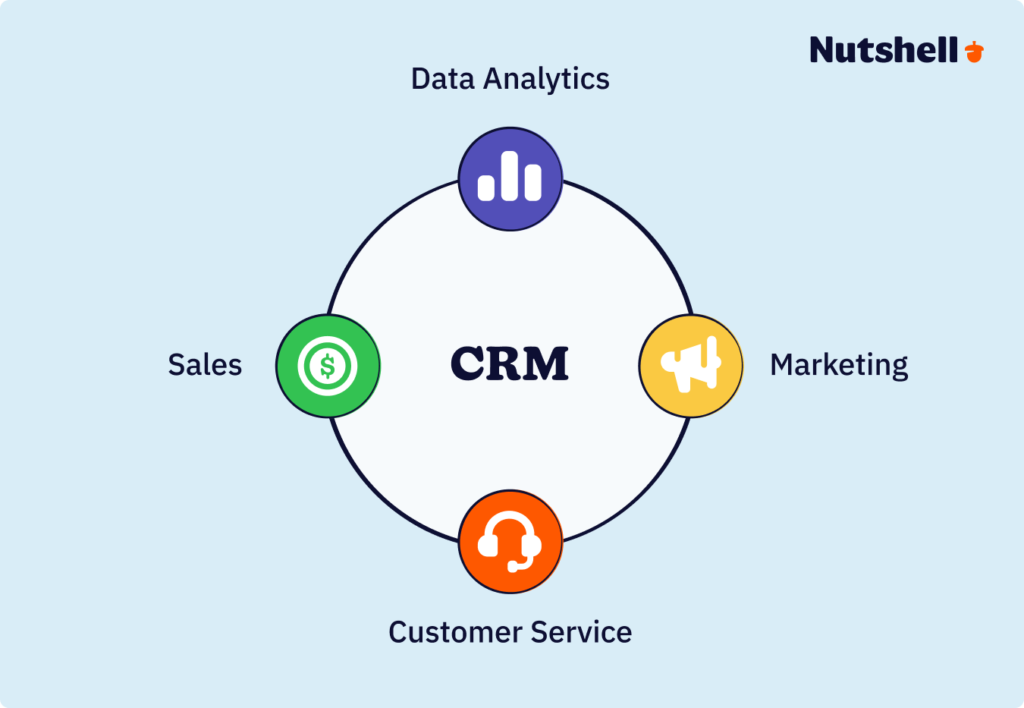
Modern CRM platforms have expanded well beyond contact storage, too. Today’s CRM is an operational hub connecting sales, marketing, and customer success around a shared view of the customer—pipeline management, email automation, reporting, integrations with the rest of your tech stack, and AI-powered features that surface insights and flag risks before they become problems.
Simply put, the address book grew up.
For a complete guide to what a sales CRM is specifically, see What is a sales CRM →
What does a CRM do? Core functions explained
A CRM does six core things for your team, but none of them are really about features. They’re about what actually changes when the system is in place. If you’re looking for a quick CRM software overview, it helps to focus on how the technology impacts your daily workflow rather than getting bogged down in tech jargon.
Here’s what that looks like in practice.
It centralizes contact and company data
Every contact a rep has ever spoken with, every company they’ve pitched, and every piece of information collected along the way lives in one shared database that anyone on the team can access. No more digging through someone else’s inbox to find a phone number. No more asking around to figure out who last spoke to a prospect — or what they actually talked about.
When a contact calls in, any rep can pull up their full profile in seconds. Here’s what that looks like when it matters:
- A rep goes on vacation.
- A prospect replies to their email while they’re out.
- A teammate steps in, reads the full thread, and responds without missing a beat.
No awkward “let me check with my colleague,” and no starting over. The relationship continues exactly where it left off.
For a deep dive into managing contact data in your CRM, see Understanding customer data and how to collect it →
It tracks every interaction and touchpoint
CRMs log emails, calls, meetings, notes, and any other activity tied to a contact or deal, creating a timeline of the relationship that the whole team can see.
Managers know what reps are actually doing. New hires can review the full history of an account before their first call with a customer they’ve never spoken to. Leads can move through your funnel as smoothly as always.
That visibility changes how marketing operates, too. A marketing manager looks at a high-value deal in the pipeline and sees that the prospect downloaded two whitepapers, attended a webinar, and had three calls with sales over the last 60 days.
That’s more than a simple data point—that’s the context needed to send the right message at the right moment rather than blasting another generic email into the void.
For guidance on setting up automated email workflows, see Setting up CRM automations and workflows →
It manages your sales pipeline and deal stages
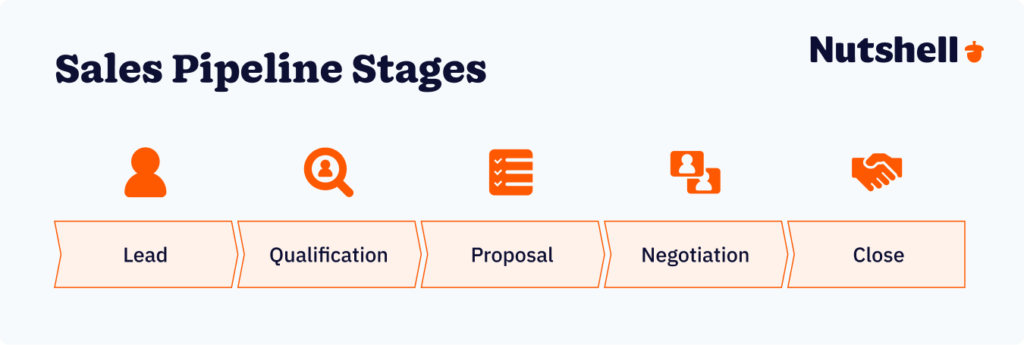
Every deal is assigned to a stage and lives in the pipeline, where reps and managers can see it. Most CRMs provide a standard pipeline with the following stages:
- Prospecting
- Proposal Sent
- Negotiation
- Closed Won
Reps know what they own and what needs to happen next. Managers see the entire team’s pipeline at once, not just whatever individual reps choose to share in a status meeting. In some CRMs, teams can also customize their pipelines to match their specific selling process.

More usefully, managers start spotting patterns. Which stages move fast? Which ones stall out consistently? Where does coaching actually need to happen?
A sales manager runs a pipeline report and sees 12 deals sitting in “Proposal Sent” for more than two weeks. That’s not a coincidence — that’s the follow-up list for this week, right there on the screen.
It automates follow-up and repetitive tasks
CRMs automatically send follow-up emails, create tasks when a deal reaches a certain stage, assign incoming leads to reps based on territory or workload, and remind reps when it’s time to check back in. Deals keep moving without anyone having to manually remember to move them.
Here’s what that looks like when it’s working: a prospect submits a demo request form, and the CRM creates the contact record, assigns it to the right rep by geography, fires off a confirmation email, and schedules a callback task for within the hour.
Zero manual steps from anyone on your team. That’s not a fantasy. That’s a Tuesday. Explore more CRM automation examples for your sales workflow.
For a full guide to CRM automation, see Using automation to improve efficiency →
It gives you reporting and real-time visibility
A CRM pulls activity and outcomes into dashboards that show you what’s working and what isn’t—win rates by rep, deals closed per month, average deal size, time to close, pipeline coverage, revenue forecasts.
The question leadership is asking shifts. Not “how many deals do we have?” but “why are deals closing faster in the Northeast than the Southeast, and what do we do about it?” Master CRM analytics and reporting to answer these questions with data.
Picture a CEO opening the CRM and seeing the current quarter’s forecast at $420K with a 75% confidence weighting. No spreadsheet. No asking the sales manager for a status update. No waiting for Friday’s pipeline call. The system shows reality in real time—and that’s a fundamentally different way to run a business.
For a full guide to CRM reporting and analytics, see Using sales reporting and analytics in your CRM →
It connects sales and marketing around shared data

When marketing runs a campaign, the CRM tracks everything:
- Which contacts engaged
- Which became leads
- Which leads turned into closed deals
Sales can see what a prospect downloaded before the first call. Marketing can see which campaigns generate the highest close rates—not just the most form fills.
Both teams work from the same contact records, pipeline data, and lead definitions. A marketing manager can export a list of contacts who attended the last two webinars but still haven’t been contacted by sales. That list becomes a targeted campaign with messaging built around what those specific people have already engaged with. This is why CRM and email marketing integration drives measurable revenue growth.
No overlap. No wasted budget. No “whose lead is this?” argument.
For guidance on CRM integrations, see Integrating your CRM with other tools →
What does a CRM do for each team?

While everyone on your team will use a CRM in different ways, everyone gets something real out of it. Here’s what actually changes for each role when a CRM is in place.
What a CRM does for sales reps
A CRM gives every rep a single workspace where every contact, deal, email, call, and next step lives. No more bouncing between an inbox, a spreadsheet, a calendar, and a stack of sticky notes. This approach is called next action based selling—always knowing what to do next.
Simply open the CRM and see exactly what needs to happen today:
- What follow-ups are due
- A list of calls to make
- A roundup of proposals to send
- All tasks sitting overdue
It also completely eliminates the “where did I leave off?” problem. When a rep calls someone from three weeks ago, they don’t scroll back through 47 emails trying to reconstruct the conversation.
The full timeline is right there—what was discussed, what was promised, what documents got sent. They pick up exactly where they left off.
And the busywork? Mostly gone. CRMs log emails automatically, schedule follow-up reminders, move deals between stages, and surface the next best action. Reps spend less time on data entry and more time actually selling.
It sounds obvious, but it’s remarkable how rarely it happens without a system enforcing it.
For strategies on using CRM to manage your sales team, see Managing a sales team →
What a CRM does for sales managers
For sales managers, a CRM opens doors that were previously inaccessible.
Real-time pipeline visibility, without asking anyone for an update. Every deal in play, every one that’s moving, every one that’s been stalled for two weeks—visible without scheduling a single status meeting.
With this visibility, coaching can shift from “tell me what you’re working on” to “I can see this deal has been stuck for 12 days—let’s talk through it.”
Forecasting becomes grounded in something real. Instead of taking reps at their word on a Monday morning call, managers run a weighted pipeline report showing exactly how much revenue is likely to close this quarter based on deal stage, value, and close date.
The number isn’t optimism—it’s math.
Managers can also get a look at what’s actually working. Compare win rates by rep, by lead source, or by region. If one rep closes deals 30% faster than the team average, the manager can find out why and replicate it. That’s the difference between managing a team and actually developing one.
What a CRM does for marketing teams
Marketing teams can use a CRM to see which campaigns generate real pipeline and closed revenue. That data might include:
- Which email campaigns led to sales conversations
- Which webinars produced closed deals
- Which content is engaging the accounts that actually matter
Reporting shifts from activity to business impact, which is a significant change for most marketing teams.
CRM also makes hyperpersonalized campaigns possible. Marketers can segment contacts by dozens of other attributes stored in the system:
- Industry
- Deal stage
- Past engagement
- Company size
With this information, marketers can send tailored messaging based on where someone actually is in the buying journey. A contact who attended a webinar gets different follow-up from someone who just requested a demo. And the response rate difference is significant.
Most importantly, CRM closes the loop with sales. Marketing sees which leads sales is following up on and how fast. Sales sees which content a prospect engaged with before booking a call. Both teams operate from the same source of truth—and the monthly “whose fault is the lead quality?” debate starts to disappear.
For guidance on how CRM and email marketing work together, read Nutshell’s guide on CRM benefits→
What a CRM does for business owners and executives
Here’s what changes at the top. Owners can log into the CRM and see current pipeline, forecast, win rate, and sales velocity—no waiting for a monthly report or a deck someone spent three hours building. Decisions happen faster because the data is already there.
It also protects the business from knowledge loss. When a key rep inevitably leaves, their entire book of business stays in the system. Every contact, every deal note, every next step—and their replacement can step in and pick up right where the last person left off. The business isn’t held hostage by what’s sitting in one person’s email inbox.
Beyond that, CRM shows where to invest and where to fix:
- Which lead sources produce the best ROI?
- Which products sell fastest?
- Where are the pipeline bottlenecks creating drag?
The CRM becomes more than a call-logging tool for individual tools—it becomes the operational dashboard for the entire go-to-market function.
What types of CRM are there?
CRM software generally falls into three categories: operational (automating sales pipelines, marketing, and service workflows), analytical (surfacing insights and trends from customer data), and collaborative (sharing customer information across sales, marketing, and support teams). Most modern platforms combine all three, with operational capabilities at the core and analytical and collaborative features built in.
If you’re evaluating which type fits your use case, see our full breakdown: Different types of CRM software →
Why does your business need a CRM?
Most businesses adopt a CRM not because they want more software, but because they’ve hit a breaking point with lost leads, missed follow-ups, inaccurate forecasts, or a growing team that a shared spreadsheet can no longer support. A CRM solves the underlying problem by giving every rep, manager, and team a single, reliable source of truth for every contact, deal, and conversation.
For a full breakdown of the benefits, see: Benefits of using CRM software →
How do you get started with a CRM?
Adopting a CRM doesn’t have to be a six-month implementation project. With the right platform and a structured rollout, most small and mid-sized teams are fully operational in two to four weeks. Effective CRM implementation planning makes the difference between success and failure. Here’s the path that works.
Step 1: Define what you want the CRM to do
Before you open a single demo, write down the three to five specific problems you’re trying to solve:
- “I want every rep to see what the last conversation with a contact was.”
- “I want a real-time pipeline report I can pull up in 30 seconds.”
- “I want to stop losing leads between marketing and sales.”
These become your evaluation criteria, your onboarding checklist, and your definition of success. Without them, you’ll end up evaluating features instead of solutions.
Step 2: Choose a CRM built for your team size and selling motion
This is where most teams make the wrong call. Enterprise CRMs like Salesforce are genuinely powerful, but they require an admin, often a consultant, and months of configuration before they’re usable.
Lightweight CRMs are quick to start but hit a ceiling fast. For B2B SMBs, you want something powerful enough to handle a real sales process but simple enough that your team will actually use it. Nutshell is built specifically for that middle ground.
For guidance on what to look for when evaluating CRM options, see What to look for in a CRM →
Step 3: Import your contacts and define your pipeline stages
Start by migrating your existing contact and company data—whether that’s from a spreadsheet, a previous CRM, or an email list. Then build out your pipeline stages to match how your team actually sells. For a complete guide, see CRM setup and implementation best practices.
Most teams start with four to six stages:
- Lead
- Qualified
- Proposal Sent
- Negotiation
- Closed Won
- Closed Lost
Keep it simple at first. You can always add complexity later. You can’t easily remove it once people are used to it.
For a step-by-step guide to CRM setup and migration, see Setting up and migrating CRM software →
Step 4: Connect your email and calendar
Synced email and calendar integration is a must-have. Your CRM should automatically log every email sent to a contact and let reps send emails directly from within the platform without requiring you to switch tabs or copy-paste. Calendar sync ties every scheduled meeting to the right contact and deal.
If your reps are still jumping between the CRM and their inbox to do basic communication, the setup isn’t done yet.
Step 5: Train your team and set usage expectations
CRM rollouts fail when leadership drops a new tool on the team without explaining why it matters or how to use it. Run a live onboarding session where every rep creates a contact, logs an activity, and moves a deal through the pipeline from start to finish. Then set the expectation clearly: the CRM is the source of truth.
If it’s not in the CRM, it doesn’t exist.
Say that out loud. Mean it.
For a complete guide to CRM onboarding and training, see CRM onboarding and training guide →
Step 6: Start simple, then layer on automation
Don’t try to automate everything on day one. Complexity kills adoption — this is the most common CRM implementation mistake, and it’s entirely avoidable. Start with manual data entry and pipeline tracking. Once the team is comfortable and the system is proving its value, add email sequences, task automation, and reporting layers. Prove the basics first, then expand.
How much does a CRM cost?
CRM pricing typically runs $12 to $30 per user per month at the entry level, $40 to $80 for mid-tier plans with automation and integrations, and $150+ for enterprise platforms with advanced AI and dedicated support, though many vendors also offer free tiers that teams tend to outgrow quickly. The right price point depends entirely on your team’s size and how much of the sales process you need the CRM to handle.
For a full breakdown of CRM pricing and what drives cost, see: How much does a CRM cost? →
How Nutshell approaches CRM
Nutshell was built specifically for B2B sales and marketing teams at small and mid-sized companies who need a CRM that’s powerful enough to scale but simple enough to use without a dedicated admin. Here’s what that actually means in practice.
👉 Built for teams who sell, not teams who administer software. Most CRM platforms are designed for enterprises that have IT departments and implementation consultants on retainer. Nutshell is designed for teams who need to be up and running in just a few days. The interface is intuitive, onboarding is guided, and nothing requires custom code or a third-party consultant to configure. You set it up. You use it. That’s the whole point.
👉 Sales and marketing in one platform. Nutshell combines pipeline management, email automation, lead capture, reporting, and marketing tools in a single system so your sales and marketing teams work from the same data. One single source of truth with everything in it.
👉 Transparent, predictable pricing. No per-contact fees. No features locked behind surprise add-ons. No invoice that’s mysteriously 40% higher than what you budgeted for. Every plan includes email automation, reporting, integrations, and support. You pay per user, and you know exactly what you’re getting before you sign anything.
👉 A team that actually answers the phone. Nutshell’s support team is based in the U.S., responds in minutes rather than days, and knows the product well enough to actually solve your problem. You’ll talk to a real expert, not a robot or script reader who escalates everything.
See how Nutshell works in practice →
Go deeper: CRM resources from Nutshell
While this guide covers the broad picture, you might be looking for more specific resources depending on where you are in the process. Here’s what to read next:
- For a guide to CRM data, see CRM data: Complete guide to types, management, optimization, & more →
- For a practical guide to collecting and organizing your customer data, see Understanding customer data and how to collect it →
- For a breakdown of the different types of customer data your CRM should be capturing, see 4 types of customer data →
- For guidance on keeping your CRM data accurate and trustworthy over time, see How to keep CRM data accurate →
- For strategies on organizing and managing the customer data in your CRM, see Managing and organizing customer data →
- CRM features and capabilities: For advanced strategies to get more from your CRM, see Advanced CRM techniques and strategies →
- For guidance on monitoring and improving your team’s CRM usage, see How to monitor and improve your CRM usage →
- For guidance on custom fields and forms in your CRM, see Custom fields and forms in your CRM →
- CRM integrations: For strategies on getting the most from your CRM integrations, see Effective strategies for integrating with your CRM →
- For more specific tips on finding the right Google Workspace CRM integrations, see How to evaluate Google Workspace integrations: The complete guide →
- For guidance on keeping your CRM integrations secure, see How to keep integrations with your CRM secure →
- Sales strategies: For guidance on building a consistent, repeatable sales process with your CRM, see Creating and implementing sales strategies →
- For teams using inbound leads, see our Inbound sales resource page →
- For teams running outbound prospecting, see Outbound sales resource page →
Ready to see what a CRM can do for your team?
You don’t need a six-month implementation or a dedicated admin to get started. Nutshell is built for teams who want to get up and running fast, stay organized, and close more deals — without enterprise-level complexity or a lightweight tool they’ll outgrow before the year is out.
CRM: Frequently asked questions
-
What is a CRM system?
A CRM system is a tool designed to streamline and optimize how you manage interactions with your customers. It centralizes customer data, allowing you to track leads, nurture relationships, and improve customer satisfaction.
-
What are the benefits of a CRM?
The benefits of a CRM business system are multifaceted. By implementing a CRM system, you can expect improved customer relationships, enhanced communication, and streamlined processes. These systems facilitate personalized interactions, better sales management, and increased productivity. Furthermore, they provide insightful analytics for smarter decision-making and a significant boost to your bottom line.
-
How much does a CRM cost?
CRM costs can vary significantly based on factors such as the features, scale, and the provider you choose. While prices differ, there are options to fit various budgets, from scalable plans for small businesses to enterprise-level CRM software solutions. CRM pricing is typically based on the number of users and calculated on a monthly or annual basis.
-
What are the common challenges in CRM adoption?
To maximize the benefits of your CRM, it’s essential to understand the common challenges businesses face. A lack of proper training can result in ineffective CRM use and low adoption rates. Additionally, your team may resist new software due to comfort with existing processes. Overly complex systems can also overwhelm employees, compromise data accuracy, and hinder productivity. Learn strategies for improving CRM adoption across your organization.
-
How quickly can a business see results from implementing CRM?
Many teams see quick wins within 30-90 days: better pipeline visibility, faster deal cycles, and time savings from automation. Full ROI typically appears within 6-12 months as adoption deepens. The key is starting with a pilot team and focusing on high-impact use cases first. Follow these tips for a smooth CRM transition.
BACK TO TOPWritten by
Will Gordon Sr. Director of MarketingEdited by
Andy Fowler CEO & Co-Founder, NutshellReady to try
Nutshell for Free?Thank you! Your submission has been received!Oops! Something went wrong while submitting the form.
The History of Sales: A Look Back At the Greatest Salespeople of All Time
Published on: November 10, 2022Sales Performance Reviews: 9 Tips to Make Them Valuable

Published on: November 10, 2022What Are the Top 3 Go-To-Market Strategies?
Published on: November 10, 2022Join 30,000+ other sales and marketing professionals. Subscribe to our Sell to Win newsletter!

- Product
- Nutshell Overview
CRM & Sales
Our powerful and easy-to-use flagship product.Marketing
Email marketing, forms, landing pages, and more.Engagement
Webchat, SMS, WhatsApp & more in your Omni-Channel Inbox.Prospecting
Prospect for new leads and new contacts in your CRM.Proposals & Invoices
Create & send quotes, invoices and contracts in your CRM.
AI
See why Nutshell is the leading AI CRM.Integrations
Connect to Google/Microsoft and over 5,000 Apps.
ReportingCreate reports and forecasts in an instant.CRM Advisor
Get a dedicated point of contact to get the most out of Nutshell.Partner Marketplace
Find trusted partners to help optimize your Nutshell CRM.
- Pricing
Nutshell AI
- Resources
- Contact Us
Contact Sales
Send us your questions or book a 1-on-1 demo.Join a Demo
Join a group demo for a general overview of Nutshell.
Contact Support
Contact our support team via live chat in app or via email.Become a Partner
Refer businesses to Nutshell & earn commissions.
Contact Marketing
Questions about our website or our marketing opportunities?Careers
Join our growing team! See current openings.