Want to learn more about sales automation?
Watch our sales automation workshop for Nutshell users!
Custom fields in a CRM let you track information unique to your business by adding personalized data fields (like industry, contract type, or lead source) to people, companies, or leads. This helps sales and marketing teams capture and organize the specific details they need to qualify leads, segment lists, and tailor outreach.
A good CRM provider understands that sometimes you need specific information to track for the leads, people, and companies in your contact database. That’s where CRM custom fields come in. Custom fields are a handy feature that helps you personalize customer experience, automate workflows, and improve your reporting.
In this guide, we’ll go over the basics of how custom fields work in CRM and how to create the best custom fields for your business.
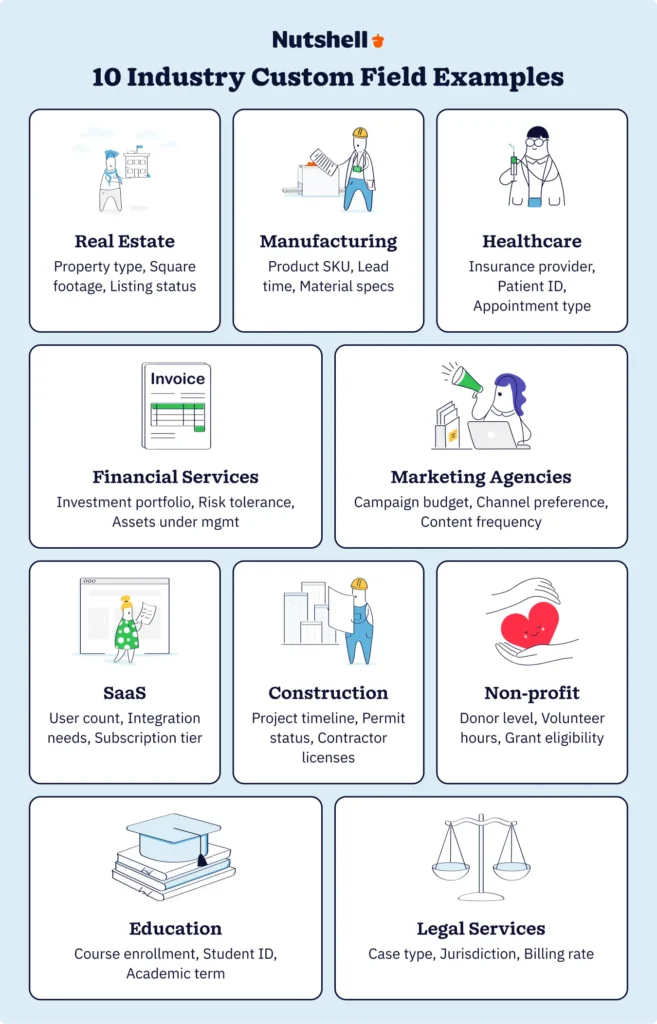
Plus, if you’re wondering what specific information you may need to capture in a custom field, we’ve compiled a list of common information needed in 10 different industries that you could swipe or use to brainstorm your own.
Nehmen Sie an unserer geführten Tour teil und entdecken Sie die unglaublichen Funktionen von Nutshell!
CRM custom fields are contact fields you create in your CRM to capture information that’s most important to your business. Custom fields differ from general preset fields (such as name, number, or email) in that they are unique to your company, and you have to create or update them yourself.
CRMs like Nutshell let you create custom fields to suit your purposes. If you have created multiple sales pipelines, you can create custom fields for each one, tailored to the specific goal of each.
Custom fields do more than capture additional information. When implemented strategically, they fundamentally improve how your sales team operates by enabling three critical capabilities: qualification speed, personalization at scale, and forecasting accuracy.
Sales reps spend an average of 21% of their day writing emails, 17% entering data, and only 28% actively selling. Custom fields reduce this administrative burden by surfacing the exact information reps need to quickly qualify or disqualify leads.
Consider a B2B software company that added a “Current CRM” custom field to its lead records. Instead of spending 10 minutes per discovery call uncovering this information, reps could see it immediately and tailor their pitch accordingly. This single field saved their 12-person sales team approximately 240 hours per quarter.
Generic outreach gets generic results. Research from McKinsey shows that companies excelling at personalization generate 40% more revenue from those activities than average players. Custom fields enable this personalization by capturing the specific details that make your outreach relevant.
An insurance agency that tracks “Policy Renewal Date” and “Coverage Type” in custom fields can automatically segment its database and send targeted renewal reminders 90 days before expiration, addressing the specific coverage type each client holds. This level of personalization converts at significantly higher rates than generic “time to renew” messages.
Revenue leaders need visibility into pipeline health. Custom fields like “Decision Timeline,” “Budget Confirmed,” or “Stakeholders Identified” provide the granular data needed to forecast accurately. According to Freshworks’ 2024 CRM survey, businesses using CRM software are 86% more likely to exceed their sales goals, and much of this success stems from better pipeline visibility through structured data capture.
When Nutshell customer SkySpecs implemented custom fields to track project specifications and inspection timelines, they gained unprecedented visibility into their pipeline. This allowed them to forecast revenue more accurately and allocate resources more effectively across their growing business.
The key insight was that custom fields aren’t just about storing more data. They’re about capturing the specific information that accelerates your sales process, enables meaningful personalization, and improves forecast accuracy. In the following sections, we’ll show you exactly which fields to create for your industry.
Summarize this content with AI:
Before we dive into which custom fields to create, let’s address a critical mistake that costs businesses thousands in lost productivity: creating too many custom fields without governance.
Here’s what typically happens: Month one, the sales team requests five custom fields. They all seem reasonable.
Month three, marketing adds eight more for campaign tracking. Month six, customer success adds another batch. By month 12, you have 80+ custom fields, and no one is sure which ones actually matter.
Validity’s 2024 CRM Data Management report reveals 24% of CRM admins report that less than half of their data is accurate and complete. 31% of admins say poor data quality costs them at least 20% of annual revenue.
A manufacturing company we analyzed started with 12 custom fields. Eighteen months later, they had 147 custom fields, with predictable results:
The cleanup cost: $38,000 in consulting fees and three months of lost productivity.
With 67% of companies concerned about their data’s readiness for AI applications, the stakes for good custom field design have never been higher. AI and machine learning tools can only deliver accurate insights when fed high-quality, structured data. Every poorly designed custom field you create today becomes a liability for AI-powered features tomorrow.
The remainder of this guide will show you how to avoid these pitfalls by implementing custom fields strategically:
With this foundation in mind, let’s explore the specific custom fields that drive results for different industries.
Here are some ideas we think could help your business track what’s most important to you.
Some general custom fields (plus the format best suited for them) to use in your CRM, plus the type of field you may want to use for each:
Industry-specific custom fields, when used strategically, can dramatically improve your team’s productivity and CRM capabilities.

We’ve compiled a list of custom field ideas that might just be the right fit for you, depending on the industry in which you work. You can use these ideas as they are, or as a starting point to brainstorm your own custom fields.
Custom fields for the SaaS industry can offer more insight into your subscribers, their preferences, and privileges.
Selling physical products online requires your team to understand buyer history and preferences, such as these eCommerce industry custom fields below:
Crucial data can be captured in your CRM for healthcare providers using custom fields such as these:
Enhance and personalize your student experience by capturing CRM custom data fields for the education industry:
Use your CRM for real estate to its maximum potential by capturing custom data such as:
Financial service providers can make most of CRM custom fields by capturing finance-specific data:
Give your agency clients the best service possible by understanding agency-specific CRM data such as:
Using a CRM for event management can help you keep track of important industry-specific data like:
Make the most of your recruitment CRM with custom fields such as:
Manage non-profit data effectively when using a CRM for your charity, with custom fields that meet your goals:
CRM built-in fields can help you achieve almost all of your data-capturing objectives. So in many cases, adding custom fields may not be necessary.
When you’re sure you need to add a custom field, it’s best to work backwards from your business goals and values. Follow this step-by-step tutorial to make the most of your CRM custom fields.
It’s important to understand your long-term goals and quarterly or short-term objectives to know how custom fields can help you reach them. Ask yourself questions such as:
Working from your goals, clarify your current sales process(es). How does your sales process meet your goals? If it doesn’t meet your goals, consider updating it. (Our handy sales process guide can help you create your ideal sales cycle.)
It’s best to map your sales process to your CRM, and include specific actions reps need to take at certain stages in the sales cycle.
Write or type down all the contact information you would need to make the sales process go much smoother. For example, you may not need certain info in the early stages of the sales cycle, but it might help you in later stages – in this case, it helps to capture this information as soon as possible.
Figure out if your CRM has the data field built in. If not, write it down as a potential custom field. Write down the label for this data, and the type of field it is (date, text, etc.).

Customize your contact input options to add your custom field. Depending on your preference and how important these values are to your sales cycle, you can make the field mandatory or optional to fill in.

If your custom field is filled via an inbound form, you can ensure leads fill this data in by marketing the field as ‘Required’.
If your custom field is not conventional, you may also want to add a message to your form so potential leads can understand why you need this specific information.
CRM custom fields are best paired with automation capabilities. Certain custom field inputs, for example, can put your contact in a predetermined pipeline. Or conditions can best be suited for certain team members, so you can set them as the owner for specific custom field answers. The options for optimal CRM automation are endless.
Watch our sales automation workshop for Nutshell users!
With Nutshell Growth Plan you can add up to 25 custom fields for records in the following categories:
Additionally, you can add custom fields on a per-pipeline basis. Which means you can capture data that’s crucial to a specific sales process, without having to add that data to another pipeline, where it may not be necessary. This allows for an even more personalized experience for your leads and customers.
If you want to capture additional company information when creating the contact, custom fields can be created. You have the option to make these fields mandatory or optional. Custom fields for Companies and People can be added with the following formats:
For Leads, your custom fields can be of the following types:
Learn more about CRM custom fields and contact management with our guided walkthroughs.
Testen Sie Nutshell 14 Tage lang kostenlos oder lassen Sie sich von uns herumführen, bevor Sie loslegen.
Now that you know how to create custom fields in your CRM and have some ideas for which ones will work for you, here are a few best practices when implementing them in your sales process:
CRM custom fields are a boon for businesses with unique goals and needs. We hope this guide helped you to identify the best fields for your sales process and inspire you to make the most of your CRM to upgrade your sales approach and boost business growth.
With Nutshell, all users have the ability to add custom fields to their People, Company, and Lead contacts. Plus, depending on your sales approach, you can even have custom fields for different sales pipelines.
Try Nutshell free for 14 days (no card required) to create your customized sales process, and elevate your data management and sales.
The number depends on your Nutshell plan: Foundation offers 10 fields, Growth provides 25, Pro includes 50, Business allows 100, and Enterprise gives you unlimited custom fields across people, companies, and leads.
Yes! Custom fields integrate seamlessly with Nutshell’s automation features. You can use them as stage goals in your sales pipelines, trigger automated actions based on field values, and include custom field data in automated emails and personal sequences.
First create the custom fields in Nutshell, then add matching column headers in your CSV file. You can import most field types including text, dates, and decision lists. Note that address and currency fields on leads cannot be imported via CSV.
Lead custom fields track deal-specific information like project requirements or contract terms. Contact (people) fields store individual details like certifications or preferences. Company fields capture organization-wide data like industry type or annual revenue. Each serves different purposes in your sales process.
Absolutely! Nutshell’s per-pipeline custom fields let you show specific fields only in relevant pipelines. For example, rental pipelines can include lease dates while purchase pipelines show warranty information, keeping each pipeline focused and organized.
Schließen Sie sich 30.000+ anderen Vertriebs- und Marketingexperten an. Abonnieren Sie unseren Sell to Win-Newsletter!