40+ AI Productivity Tools to Help You Get More Done

-

Key takeaways
- AI adoption is accelerating and delivering measurable results: Small business AI adoption jumped from 39% to 55% in 2025, with frequent users saving four or more hours weekly and 80% reporting these tools are essential for reaching new customers.
- Diverse tools address specific business needs: This article covers 40+ AI productivity tools across categories like chatbots (ChatGPT, Gemini), task management, email/inbox management, meeting transcription, content creation, image/video generation, SEO, and more—each designed to automate repetitive tasks and free up time for strategic work.
- Real-world implementation shows significant productivity gains: Repsol’s AI deployment across its organization resulted in employees saving 121 minutes per week, a 16.2% improvement in output quality, and high user satisfaction.
- AI is shifting from experimental technology to competitive necessity: Organizations increasingly view AI as essential business infrastructure rather than a nice-to-have, with trends moving toward “superworkers” (humans augmented by AI) and autonomous AI agents handling complex, multi-step processes.
- Success requires thoughtful implementation, not just tool adoption: Effective AI integration depends on proper training, clear use cases, measuring actual results, and creating organizational support—not simply rolling out technology and expecting benefits.
Small business owners face a constant challenge: too many tasks, not enough time. Between managing customer relationships, coordinating teams, and driving growth, administrative work can consume hours that should be spent on strategic priorities. This can lead small business teams to struggle with accountability, get stuck in day-to-day operations, and watch valuable time slip away on repetitive tasks.
Enter artificial intelligence productivity tools. These aren’t futuristic concepts anymore—they’re practical solutions that small businesses are adopting at unprecedented rates. In 2025, small business AI adoption jumped from 39% to 55% in just one year, with 63% of users deploying these tools daily. The reason? They’re seeing real results: 80% of small business AI users believe these tools are essential to reaching new customers, and frequent users report saving four or more hours every week.
AI productivity tools use machine learning algorithms and natural language processing to automate repetitive tasks, analyze data faster than humanly possible, and free up your team to focus on high-value work. Whether you’re drowning in emails, spending too much time on meeting notes, or struggling to keep your CRM updated, there’s an AI tool designed to solve that specific pain point.
In this comprehensive guide, we’ll explore 40+ AI productivity tools across every business function—from chatbots and task management to content creation and SEO. You’ll discover which tools can save your team the most time, learn about real companies achieving measurable results, and understand how to choose the right AI solutions for your specific needs. Plus, we’ll show you how Nutshell’s AI-powered CRM helps sales and marketing teams work smarter, not harder.
What are AI productivity tools?
AI productivity tools are software applications that use artificial intelligence to help you accomplish tasks faster and more efficiently. AI productivity tools use machine learning algorithms and natural language processing to help kickstart your process.
How to use AI to boost productivity
AI can significantly boost productivity in various ways, enabling businesses and employees to achieve more with less effort. Here’s how:
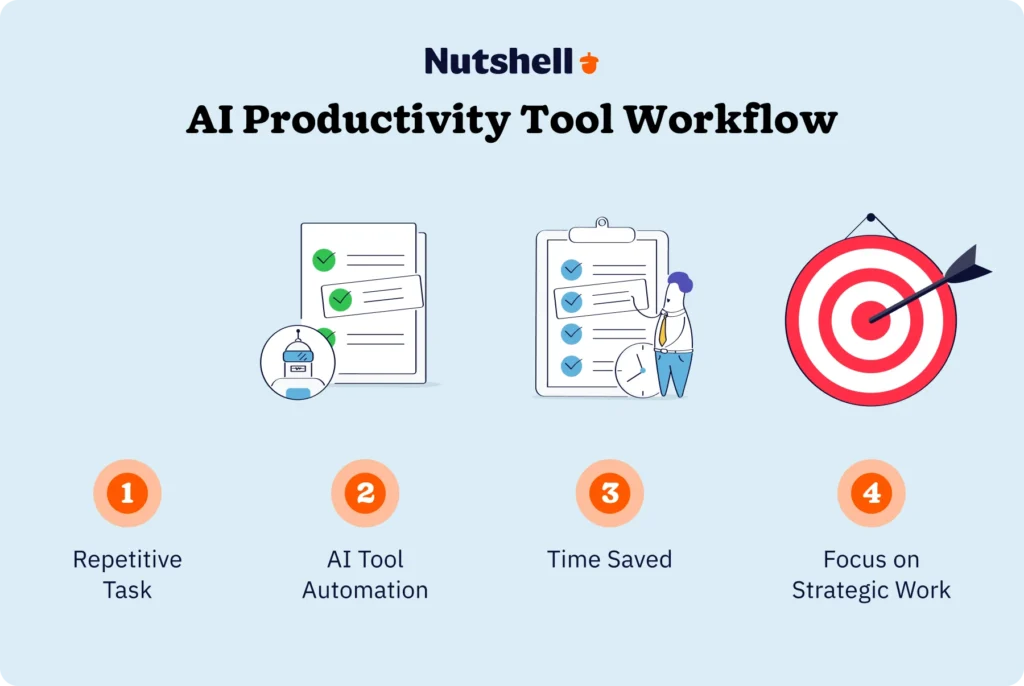
- Save time: By automating repetitive tasks, AI helps employees focus on higher-value work, allowing them to accomplish more in less time.
- Reduce costs: AI-driven tools enable companies to complete tasks efficiently with fewer resources, helping to lower labor costs while maintaining output.
- Automate mundane tasks: AI excels at handling monotonous, time-consuming activities, freeing up employees to engage in more strategic, creative, and impactful work.
- Analyze data effectively: AI systems can quickly process vast amounts of data, uncovering valuable insights, trends, and patterns that would be difficult to identify manually, helping businesses make more informed decisions.
- Make data-driven decisions: AI supports decision-making by offering data-backed recommendations, eliminating uncertainty and enabling better choices while reducing risk.
- Enhance collaboration: AI tools foster seamless collaboration, especially for remote or distributed teams, making communication and coordination more efficient.
- Optimize time management: AI-powered productivity apps with time-tracking features help employees organize their schedules, ensuring better focus and more effective use of time.
- Improve customer satisfaction: AI in customer support streamlines response times, enhancing service quality and boosting customer satisfaction by delivering quicker, more accurate solutions.
Recent statistics: The real impact of AI productivity tools
The productivity gains from AI tools aren’t theoretical—they’re backed by extensive research from authoritative sources. Here’s what the latest data reveals about AI’s impact on business productivity:
Time savings are substantial
Research from the Federal Reserve Bank of St. Louis, based on a November 2024 survey of U.S. workers, found that 20.5% of frequent generative AI users save four or more hours weekly at work. These aren’t marginal improvements—they represent entire workdays reclaimed each month.
Anthropic Research analyzed 100,000 real-world conversations with Claude AI and found that AI reduces task completion time by 80% on average. Tasks that typically take 1.4 hours to complete manually can be accomplished in a fraction of that time with AI assistance.
Small business adoption is accelerating
According to Thryv’s national survey of 540 small business decision-makers conducted in May 2025, small business AI adoption jumped from 39% in 2024 to 55% in 2025—a 41% increase in just one year. Among current users, 63% deploy AI tools daily, and 58% report saving over 20 hours per month. These businesses are reinvesting that time into growth initiatives like process improvement, customer acquisition, and innovation.
The SBA Office of Advocacy’s Business Trends and Outlook Survey reveals that small business AI usage increased from 6.3% to 8.8% in just six months between February and August 2025. More importantly, the gap between large and small business adoption is shrinking dramatically—small businesses may now be only about a year behind large enterprises in AI implementation, compared to the decades-long lag seen with previous technologies like broadband internet.
Business leaders see AI as essential
The shift in perception about AI has been dramatic. Eighty percent of small business AI users believe these tools are essential to reaching new customers, and 78% say AI is necessary to meet rising consumer expectations for speed and personalization. Two-thirds of small businesses report that AI takes pressure off themselves and their staff, allowing teams to focus on higher-value work.
Real companies, real results
Beyond survey data, case studies demonstrate tangible outcomes. When Spanish energy company Repsol deployed AI productivity tools across its organization in 2024, a study published by MIT Technology Review found that the average employee saved 121 minutes per week. Output quality improved by 16.2%, giving employees increased confidence, creativity, and analytical capability.
These statistics paint a clear picture: AI productivity tools deliver measurable, immediate value for businesses of all sizes. The question isn’t whether to adopt AI, but how quickly you can implement the right tools for your specific needs.
The best AI productivity tools in 2026
Let’s dive deeper into AI technologies that can help streamline your operations in 2026. Explore this comprehensive list of AI productivity tools by category to find the right solution for your business:
AI chatbots
An AI chatbot is a computer program that simulates human conversation using artificial intelligence and natural language processing. You ask questions or make requests, and the software provides answers, solutions, or examples tailored to your needs. Beyond simple Q&A, modern chatbots function as virtual research assistants, content collaborators, and problem-solving partners.
For small businesses, AI chatbots have become indispensable productivity tools. They eliminate the need to search through documentation, draft initial versions of complex documents, analyze data patterns, and even debug technical issues. The key advantage is speed—tasks that once required extensive research and multiple drafts can now be completed in minutes.
Here are the best AI chatbots for boosting productivity:
- ChatGPT: ChatGPT pioneered the generative AI revolution and remains the most popular chatbot worldwide. It excels at producing content, conducting market research, drafting emails, and explaining complex topics in plain language. For small businesses, ChatGPT’s versatility makes it valuable across departments—sales teams use it to personalize outreach, marketing teams leverage it for content ideation, and operations teams deploy it for process documentation. The paid ChatGPT Plus tier offers access to more advanced models, faster response times, and priority access during peak usage.
- Gemini: Google’s Gemini brings the power of Google’s search infrastructure directly into conversational AI. It excels at real-time information retrieval and can access current data from across the web, making it particularly valuable for research-intensive tasks. Gemini integrates seamlessly with Google Workspace, allowing you to use it within Gmail, Docs, and Sheets to draft content, analyze data, and automate workflows without switching between applications.
- HuggingChat: HuggingChat offers an open-source alternative to commercial chatbots, designed by leading developers at Hugging Face. While it may lack some polish of paid competitors, it provides transparency about its underlying models and doesn’t require a subscription. This makes it appealing for small businesses with budget constraints or those concerned about data privacy with commercial platforms.
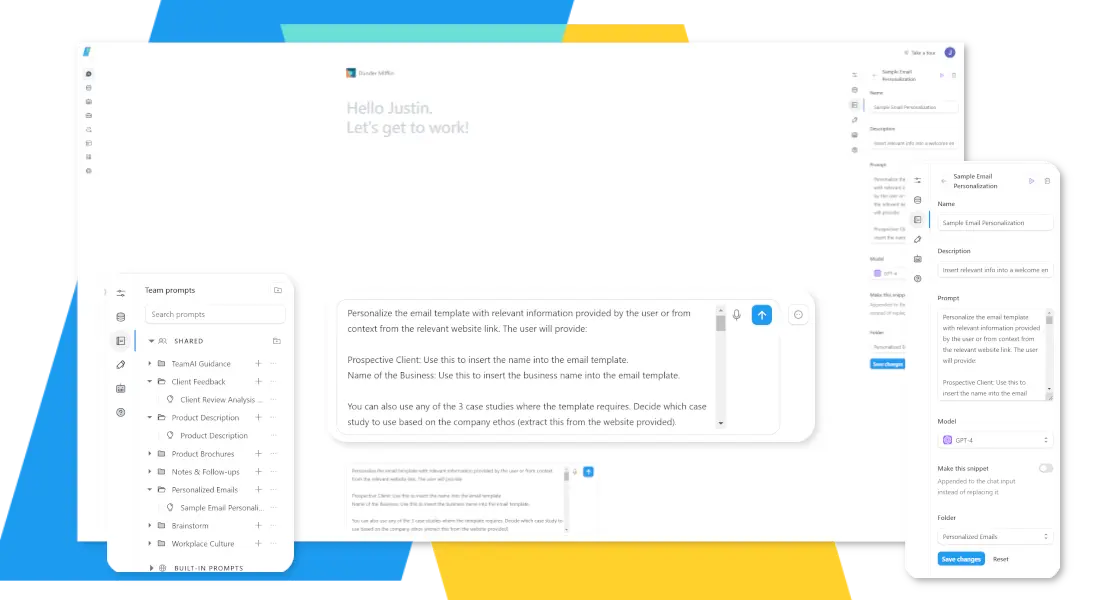
- TeamAI: TeamAI stands out by giving you access to multiple AI models—including ChatGPT, Gemini, Claude, and more—in a single interface. This matters because different AI models excel at different tasks, and TeamAI lets you leverage each model’s strengths without managing multiple subscriptions. You can create custom prompts tailored to your business needs, upload company data to inform AI responses, and share resources with team members in a collaborative workspace. For small businesses, this centralized approach eliminates the friction of tool-switching and ensures everyone has access to the best AI capabilities for each specific task.
AI task management and scheduling
Planning meetings and scheduling tasks is time-consuming and complicated. I spend at least 30 minutes organizing and reorganizing my work to-do list every week. Do you find yourself wasting valuable time rearranging your schedule as well?
These AI productivity apps for task management and scheduling can help streamline your workflow:
- Ayanza: Ayanza is a team management system that analyzes user behavior and makes recommendations to help you meet your goals and objectives.
- ClickUp: ClickUp is a project management platform where team members can communicate, set goals and reminders, and keep up with project deadlines.
- Clockwise: Clockwise is a time management system that will optimize your schedule and sync team calendars.
- Motion: Motion is a project management platform that automatically tracks and organizes your list of tasks from highest to lowest priority.
- Reclaim: Reclaim is a scheduling app all about promoting good habits and a healthy work-life balance.
- Taskade: Taskade is a comprehensive productivity assistant to help you manage and complete projects more efficiently.
- Trevor AI: Trevor AI offers task management software that is simple to use and accessible to all.
- TimeHero: TimeHero is an automated task management and scheduling tool for teams.
AI for email and inbox management
If your inbox is constantly overflowing, artificial intelligence can help you clear it. AI tools can help you sort, compose, delete, and answer emails more efficiently. Consider the following AI tools to help you manage your email account:
- SaneBox: SaneBox observes your behavior and categorizes your inbox accordingly.
- EmailTree: EmailTree organizes and monitors email activity and suggests potential follow-up messages for customer support teams.
- Mailbutler: Mailbutler is an add-on that extracts email data to gather contact details and identify tasks.
AI transcription apps and meeting assistants
Taking notes during sales calls and conferences is necessary to record ideas and develop actionable strategies. AI tools can help you stay present and hold more productive meetings by taking notes for you. These AI meeting assistants will record and transcribe audio from essential calls and meetings:
- Nutshell Business: Nutshell Business is our CRM plan infused with time-saving AI features, which include phone call and virtual meeting transcriptions—automatically transcribe and summarize sales calls and meetings attended on Zoom, Google Meet, or Teams. You’ll also get access to Notetaker, our voice-to-text transcription for note-taking, emails, and team collaboration. Explore more of Nutshell’s AI features.
- Fireflies: Fireflies software analyzes meeting conversations to identify important topics and send meeting recaps.
- Airgram: Airgram is transcription software that extracts important data from recorded meetings.
- Otter: Otter AI is an app that listens to your meetings and takes notes for you in real-time.
Need a user-friendly CRM to boost sales and team efficiency?
Take our guided tour to explore Nutshell’s incredible features!

AI for presentations and slide decks
An attractive slide deck will capture your audience’s attention and take your presentation to the next level. Though presentations take time to create, clear and compelling slides will help you get your point across. These AI tools will help you create persuasive and informative presentations in less time:
- Decktopus: Decktopus software builds your presentation based on your topic, target audience, and objective.
- Slidesgo: Slidesgo will generate a presentation based on the subject, writing tone, and general template that you choose.
- Designs.ai: Designs.ai is a comprehensive presentation maker with writing assistance, custom logos, a video maker, and AI voiceovers.
AI apps for writing and editing
Even the best writers sometimes struggle with writer’s block and tight deadlines. AI writing generators can help you bust through writer’s block to create more content quickly. You can use the power of AI to develop outlines and rough drafts. Here are some of the best AI tools for writing and editing content:
- Jasper: Jasper is a feature-filled tool with over 50 templates to help businesses write blog posts, emails, sales copy, titles, and many other types of content.
- Copy.ai: Copy.ai assists with research and reporting for long-form articles. Each prompt generates multiple options that you can use for your document.
- Anyword: Anyword guides you through the writing process step-by-step, from selecting the title to developing the final draft.
- Rytr: Rytr is a low-cost writing tool for SEOs and copywriters.
- Grammarly: Grammarly is a leading spelling, grammar, and tone-checking app — now with generative text features to help you finish your sentences.
AI for image generation
You can create unique images and graphics for your content effortlessly with an AI image generator. Try these AI tools for automated image generation:
- DALL·E 3: DALL·E 3 is a tool from the creators of ChatGPT that creates images based on your prompts. It’s very user-friendly and straightforward to use.
- Midjourney: Midjourney is an AI tool you can access through Discord. It’s ideal for creating high-quality images.
- Stable Diffusion: The Stable Diffusion AI model powers DreamStudio, an advanced image generator that offers greater customization and control.

AI for video and audio generation
Editing and producing video content is often time-consuming. Artificial intelligence can help streamline the process and produce better results. These AI apps make it easier to edit and enhance your video content:
- Descript: Descript transcribes your video content into a script and automatically updates your video as you update the script.
- Wondershare Filmora: Wondershare Filmora’s classic video editing software now includes AI technology so you can remove background noise, increase sound quality, and polish your videos quickly and easily.
- Runway: Runway has a steep learning curve, but it offers advanced AI tools to help you produce unique videos.
- Fliki: Fliki makes it fast and easy to add text captions to videos for social media.
AI for web design
Website design tools powered by artificial intelligence can help streamline your website build. Complete your web design faster and more efficiently with these AI tools:
- Divi AI: Divi AI is an artificial intelligence-powered website builder for WordPress that simplifies the web design process.
- Wix ADI: Wix ADI is an AI-driven website builder that streamlines and simplifies website creation for people with limited technical skills.
- Framer AI: Framer AI creates an entire website from a text prompt that you can adjust to meet your needs.
AI for SEO
SEO requires a dynamic and complex set of strategies that can be challenging for one person to juggle. SEO specialists can use AI for productivity in many ways, including gathering and analyzing data, improving website performance, and assisting with content creation. Here are some AI tools that can help you manage SEO:
- Surfer SEO: Surfer SEO is an all-in-one content strategy tool to help you research, outline, create, and optimize existing web pages.
- Pro Rank Tracker: Pro Rank Tracker records, analyzes, and reports your sitewide rankings so you can quickly see how your content performs at all times.
- NitroPack: NitroPack includes features like caching and image optimization to increase page loading speed for SEO.
AI for research
Writing about new topics all the time requires hours of research. AI productivity tools can help you research more efficiently by scouring the Internet with you and organizing key findings into one convenient document. Try these AI tools to help you with research:
- Genei: Genei suggests resources and summarizes research to help you create blogs, articles, and reports more efficiently.
- Aomni: Aomni researches topics for you by scouring the web for information and answers to common questions.
AI for 3D modeling
New artificial intelligence software is impacting the design industry as well. AI offers innovative and user-friendly features that transforms the production of 3D models and animations. Check out these 3D modeling tools that can help boost your efficiency:
- Spline AI: Spline AI is a free tool that generates scenes, objects, and animations based on your text prompts.
- 3DFY.ai: 3DFY.ai transforms text prompts into 3D models.
- Meshcapade: Meshcapade takes 2D pictures and turns them into 3D avatars that you can use for designing clothes, gaming, or offering a virtual fitting room.
2026 Industry trends shaping AI productivity
Understanding the broader trends driving AI adoption helps you make smarter decisions about which tools to implement. Here are five key developments reshaping how businesses use AI for productivity in 2026:
The rise of AI “Superworkers”
The workplace is evolving toward a model where employees become “superworkers” – individuals augmented by AI who can dramatically increase their output and impact. As McKinsey’s January 2025 research report “Superagency in the workplace” explains, this trend emphasizes human-AI collaboration rather than replacement. AI handles routine cognitive tasks like data entry, scheduling, and initial research, while humans focus on strategic thinking, creative problem-solving, and relationship building. The most successful organizations are those investing in training their teams to work effectively alongside AI, not those trying to replace workers with automation.
Agentic AI transforms sales and operations
We’re moving beyond simple chatbots to autonomous AI “agents” that can execute complex, multi-step business processes. According to Gartner’s 2025 analysis, these agents work in the background on tasks like CRM data entry, lead qualification, meeting preparation, and even initial customer outreach. Unlike traditional automation that requires rigid rules, agentic AI can adapt to changing circumstances and make decisions based on context. For sales teams, this means AI agents can automatically update opportunity records after calls, flag at-risk deals based on conversation sentiment, and prepare personalized outreach based on buyer behavior—all without human intervention.
The productivity measurement challenge
While 85% of professionals now use AI for work tasks (comparable to Gmail and Slack adoption rates), traditional productivity metrics struggle to capture AI’s true impact, according to Worklytics’ 2025 research. Time saved doesn’t always translate directly to increased output, as employees may reinvest that time in strategic work that’s harder to quantify. Organizations are rethinking how they measure productivity, moving beyond simple time tracking to focus on outcomes, innovation, and strategic value creation. This shift matters because it changes how you should evaluate AI tool success—focus on business results achieved, not just hours saved.
AI as competitive infrastructure
Small businesses have shifted their perspective on AI from “experimental technology” to “business-critical infrastructure.” Thryv’s 2025 survey found that 80% of small business AI users believe these tools are essential to reaching new customers, marking a fundamental change in perception. AI is no longer a nice-to-have advantage—it’s becoming table stakes for competing effectively. Businesses that delay adoption risk falling behind competitors who can respond faster, personalize better, and operate more efficiently.
The emergence of “frontier firms”
Microsoft’s Work Trend Index predicted 2025 as the year “Frontier Firms” are born—organizations that rewire their entire business model around “intelligence on tap,” where AI becomes embedded infrastructure rather than a standalone tool. These companies aren’t just adding AI features to existing processes; they’re fundamentally reimagining how work gets done when AI capabilities are available everywhere. For small businesses, this trend suggests that the greatest gains will come not from isolated AI tools, but from thoughtfully integrating AI across multiple business functions to create compounding benefits.
Real-world success story: How Repsol saved 121 minutes per employee every week with AI
The business case for AI productivity tools becomes clearer when you see real implementation results. Consider Repsol, a global energy leader based in Spain with operations spanning multiple countries and thousands of employees.
The Challenge
Like many organizations, Repsol recognized that everyday tasks were consuming time that could be better spent on strategic work. Employees spent hours summarizing meeting content, pulling key information from lengthy documents, and managing endless email threads. These tasks were necessary but didn’t directly contribute to innovation, customer service, or business growth.
The Implementation
In 2024, Repsol became one of the first companies to deploy Microsoft Copilot across its entire organization, partnering with Accenture, Microsoft, and Avanade to ensure successful adoption. Rather than simply rolling out the technology and hoping for the best, Repsol took an integrated approach combining technology, strategy, talent development, and operations.
They launched a pilot program with 550 employees to gauge Copilot’s actual impact rather than relying on vendor claims. The company showcased the tool’s capabilities through engaging demonstrations, followed by hands-on training sessions that let participants explore practical use cases relevant to their specific roles. They gamified the learning process to make adoption enjoyable and created a Community of Practice to encourage knowledge sharing across departments.
The Results
After four months of experimentation, pilot testing, and detailed analysis, a study published by MIT Technology Review revealed quantifiable productivity gains:
- The average employee saved 121 minutes per week—equivalent to reclaiming three full workweeks per year
- Output quality improved by 16.2%, measured through evaluations of writing, communication, originality, and design
- More than 60% of licensed users wanted to continue using Copilot after the pilot ended
- Training sessions achieved a 92% Net Promoter Score, indicating high satisfaction
- Real-time help resources received a perfect score from users
What They Actually Use It For
The productivity gains came from practical, everyday applications. Employees now record meetings and ask Copilot to extract key tasks, deadlines, and responsibilities. With just a few prompts in Word, they transform those notes into clear summaries, then draft PowerPoint presentations without starting from scratch. Finance teams use it to analyze responses to Requests for Proposals (RFPs) or create initial drafts from templates, work that previously required hours of manual effort.
Why This Matters for Small Businesses
Repsol is a large, global organization, but the productivity challenges they faced—and solved—mirror those confronting small businesses. The difference is that small businesses often feel time constraints even more acutely because teams wear multiple hats and lack the deep resources of enterprise organizations.
The key lesson from Repsol’s experience isn’t just that AI tools work—it’s that successful implementation requires thoughtful change management, comprehensive training, and creating a culture that embraces new ways of working. Technology alone doesn’t transform productivity; technology combined with proper training, clear use cases, and organizational support does.
For small businesses considering AI adoption, Repsol’s approach offers a blueprint: start with a pilot program involving key team members, invest in hands-on training rather than just providing access, measure actual results rather than assuming benefits, and create opportunities for employees to share best practices and learn from each other.
Frequently Asked Questions
-
1. What exactly are AI productivity tools?
AI productivity tools are software applications that use artificial intelligence to automate tasks, streamline workflows, and enhance decision-making. They leverage machine learning algorithms and natural language processing to understand context, generate content, analyze data, and execute complex processes with minimal human intervention. Unlike traditional productivity software that simply stores information or executes predefined rules, AI tools can adapt to new situations, learn from patterns, and make intelligent recommendations. They include AI writing assistants, meeting transcription tools, task automation software, and chatbots that help you accomplish more in less time. For small businesses, this means capabilities that were once available only to enterprises with large IT budgets are now accessible through affordable, user-friendly applications.
-
2. How much do AI productivity tools typically cost?
Pricing varies widely based on functionality and scale. Many AI tools offer free plans with limited features (like ChatGPT, Notion AI, or Grammarly). For business use, most platforms offer tiered pricing models ranging from $10-$50 per user monthly for individual professionals to custom enterprise pricing for teams.
-
3. Are AI productivity tools safe for sensitive business data?
Most reputable AI tools use encryption and follow security best practices, but due diligence is essential. When evaluating tools for business use, ensure they comply with relevant regulations like GDPR (for European customer data) and HIPAA (for healthcare information). Check whether the tool stores data locally on your devices or in the cloud—cloud storage offers convenience and team collaboration but requires trusting the vendor’s security measures. Review data retention and deletion policies carefully; some free AI tools retain and use your inputs to train their models, which could expose proprietary information. For sensitive business data, use enterprise versions that typically offer enhanced security features, data residency options, dedicated environments, and contractual guarantees about data handling.
-
4. Do I need technical expertise to use these tools?
No technical background is required for most AI productivity tools. They’re designed with user-friendly interfaces and typically offer intuitive controls, built-in tutorials, onboarding guides, customer support, and documentation for advanced features. Modern AI tools emphasize conversational interaction, meaning you simply describe what you need in plain language rather than learning complex commands or programming syntax. The learning curve is typically measured in hours, not weeks. For example, most users become comfortable with ChatGPT after just a few sessions, and tools like Grammarly work invisibly in the background with virtually no learning required.
-
5. How much time can AI productivity tools actually save?
Results vary by role and implementation, but research provides concrete benchmarks. According to the Federal Reserve Bank of St. Louis survey conducted in November 2024, workers using generative AI save an average of 5.4% of their work hours—equivalent to 2.2 hours per week for someone working 40 hours. Frequent users experience even greater benefits, with 20.5% reporting savings of four or more hours weekly. Among daily AI users, 33.5% save four or more hours each week. Anthropic’s research analyzing 100,000 real Claude conversations found that AI reduces task completion time by 80% on average for tasks like writing, analysis, and research.
-
6. Will AI tools replace my current workflow completely?
No, AI tools are designed to enhance rather than replace human work. The most effective implementations use AI to handle repetitive, time-consuming tasks while humans focus on strategic thinking, creative problem-solving, and relationship building.
-
7. How do I choose the right AI productivity tools for my needs?
Start by identifying your biggest productivity pain points rather than trying to implement AI everywhere at once. Ask yourself: What repetitive tasks consume the most time? Where do bottlenecks slow down your team? Which processes frustrate employees due to tedium or complexity? Once you’ve identified priority areas, evaluate tools based on your specific workflow challenges—choose tools that address your most pressing issues first.
Advice to consider when choosing an AI productivity tool:
- Assess integration with existing tools—AI tools that work seamlessly with your CRM, email, calendar, and project management systems deliver more value than standalone applications.
- Consider your budget and pricing models—start with free tiers to test functionality before committing to paid plans.
- Review security requirements—if you handle sensitive data, enterprise versions with enhanced security may be necessary despite higher costs.
Read user reviews and ratings from businesses similar to yours—don’t just rely on vendor marketing. - Check available support and training resources—tools with comprehensive documentation, active user communities, and responsive support help ensure successful adoption.
-
8. What are the potential drawbacks of using AI productivity tools?
Common challenges include an initial learning curve, the potential for over-reliance on automation, the need for human verification of AI output, subscription costs for premium features, internet connectivity requirements, and privacy considerations. There’s also a risk of diminishing the human touch in customer interactions if AI-generated content lacks personalization.
Try Nutshell Business for world-class AI productivity tools
Nutshell Business uses artificial intelligence to help your team accomplish more.
Our AI-powered CRM plan boosts the productivity of your sales and marketing teams with AI-powered features like:
- Zoom meeting transcription and summarization so you can focus instead of taking notes and quickly review what was discussed in meetings
- Voice-to-text transcription for faster note-taking, writing, and activity logging
- Timeline summarization so you can quickly understand the most important aspects of your relationships with people, companies, and leads
Plus, with Business, you get access to all of the features in our Pro plan, which include pipeline management, sales automation, personal email sequences, and much more.
Sign up today to start your 14-day free trial of Nutshell Business! Or contact our team for more information on how Nutshell can help your business be more productive.
See Nutshell in action!
Try Nutshell free for 14 days or let us show you around before you dive in.
 BACK TO TOP
 Written by
Jewell July Marketing SpecialistReady to try
Nutshell for Free?Thank you! Your submission has been received!Oops! Something went wrong while submitting the form.




What Is Revenue Intelligence? An All-Encompassing Guide
Published on: January 24, 2024Highly Effective Strategies for Elevating Sales Team Performance
Published on: November 10, 2022Join 30,000+ other sales and marketing professionals. Subscribe to our Sell to Win newsletter!










