Introducing A/B Testing in Nutshell’s Email Marketing
-
Last updated on: February 17, 2026
Knowing what strategies work for engaging your customers and leads is crucial for marketing success, which is ultimately business success.
To help solve that need, we’ve launched a major update to Nutshell’s email marketing software— the ability to run A/B tests on your marketing emails. A/B testing lets you easily create variations of your campaigns to optimize your emails and spark better results.
With this new update, Nutshell’s email marketing is getting even more powerful at helping your team discover the best ways to connect with leads and customers.

How does A/B testing in Email Marketing work?
A/B testing lets you create two versions of a campaign and test which one results in more conversions from your audience. You can experiment with email design and copy to determine which subject lines, preview text, and content increases your email open and click rates.
You’ll schedule your emails to send to subsets of your audience and select how you want Nutshell’s email marketing tool to determine a winning campaign. Then let Nutshell handle the data collection for you!
What can I customize with A/B testing in Nutshell’s Email Marketing?
With this feature, you’ll have full control over how to test your campaigns’ success. Before you launch your campaign, you get to decide:
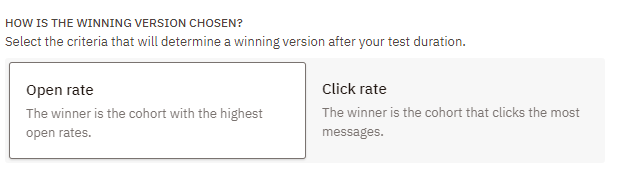
- Which criteria Nutshell should use to select the winning version, whether open or click rates.
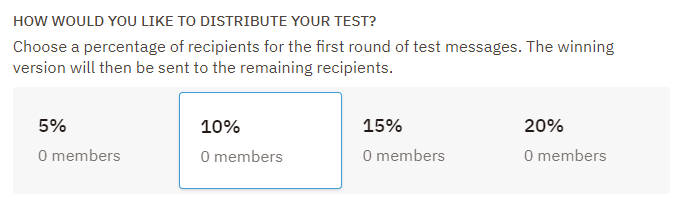
- What percentage of your audience will receive the test emails.
- How long Nutshell should collect data before declaring a winner.
- Which version Nutshell should send in case of a tie.
One of the best parts of A/B testing in Nutshell’s Email marketing is the automation. Once Nutshell collects email open and click data for the length of time you specified, it automatically determines the top-performing variation and delivers it to the rest of your audience, helping you drive next-level results.


Level up your team’s marketing savvy with Email Marketing
Use A/B testing in Nutshell’s email marketing software to learn what works best for your audience and quickly leverage those insights to increase audience engagement, strengthen relationships, and ignite more growth for your business.
Still have questions? Our A/B testing support article can point you in the right direction. You can also reach out to our support team for assistance!
New to Nutshell’s email marketing? Start a free 14-day trial to give this feature a try and reap the benefits of a two-in-one CRM and email marketing tool.
Frequently asked questions
-
1. What kinds of campaigns can I A/B test?
You can A/B test a new broadcast or newsletter in Nutshell’s email marketing software. You can also enable A/B testing on existing broadcasts and newsletters.
-
2. Does audience engagement affect results after a winning campaign is selected?
Any audience engagement metrics after the email testing period ends isn’t included in test results.
-
3. Is there a minimum or maximum audience size for A/B testing?
You must send A/B test emails to a minimum of 20 recipients, but A/B tests are most helpful when sent to an audience of at least 1,000. There is no maximum audience count.
-
4. How do I know if my A/B test results are statistically significant?
Results are reliable when you reach at least 95% confidence level. Nutshell recommends testing with 1,000+ recipients for meaningful results. If your test shows a clear winner with strong performance differences, you can trust the data. Smaller audiences may need longer test durations.
-
5. What’s the best way to test email subject lines?
Test one element at a time—like length, personalization, or tone. Keep subject lines between 40-50 characters for optimal display. Try questions vs. statements, or test including numbers. Run your test for at least 2-4 hours to capture different time zones and reading habits.
-
6. Should I test multiple elements at once or one at a time?
Test one element at a time for clearer insights. When you change multiple things—like subject line AND content—you won’t know which drove results. Once you’ve optimized individual elements through separate tests, you can run multivariate tests if you have an audience of 5,000+.
-
7. How often should I run A/B tests on my email campaigns?
Test at least once per month, but not every single send. Focus on high-impact campaigns like product launches or seasonal promotions. Prioritize tests that align with your goals—improving open rates, clicks, or conversions. Build a testing calendar to track learnings and apply insights consistently.
-
8. What should I do after my A/B test identifies a winner?
Apply winning elements to future campaigns immediately. Document your findings—what worked, for which audience, and why. Look for patterns across multiple tests to inform your overall strategy. Use Nutshell’s reporting features to track long-term performance improvements and continue testing new variations.
ONE TEAM. ONE TOOL.
Powerful email marketing, minus the headaches
Nutshell’s email marketing software plugs directly into your CRM data, so you can create highly targeted audience segments, track the impact of your emails in real-time, and manage all your communications out of a single tool. Get started for free!
BACK TO TOPWritten by
Chris Cain VP of Product Development, NutshellReady to try
Nutshell for Free?Thank you! Your submission has been received!Oops! Something went wrong while submitting the form.
Sales Performance Reviews: 9 Tips to Make Them Valuable
Published on: November 10, 2022Highly Effective Strategies for Elevating Sales Team Performance
Published on: November 10, 2022What Are the Top 3 Go-To-Market Strategies?
Published on: November 10, 2022Join 30,000+ other sales and marketing professionals. Subscribe to our Sell to Win newsletter!
- Product
- Nutshell Overview
CRM & Sales
Our powerful and easy-to-use flagship product.Marketing
Email marketing, forms, landing pages, and more.Engagement
Your omni-channel inbox in your CRM.Prospecting
Prospect for new leads and new contacts in your CRM.Quotes & Invoices
Quickly create quotes & invoices in your CRM.
AI
See why Nutshell is the leading AI CRM.Integrations
Connect to Google/Microsoft and over 5,000 Apps.
ReportingCreate reports and forecasts in an instant.CRM Advisor
Get a dedicated point of contact to get the most out of Nutshell.Partner Marketplace
Find trusted partners to help optimize your Nutshell CRM.
- Pricing
Nutshell AI
- Resources
- Contact Us
Contact Sales
Send us your questions or book a 1-on-1 demo.Join a Demo
Join a group demo for a general overview of Nutshell.
Contact Support
Contact our support team via live chat in app or via email.Become a Partner
Refer businesses to Nutshell & earn commissions.
Contact Marketing
Questions about our website or our marketing opportunities?Careers
Join our growing team! See current openings.