Understanding CRM
“Nutshell is super user-friendly and intuitive
“I would highly recommend Nutshell
“Easy to use and... wait for it ... 100% buy in!
“Nutshell is both simple and powerful
CRM (customer relationship management) software and email marketing are two digital marketing tools you should be aware of. Combining these for CRM email marketing allows businesses to monitor and interact with leads, forming better customer relationships and generating conversions.
Email marketing in a CRM is the integration of targeted email outreach directly within your customer database—allowing sales and marketing teams to automate personalized campaigns, track engagement, and nurture leads using real-time customer and deal data. This alignment streamlines outreach, improves timing, and ensures every message is tailored to the buyer’s journey.
Take our guided tour to explore Nutshell’s incredible features!
Table of Contents
That said, you’re probably wondering why there’s even a CRM vs. email marketing debate to begin with. What’s the benefit of your CRM integrating with email marketing platforms, and what should you consider when setting up that integration?
We’ll answer these questions and more in this resource. Read on to learn more.
CRM (customer relationship management) software helps businesses organize and manage relationships with current and potential customers. A CRM stores customer information, tracks leads through your sales pipeline, automates communications, and measures the results of your sales and marketing strategies.
With built-in data analytics, CRMs help you:
As of 2025, 91% of businesses with at least 10 employees use a CRM to manage these critical relationships. Businesses that don’t tend to fall behind.
Our interactive worksheet compares the benefits offered by Nutshell, your existing contact management solution, and any other CRMs you’re currently evaluating.
COMPARE
Our interactive worksheet compares the benefits offered by Nutshell, your existing contact management solution, and any other CRMs you’re currently evaluating.
Email marketing is a digital marketing strategy where you send promotional messages, newsletters, and targeted campaigns to your audience via email. With an average ROI of $36 for every $1 spent, email marketing remains one of the most cost-effective channels for nurturing leads, engaging customers, and generating sales.
Since 99% of people check their email daily, email marketing provides direct access to your audience at every stage of the buyer’s journey. You can send your customers everything from regular newsletters to those “We miss you!” emails to entice previous customers to interact with your brand again.
CRM is about managing the relationships between you and your many customers. Email marketing software helps you build a subscriber list and reach out to those customers via email campaigns.
CRM and email marketing integration creates a bidirectional data bridge between your customer database and your email platform. This connection ensures that when customer information changes in one system, it automatically updates in the other—eliminating manual data entry and keeping your teams aligned.
Here’s what actually happens when you integrate these systems.
The data flow:
Why integration matters more than ever in 2026:
The marketing automation market is growing from $47.02 billion in 2025 to $81.01 billion by 2030, driven largely by businesses recognizing that disconnected systems cost them real revenue. Companies using integrated email marketing automation to nurture leads experience a 451% increase in qualified prospects compared to those managing systems separately.
There are three levels of integration depth your business might use:
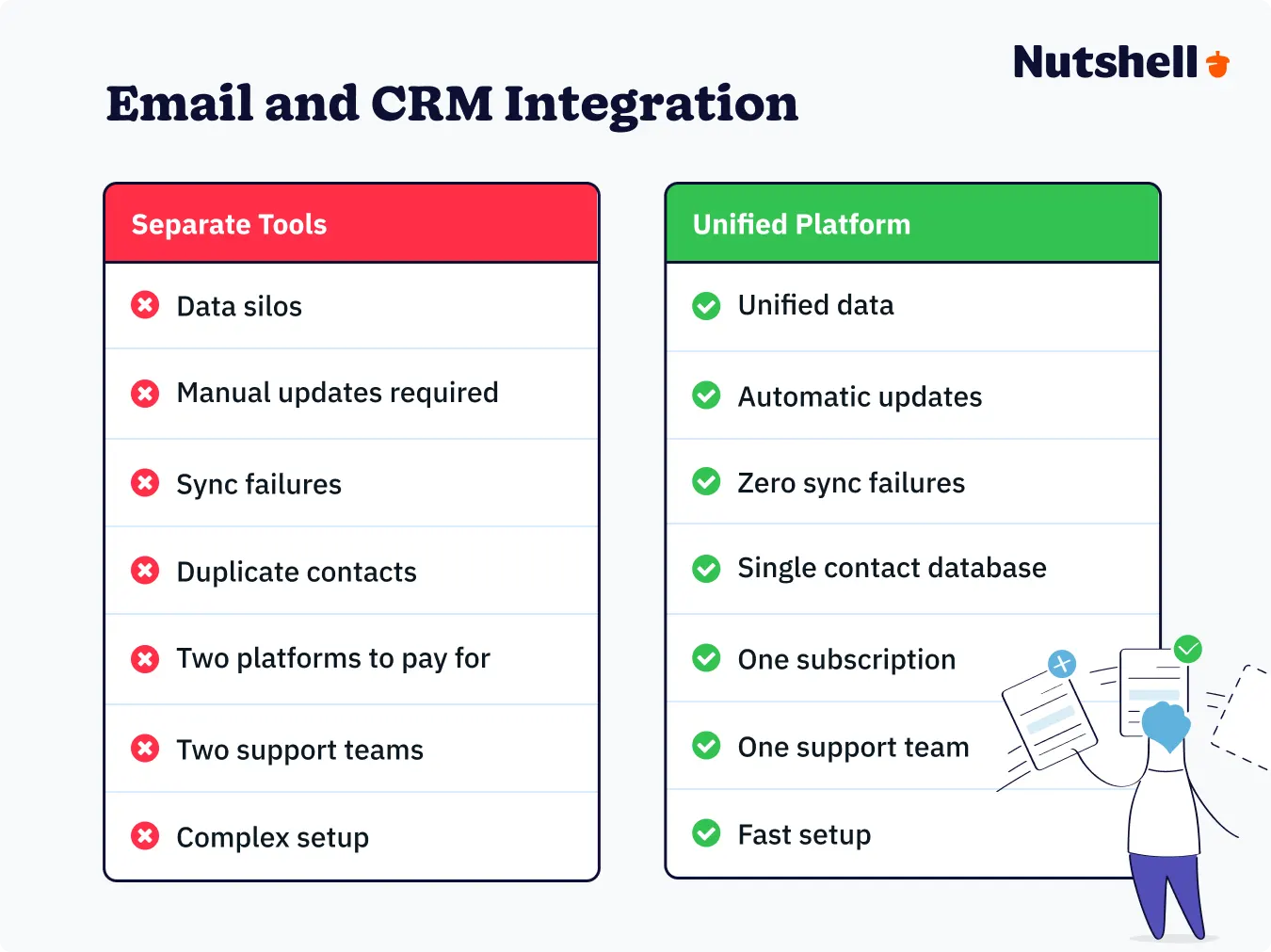
The unified platform advantage:
While you can integrate separate CRM and email marketing tools, platforms like Nutshell that combine both in one system eliminate integration complexity entirely. There’s no data sync to configure, no API connections to maintain, and no risk of sync failures causing data inconsistencies. Everything simply works together because it was built to work together.

In the sections that follow, you’ll learn exactly how to implement each integration approach, which data fields to prioritize, and how to set up automation workflows that turn your integrated system into a revenue-generating machine.
Maximize your CRM data with the Nutshell Marketing suite of tools, like Email marketing, SMS marketing, Landing pages, web forms, and reporting.
When it comes to connecting your CRM with email marketing, you have three main approaches. Each has distinct advantages, implementation complexity, and ongoing maintenance requirements. Understanding these differences helps you choose the right path for your business size, technical resources, and growth timeline.
What it is: A single platform that combines CRM and email marketing in one system, with no external connections required.
How it works: Because the CRM and email functionality are built on the same database, there’s no separate integration to configure. Customer data and email engagement metrics exist in the same system automatically.
Examples: Nutshell, HubSpot, Zoho CRM (when used with Zoho Campaigns)
Best for:
Advantages:
Limitations:
Implementation timeline: Two to four weeks for most small businesses (includes data migration, customization, and team training)
Nutshell example: Nutshell’s CRM and email marketing suite work as one unified platform. When you create a campaign, you’re pulling directly from CRM contact data. When someone clicks an email link, that activity appears immediately in their CRM timeline. No integration to configure, no sync delays, no technical headaches.
What it is: Using Application Programming Interfaces (APIs) to connect your standalone CRM with a separate email marketing platform.
How it works: APIs create a programmed connection between two systems, allowing specified data fields to sync on a defined schedule (real-time, hourly, daily, etc.). When configured properly, changes in one system automatically update the other.
Examples: Connecting Salesforce with Mailchimp, Pipedrive with ActiveCampaign, or Monday.com with Brevo
Best for:
Advantages:
Limitations:
Implementation timeline: Four to eight weeks on average, longer for complex custom requirements
Common API integration scenarios:
What it is: Using integration platforms like Zapier, Make (formerly Integromat), or Workato to connect your CRM and email marketing platform without coding.
How it works: These middleware platforms provide pre-built “connectors” that watch for specific triggers in one system (like “new contact added to CRM”) and automatically perform actions in another system (like “add contact to email list”).
Examples: Using Zapier to connect Insightly with ConvertKit, or Make to sync Copper CRM with Constant Contact
Best for:
Advantages:
Limitations:
Ongoing costs add up: Per-task pricing means high-volume operations get expensive quickly
Limited customization: Restricted to pre-built trigger and action combinations
Sync delays: Updates happen on schedules (every 15 minutes, hourly) rather than real-time
Task limits: Free or low-tier plans restrict monthly task volumes
Troubleshooting challenges: When zaps fail, diagnosing issues requires understanding both systems
Implementation timeline: One to two weeks for basic setups, longer for complex multi-step workflows
Common connector patterns:
Choose native integration if you want the fastest implementation, easiest team adoption, and minimal ongoing maintenance. This approach delivers the best ROI for most small to mid-sized businesses.
Choose API integration if you’re a larger organization with technical resources, need best-of-breed specialized tools, or have complex custom requirements that demand maximum flexibility.
Choose third-party connectors if you need to connect existing systems quickly without developer support, have straightforward data sync needs, and want to test integration concepts before committing to more permanent solutions.
For most businesses reading this guide, a native integration platform like Nutshell delivers the optimal balance of speed, simplicity, and results—letting you focus on growing your business instead of managing integrations.

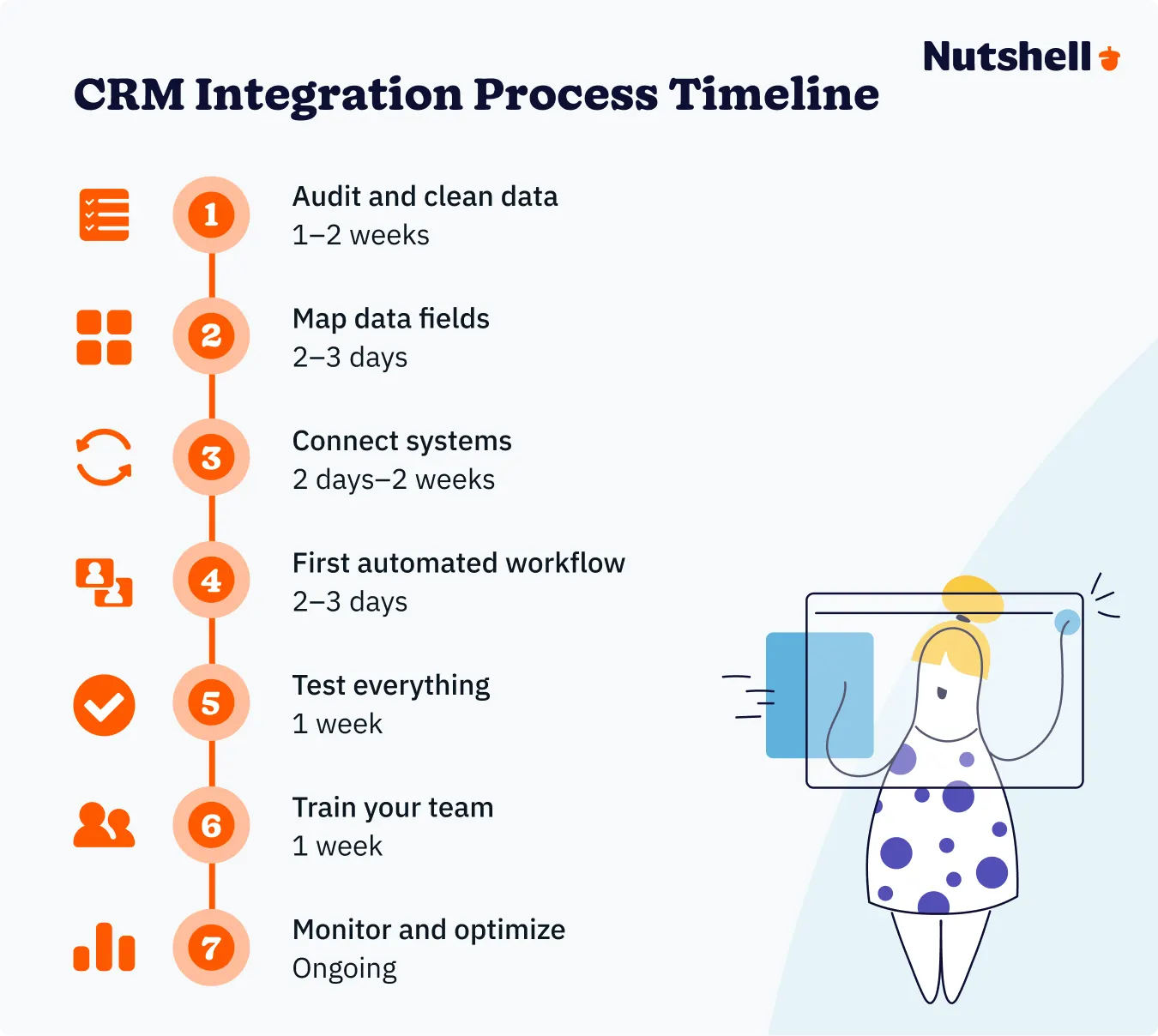
Whether you’re implementing a native integration platform or connecting separate systems, following a structured process ensures successful implementation. This step-by-step framework has helped hundreds of businesses integrate CRM with email marketing without the frustration, delays, or budget overruns that derail most projects.
Why this matters: Integration amplifies whatever data quality you currently have. Clean data becomes powerful automation; messy data becomes expensive chaos.
What to do:
Time investment: One to two weeks for most businesses
Common mistake to avoid: Skipping data cleanup to “move faster” only causes bigger problems after migration when you’re dealing with thousands of duplicate or incorrectly formatted records.
Why this matters: Data mapping defines which CRM fields connect to which email platform fields. Incorrect mapping means personalization tokens pull wrong information, segmentation breaks, and automation triggers fail.
Essential fields to map:
What to do:
Time investment: Two to three days
Common mistake to avoid: Assuming field names that sound similar actually contain the same type of data. Always verify with sample records before finalizing the map.
Why this matters: This is where technical implementation begins. The method you choose determines complexity, timeline, and ongoing maintenance requirements.
For native integration platforms (like Nutshell):
For API integrations:
For third-party connectors (Zapier, Make, etc.):
What to do:
Time investment: Two days to two weeks depending on method
Common mistake to avoid: Connecting your entire database immediately without testing. Start small, verify everything works correctly, then scale up.
Why this matters: Automation is where integrated CRM email marketing delivers real ROI. Starting with one high-impact workflow proves value quickly and builds momentum.
Best first workflows to implement:
What to do:
Time investment: Two to three days per workflow
Common mistake to avoid: Creating overly complex workflows with dozens of branches and conditions. Start simple, prove it works, then add sophistication over time.
Why this matters: Nothing damages trust faster than sending emails with broken personalization, wrong links, or content meant for a different audience. Thorough testing catches these issues before customers see them.
Personalization tokens:
Links and CTAs:
Timing and triggers:
Mobile rendering:
Unsubscribe functionality:
What to do:
Time investment: One week
Common mistake to avoid: Testing only with “perfect” contact records that have all fields filled in. Always test with incomplete records to see what breaks.
Why this matters: The best integration in the world fails if your team doesn’t understand how to use it. Proper training ensures adoption, prevents mistakes, and helps everyone realize ROI faster.
Sales team training:
Marketing team training:
Leadership training:
What to do:
Time investment: One week
Common mistake to avoid: Assuming people will “figure it out on their own.” Invest in training upfront to prevent frustration and maximize ROI.
Why this matters: Integration isn’t “set it and forget it.” The businesses that achieve 50% or higher revenue lifts from email marketing are constantly monitoring performance, testing improvements, and expanding successful workflows.
What to monitor in the first 30 days:
Optimization opportunities:
Scaling strategies:
What to do:
Time investment: Ongoing
Common mistake to avoid: Launching integration and then ignoring it for months. The first 30 to 60 days are critical for optimization and building team confidence.
Now that you understand the integration process, the next section covers exactly which data fields should sync between your CRM and email platform—and why each one matters for personalization and automation success.
Not all data is equally valuable for email marketing. Syncing everything creates noise; syncing too little limits personalization and automation effectiveness. Focus on these priority data categories to maximize ROI while keeping your system clean and performant.

These fields are non-negotiable for basic email marketing functionality:
These fields unlock powerful segmentation and automation:
These fields prove email marketing’s financial impact:
Fields unique to your industry or business model:
What engagement data should flow back to your CRM?
Don’t forget the reverse direction—email engagement metrics that inform sales outreach:
Email opens: Shows general interest level (note: iOS privacy features make this less reliable)
Email clicks: Much more valuable than opens. Shows active engagement with specific content.
Links clicked: Which specific links did they click? This reveals intent and interest areas.
Emails bounced: Hard bounces indicate invalid email addresses requiring cleanup.
Unsubscribes: Automatically update CRM subscription status to prevent sales from cold-calling people who opted out.
Email replies: Trigger notifications to sales reps when prospects reply to marketing emails.
Form submissions: Track when email clicks convert into demo requests, content downloads, or other conversions.
Avoid syncing these data types to keep your email platform focused and high-performing:
Getting data sync right is the foundation of successful CRM email marketing integration. The right data enables powerful personalization and automation; too much data creates confusion and maintenance headaches.
Even with careful planning, CRM email marketing integration hits predictable roadblocks. Here are the five challenges that cause 80% of implementation delays—and the proven solutions that get you back on track.
The problem: You have “Sarah Johnson, [email protected]” in your CRM and “Sarah J., [email protected]” in your email platform. When you integrate, do you merge them or create two separate records? Multiply this by hundreds of contacts and you have chaos.
Why it happens: Different systems use different matching logic. Some match on email address only, others require exact name matches, and some create new records instead of updating existing ones when fields don’t align perfectly.
The solution:
Prevention tip: Implement form validation that prevents duplicate submissions at the point of capture. Required email verification stops most duplicate creation before it starts.
The problem: Your integration worked perfectly last week. This week, contacts stopped syncing, automation workflows paused, and you only discovered the issue when a prospect asked why they didn’t receive your email.
Why it happens:
The solution:
Recovery tip: When sync fails, don’t panic. Most platforms queue failed sync attempts and process them once connection is restored. Verify the queue processed correctly before resending any manual campaigns.
The problem: Your emails start landing in spam folders more often after integration. Bounce rates increase. Inbox providers begin flagging your domain.
Why it happens:
Integration often reveals data quality problems that weren’t obvious before:
The solution:
Prevention tip: Roughly 7% of emails land in spam folders even with good list hygiene. Regular list cleaning is essential—B2B email lists decay at 22.5% per year due to job changes and inactive addresses.
The problem: Your sales team continues logging emails manually in the CRM instead of using the integrated email tool. Your marketing team keeps using their old email platform “because it’s easier.” Integration ROI never materializes because nobody actually uses it.
Why it happens:
The solution:
Involve teams early: Include sales and marketing representatives in the selection and implementation process. People support what they help create.
Focus on WIIFM (What’s In It For Me): Don’t just explain what the integration does. Explain how it saves each person time, makes them more successful, and reduces frustration.
Create champions: Identify early adopters who love the new system and empower them to help train and encourage others.
Make it easier than the old way: Remove access to old tools once the new system is live. Sometimes you need to remove the path of least resistance.
Celebrate early wins publicly: When someone closes a deal using email automation insights, share that success story. Social proof drives adoption.
Provide ongoing support: Don’t just train once and disappear. Offer office hours, quick-help Slack channels, and refresher sessions.
Track adoption metrics: Monitor who’s using the system and who isn’t. Have managers address non-adoption directly.
Reality check: According to Freshworks’ 2024 CRM survey, training and adoption by users was the #1 challenge when implementing CRM systems (cited by 25% of businesses). This isn’t a technology problem—it’s a people problem that requires people-focused solutions.
Prevention tip: Start with one simple, high-value use case that makes life immediately easier. For sales teams, showing email engagement data in contact records is a quick win. For marketing teams, one-click audience segmentation based on CRM data proves value fast.
The problem: Sales says email marketing isn’t driving results. Marketing says their campaigns influenced three closed deals last month, but sales credits those to cold calls. Leadership doesn’t know who to believe or whether the integration investment was worth it.
Why it happens:
The solution:
Measurement framework:
Track these key metrics to prove integration ROI:
Prevention tip: Set up proper tracking before launching campaigns, not after. Retrofitting attribution is significantly harder than building it correctly from the start.
The problem: What started as a $50 per month email marketing budget has ballooned to 500+ per month when you factor in the CRM subscription, integration middleware fees, developer costs for custom API work, and additional per-contact charges as your list grows.
Why it happens:
The solution:
Prevention tip: Request detailed pricing from vendors showing total costs at your current volume and at 2x growth. Hidden fees often lurk in per-contact charges, overage fees, and required add-ons.
Before you hit any of these challenges, make sure you’ve chosen the right integration approach for your business reality:
The bottom line: Most integration challenges stem from choosing overly complex solutions when simpler options would deliver better results. Match your integration method to your actual resources, technical capability, and business needs—not to what seems most impressive or feature-rich on paper.
So, why should your company consider investing in a CRM with email functionality? What are the benefits of CRM email marketing tools versus purchasing separate email marketing software or hiring professional email marketing campaign services?
There are many reasons, but these are the most significant benefits you can look forward to.
Having your CRM integrated with email tools can benefit you by helping you better segment your email lists.
You don’t want to send the same emails to every single one of your prospective customers—after all, not all customers are alike. Segmenting your email list helps you reflect this fact in your marketing.
You can use your CRM to split your audience into groups based on their interests, customer status, and other characteristics. With many CRMs, you can even identify potential customers who’ve interacted with your website or other marketing content.
Then, you can use your email marketing software to build an email marketing campaign that targets those groups of contacts and (hopefully) turns them into paying customers.
For many sales professionals, email is the secret weapon in their selling arsenal. A CRM like Nutshell helps you better understand your audience.
When you combine email with the customer insights stored within a company’s CRM, you’ll be able to craft much more personalized and, ultimately, more effective messages. Compared to non-personalized emails, personalized email messages have a 29% higher open rate and a 41% higher click-through rate.
Comparing the success rates of your templates and automated email sequences can help you fine-tune your messages and boost your success rate.
Go from prompt to polished first draft in minutes with the 1-click AI email campaign builder!
Imagine the time you’d save if your CRM offered native email functionality or a two-way sync with your email program. Rather than bouncing back and forth between programs, you could do all your work out of one system.
Voilà! Top-notch CRMs, like Nutshell, allow you to do just that. Plus, the email templates you’ll have at your disposal will save you a lot of time on re-typing.
When your CRM offers email capabilities, your entire team will have a complete and accurate view of the customers you’re serving.
Email conversations can be stored in a CRM’s customer timelines, which means that any member of your sales, marketing, or support teams can get full context on your company’s relationship with a prospect or buyer simply by looking them up in your CRM.
Without a CRM database, email communications are hidden away in personal inboxes and cannot be leveraged by anyone else on the team.
Your CRM can do more than help you build your email campaigns—it can also automate those campaigns, sending out emails in response to specific user behaviors or on a predetermined schedule. For example, if someone joins your email list, your CRM might automatically send out a welcome email.
Even if you’re using an external tool for most of your email marketing, your CRM can still be helpful when it comes to automation. That’s because it has direct access to tons of customer data that can inform which groups receive which emails at which times.
This saves your team time and can also lead to better results. Automated emails account for 41% of email orders, even though they make up just 2% of emails sent.
Another huge benefit of a CRM with email marketing integration is that it helps you to track engagement with your email campaigns and connect that data to specific subscribers, customers, and companies.
As your email platform runs your campaigns, it will generate data on metrics such as open rate, click-through rate (CTR), and conversion rate. When your CRM and email marketing are integrated, this email engagement data is connected directly to the customer data in your CRM.
This enables you to explore all the customer data for individuals and groups of users who received your campaigns. You’ll also see email engagement on individuals’ profiles in your CRM so that you can easily reference it later.
CRM email marketing software can help teams with so much more than following up with sales leads, sending out bulk emails, or creating personalized sequences. It allows you to automate and scale targeted messaging for better customer lifecycle management.
Craft highly personalized email drip campaigns that speak to your prospects and leads in a way that aligns with where they are in the buyer journey. For instance, you can use these campaigns to ensure leads get the right message at the right time to move them further along your pipeline.
When done right, lifecycle email marketing can be an effective way to nurture and retain customers. When your messaging matches your customer’s wants and needs, you increase your chances of delivering positive customer experiences and solidifying meaningful relationships.
Combining the power of CRM with robust email marketing tools can also boost revenue from existing customers with upsell and cross-sell opportunities.
Even as a tech giant, Amazon’s roots can inspire small-to-mid-sized businesses (SMBs). Leveraging data to track each customer’s browsing and purchase history, they began sending highly targeted emails—like abandoned‑cart reminders and “Recommended for You” suggestions—which lifted open rates by approximately 35% and drove significant repeat purchases.
With modern CRM and email marketing technology, this kind of strategy isn’t just for big tech companies. For SMBs, the lesson is clear. Even simple segmentation (e.g. “viewed but didn’t buy”) based on CRM data can significantly boost engagement—without complex tools or big budgets.
So the question is, which CRMs have the best email capabilities? More importantly, which of these platforms is right for your company?
The following eight CRMs have made email integral to their feature sets. Here’s a quick summary of each:
| CRMs for email marketing | Key features |
| Nutshell | Strong email automation features, email sequencing, shareable templates, easy contact filtering for targeted bulk emails, personal email sequence tool, two-way sync with Gmail and Office 365, MailChimp, Zapier, and a native email marketing suite |
| Insightly | Real-time analytics for all campaigns with email template feature and integration with Outlook, Gmail, MailChimp, and Zapier |
| Agile CRM | Easy creation, sending, and tracking of email campaigns with a selection of visually pleasing templates, personalization features, robust reporting dashboard, email A/B testing, drag and drop email builder, social sharing, and autoresponders |
| Zoho CRM | Email template feature with reporting features, integration with Zoho Campaigns, and analytics for each salesperson |
| Microsoft Dynamics 365 | Personalized emails based on recipient data from the CRM, plus the launch of multiple simultaneous email campaigns, journey builder, and automated launch |
| ActiveCampaign | Marketing automation platform with CRM functionality, extensive template library, personalization and list segmentation capabilities, A/B testing, and integrations with 250 other apps |
| Copper | Integration with G Suite and Gmail, one-off message sending, templates for streamlined sending, and limited automation capability with MailChimp |
| HubSpot | Access to automated sequences, a template editor, detailed analytics, lead scoring, website analytics, blog management, contact organization, email sending, and email tracking for opens, click-throughs, and downloads |
Read through the descriptions of each to determine the right fit for your organization.

Nutshell is an all-in-one CRM and email marketing platform that’s “simple enough for any user, sophisticated enough for any business.” This mantra also applies to the software’s email capabilities.
The service has robust email automation features, including email sequencing, shareable templates, easy contact filtering for targeted bulk emails, and even a native email marketing suite—everything you need to take the grunt work out of email communication.
Nutshell’s personal email sequence tool allows sales professionals to perform one-on-one outreach at scale. These email sequences shut off automatically once your recipient replies. You can even set them up to trigger when a lead reaches a particular pipeline stage, which means you can nurture all your new prospects without lifting a finger.
And because Nutshell tracks reply rates of your sequences, you’ll be able to easily tell which emails work best and which need a rewrite.
Every salesperson knows that retyping the same emails over and over again is incredibly tedious. Nutshell’s time-saving email templates remove the monotony from the workday and allow users to fire off messages in seconds, not minutes.
Plus, Nutshell’s two-way sync with Gmail and Office 365 helps you stay organized and productive in or out of your CRM. Even if you use a different email provider, you can still send outgoing work emails from Nutshell.
And with the Nutshell SMS add-on, you can make your emails even more effective with the added dimension of text messaging in your campaigns, increasing the chance of engagement and retention.
If you’re looking for a powerful yet completely intuitive CRM solution with cutting-edge email functionality, you can’t do much better than Nutshell.
Catch your buyers’ attention at every stage of the funnel with Nutshell’s email marketing tool that’s built right into your CRM.

Insightly is a popular name in the CRM world. The platform focuses on helping its users build strong, lasting customer relationships. One way they do this is by offering email automation features.
Inside the platform, users can create and send emails with just a few clicks and view real-time analytics for all campaigns. Insightly also offers a handy email template feature to save salespeople valuable time.
From one-off messages to bulk sends, this CRM offers a fair amount of native email options and integrates with Outlook, Gmail, MailChimp, and Zapier for more functionality.

With Agile CRM, users can easily create, send, and track email campaigns in addition to the platform’s traditional customer relationship management features.
Users simply select the look they want from a selection of visually pleasing templates and begin crafting their messages.
Speaking of crafting a message, Agile’s personalization features make connecting with prospects a cinch. Contact attributes (details such as recipient name, location, industry, etc.) can automatically be pulled and included to give each email an individualized feel.
But all this template and personalization goodness wouldn’t be beneficial without some way to track results. Fortunately, Agile CRM includes a robust reporting dashboard to monitor things like email opens and click-throughs. The lead scoring feature helps users accurately qualify leads based on the metrics in the reporting dashboard.
Additionally, Agile CRM offers email A/B testing, a handy drag-and-drop email builder, social sharing, and the ability to send autoresponders. We have to admit that this service’s email capabilities are top-tier.

Zoho is a complete software suite that offers everything from accounting software to helpdesk tools. One of the company’s many offerings is a CRM platform, which also happens to have email functionality.
Similar to the solutions already reviewed, Zoho CRM includes an email template feature that will free sales teams from tediously drafting the same messages repeatedly.
The Zoho template creator also includes drag-and-drop capabilities, making adding text, images, tables, etc., to emails super simple.
Zoho CRM includes reporting features that inform users of when the system sent their messages and if they were opened and read.
Sales managers using Zoho CRM will also be able to see analytics for each salesperson they oversee and determine areas of improvement.
We should note that while bulk email campaigns within Zoho CRM are possible, users will have to integrate the platform with another Zoho offering named Zoho Campaigns. The integration is seamless, but it’s another step that potential users should be aware of.

Microsoft Dynamics 365 will help you improve the impact and return from your email campaigns. The key value that Dynamics 365 brings to email marketing is the ability to automate the creation of personalized emails. Thus, you can set up rules to get dynamic content in your emails tailored to each recipient based on the data from their profile in your CRM.
In Dynamics 365, you can conveniently launch multiple simultaneous email campaigns targeted at different audience segments. In addition to emails, you can create social media interactions via push notifications and text messages.
Based on your vision of how to engage with customers at different stages of their decision-making, you map different scenarios in a journey builder and set up the timing for an automated launch.
Dynamics 365 ranks among Gartner’s Magic Quadrant’s best B2B marketing automation platforms. It garners high praise from companies with dynamic marketing activities that seek time-saving automation, one-to-one personalization, and omnichannel campaign delivery.

ActiveCampaign is a unique entry on this list for one simple reason: it started as a marketing automation platform and then added true CRM functionality.
This fact doesn’t mean the platform can’t competently manage your customer relationships—it just means that the tool is for those who prioritize marketing automation above all other features.
Because of this, ActiveCampaign looks and operates more like traditional email marketing software than the CRMs you’re probably used to. Once inside the platform, users can build email newsletters, craft full automated sequences, schedule messages, and view reports.
ActiveCampaign’s template library is extensive, as are the personalization and list segmentation capabilities. It also includes A/B testing and integrations with Paypal, Shopify, Facebook, and 250 other apps.
In brief, ActiveCampaign is an excellent option for those seeking a marketing automation platform with CRM functionality rather than a CRM service with marketing automation features.
It’s also one of the more expensive options on this list. Depending on the number of contacts a user has, you can obtain these marketing automation and CRM features for $49 a month or more.

Copper is another CRM on this list with a unique twist: Copper designed this CRM for G Suite users. If your company doesn’t use the Google platform, this solution definitely won’t work for you. But if you do, you might enjoy the convenience of having a CRM service built for Google.
Unsurprisingly, Gmail users will have an incredibly short learning curve with this CRM—the entire solution lives inside the email program they use daily. Users simply fire up Gmail and can begin building better relationships with contacts immediately.
Related: Save time and stay organized with the Nutshell for Gmail Chrome extension!
Copper is pretty limited in terms of email capability. Users can send one-off messages via Gmail, build templates for streamlined sending, and automate specific responses. But for more detailed email automation capability, users must integrate their Copper accounts with MailChimp.
Due to the limited email automation capabilities, we can only recommend Copper to folks who are already using G Suite and MailChimp and are more interested in standard CRM features than advanced email functionality.

HubSpot is a very well-known software company offering CRM and sales enablement tools to support its widely used marketing automation platform. As far as email automation features go, the platform provides access to automated sequences, a template editor, and detailed analytics.
Once users have selected a template and built an email sequence, they can automate it, freeing up more time for other tasks and ensuring that important leads never fall through the cracks.
Users can then track emails for opens, click-throughs, and downloads. Based on historical data, users can also score leads and predict the likelihood of them becoming customers.
All in all, HubSpot is great for companies who want a full package. If you’re looking for one solution to handle your website analytics, manage your blog, organize your contacts, and send emails, HubSpot is a solid choice, though the cost could be a deal-breaker for growing companies.
Related: What Does HubSpot Cost, and Why Is It So Expensive?
Finding a CRM solution with native email marketing software integration is the first prize. But if you already have a CRM system and want to connect a reliable email marketing tool to it, there are a few features you should look out for.
First and foremost, ensure that the email marketing app integrates seamlessly with your CRM platform. If the tool offers a free trial, sign up and run a CRM and email marketing software integration trial.
Should you run into any issues, reach out to the provider’s customer support team. This will give you a good idea of how easy it is to link the software with your CRM, and you’ll have a chance to put their customer support team to the test.
Once connected, make full use of that software trial by testing all the available features to determine how well it works with your CRM.
Crafting eye-catching, branded emails, newsletters, and broadcasts calls for a visual editor that’s easy to navigate and learn. So, when you test email marketing tool options within your CRM, make sure it’s a user-friendly application.
Ideally, you should seek out tools with professional-looking email templates to help you get started. You should also opt for visual editors built for hassle-free drag-and-drop editing to ensure you and your team get hit the ground running.
The ability to set up email drip sequences is a must. You should have the option to add several messages to the sequence and time the email distribution as you see fit. But you’ll also want the ability to run automated targeted emails triggered by actions related to your pipeline.
For instance, if one of your team members qualifies a prospect, they may move it to the next stage of your sales pipeline. Your email marketing tool should let you set up a personalized email template that automatically sends to the lead when that happens.
THAT’S PRO
Are you falling off your prospects’ radars? With Nutshell’s personal email sequences, we’ll remember the follow-up for you.
One of the best ways to maximize your email campaign success is to monitor how your audience engages with your emails and optimize accordingly. This means you’ll need a way to track metrics like open and click-through rates.
Check to ensure that your chosen email marketing software provides comprehensive reporting and analytics features. This way, you can easily draw reports to see how your campaigns are doing and where there’s room for improvement.
Run email A/B tests to gauge your audience’s preferences and adjust your email content for the best results, making the most of the analytics and reporting functionality available.
Many email marketing tools offer a host of fantastic features but come with significant limitations on less expensive plans. When evaluating your options, take note of limits related to the number of marketing contacts you can have and the number of emails you can send per month.
Compare the pricing between your preferred options for the same number of marketing contacts and emails to get a better idea of which tools offer the best value for your money. This will also help you determine which pricing plans are a good fit for your current operation and whether you can scale easily when your business grows.
In the world of CRM and digital marketing, things are always changing, so it’s essential to stay ahead of the curve. Here are some of the key trends to look out for when it comes to CRM and email marketing.
Artificial intelligence and its integration into CRM and email marketing platforms are revolutionizing the way businesses interact with their customers. With AI-powered CRMs, even small businesses can leverage predictive lead scoring, AI-assisted content creation, personalization, and more. In email marketing, AI can help to optimize send times, enable dynamic content, and enhance segmentation, enabling more personalized and effective email campaigns.
Gone are the days of basic personalization. Today, businesses are moving toward highly tailored experiences based on customer data. By integrating CRM data with their email marketing, teams can personalize email content, offers, and timing, increasing engagement and conversions. This trend emphasizes the importance of understanding your audience to deliver more meaningful interactions.
As data privacy regulations become more prevalent and more stringent, businesses need to prioritize data security and compliance. This involves ensuring you have proper consent management processes, transparently sharing data usage information with customers, and ensuring they have control over their information. Focusing on data protection builds trust and ensures compliance.
Integrating CRM with other business systems and automating tasks is a trend that continues to gain momentum. By streamlining workflows through integration with email marketing platforms, marketing automation tools, and other systems, SMBs can save time and resources while enhancing the customer experience. Automation allows businesses to focus on strategic initiatives rather than getting bogged down by repetitive tasks.
Enhancing the overall customer experience is at the forefront of CRM and email marketing strategies. With CRM data, businesses can personalize interactions and provide improved customer service, which helps to strengthen customer relationships. Email marketing helps enhance customer communication, provide valuable content, and deliver personalized offers, improving customer relationships and overall experience.
At Nutshell, we understand how tough it can be to choose between two tools that are undoubtedly helpful in generating and maintaining leads. That’s why we made the decision easy by creating the perfect CRM for email marketing.
How? We combined them.
With Nutshell’s email marketing software, you can combine email marketing with CRM data. Instead of bouncing between different platforms to gather email subscribers and generate an email campaign, your sales and marketing teams can do it all with one system.
Nutshell’s email marketing connects CRM with email marketing so you can target custom audiences with beautifully designed email campaigns that resonate with your customers.
The CRM filtering tools allow you to create precise audiences for your email campaigns easily. Whether you’re looking to connect with subscribers in a specific geographic location or industry or want to target them based on how long they’ve been a customer, Nutshell’s got you covered.
After you launch your campaign, you can keep track of its success with Nutshell’s email marketing’s reporting dashboard. You’ll see who’s opened your emails and interacted with them so you can reach out to them and turn those people into buyers.
Because Nutshell’s CRM platform powers Email marketing, you no longer have to worry about contacts getting out of sync between your sales and marketing software, and you can build highly targeted audience lists based on any customer segment.
It’s vital that your company invests in the right CRM solution, considering that sales reps rely on CRM so heavily to make connections with their buyers.
With Nutshell’s email marketing, you can catch your buyers’ attention at every marketing funnel stage. Our email marketing software connects seamlessly with your CRM data to target your audiences with personalized email campaigns that convert your subscribers into paying customers.
Learn more about combining your Nutshell CRM with email marketing and what Nutshell’s email marketing software can do for you by starting a 14-day free trial. Or, contact us today to schedule a live demo or learn more about the benefits of Nutshell.
Table of Contents
Yes, for most small to mid-sized businesses. All-in-one CRMs like Nutshell combine contact management with email marketing features—eliminating data sync issues and reducing costs. However, if you need enterprise-level email features like 200-step automations or advanced A/B testing, specialized platforms may still be necessary.
For all-in-one platforms like Nutshell, setup takes 2-4 weeks for most small businesses. This includes data migration, customization, and team training. If you’re integrating separate systems (CRM + standalone email tool), expect 4-8 weeks. Proper planning during week one saves 3-4 weeks during rollout.
Essential fields include contact information (name, email, phone), lifecycle stage, purchase history, deal values, lead scores, and engagement metrics (opens, clicks). Also sync behavioral data like website activity, email preferences, and geographic information. This enables personalized campaigns beyond just using first names.
CRM data enables dynamic content based on purchase history, deal stage, location, and behavior. You can recommend products based on past orders, send location-specific offers, trigger emails when deals reach certain stages, and adjust messaging for lifecycle stages—all automatically, creating genuinely relevant experiences.
The biggest mistakes include starting with messy data (duplicates, outdated records), skipping segmentation (sending generic blasts), neglecting team training, failing to automate workflows, and not cleaning data regularly. Avoid these by auditing data first, defining clear goals, training your team, and establishing ongoing maintenance schedules.
Maximize your CRM data with the Nutshell Marketing suite of tools, like Email marketing, SMS marketing, Landing pages, web forms, and reporting.
Join 30,000+ other sales and marketing professionals. Subscribe to our Sell to Win newsletter!