The top 13 CRM issues and how to address them

-

Quick answer: What are the most common CRM issues, and how do you fix them?
The most common CRM problems—poor user adoption, bad data, integration headaches, and overwhelming complexity—are almost always people and process issues, not technology failures. The fix starts with choosing a tool your team will actually use, defining a clear strategy before you launch, and keeping your data clean from day one.
Key takeaways
- 55% of CRM implementations fail — but nearly all failures are preventable with the right approach
- People, not technology, cause most CRM problems — over 60% of failures trace back to adoption and change management issues
- The right CRM makes all the difference — an intuitive, affordable platform your team will actually use is worth far more than a feature-heavy one they won’t
- Clean data and clear strategy come first — technology can’t fix a broken process, but it can accelerate a good one
- CRM success is measurable — companies with well-implemented CRMs see an average of $8.71 return for every $1 spent (Nucleus Research)
Your CRM should be the engine that drives your sales team forward. Instead, for a lot of growing businesses, it becomes the thing their reps work around — a clunky, half-adopted system full of outdated data that nobody fully trusts.
Here’s the uncomfortable truth: 55% of CRM implementations fail to achieve their planned objectives, according to research from Johnny Grow. And CRM projects fail at nearly double the rate of other IT initiatives — 50 to 70% vs. 37% for IT projects overall (Standish Group). The technology itself rarely causes these failures. Over 60% of the time, it comes down to people and process — poor adoption, insufficient training, misaligned teams, and choosing a tool that was never the right fit to begin with.
The good news? Every one of these problems is preventable. We’ve put together this guide to walk you through the 13 most common CRM issues, why they happen, and exactly what to do about them — so your team can spend less time wrestling with software and more time closing deals.
“The teams that succeed with CRM aren’t always the ones with the most features — they’re the ones that chose a tool their reps actually want to open every morning.”
– Will Gordon, Sr. Director of Marketing, Nutshell
The 13 most common CRM issues at a glance
- Poor user adoption leads to incomplete data and wasted CRM investment
- Inaccurate or outdated data undermines decisions and AI-powered features
- Integration issues creates data silos and manual re-entry burden
- Overwhelming complexity drives reps back to spreadsheets
- Lack of customization forces your team to adapt to the tool instead of the other way around
- Cost and ROI concerns: hidden fees and poor adoption kill CRM returns
- Limited reporting and analytics leaves revenue leaders flying blind
- Poor technical support turns minor issues into major productivity losses
- Limited mobile access disconnects field teams from live customer data
- Data security concerns puts sensitive customer information at risk
- Lack of clear CRM strategy turns your CRM into an expensive database nobody trusts
- Data migration challenges poisons a new CRM with old, messy data
- Lack of proactive pipeline visibility leads to stalled deals and inaccurate forecasts going unnoticed until it’s too late
Table of contents
- Understanding why CRM implementation fail
- 1. Poor user adoption
- 2. Inaccurate or outdated data
- 3. Integration issues
- 4. Overwheling complexity
- 5. Lack of customization
- 6. Cost and ROI concerns
- 7. Limited reporting and analytics
- 8. Poor technical support
- 9. Limited mobile access
- 10. Data security concerns
- 11. Lack of clear CRM strategy
- 12. Data migration challenges
- 13. Lack of proactive pipeline visibility
- FAQs
Say goodbye to CRM frustrations!
Tired of problematic CRM software? Try Nutshell Sales—a refreshingly simple CRM your team will love. Streamline your sales process with Nutshell—headache free!

Understanding why CRM implementations fail
Before diving into specific challenges, it helps to understand the bigger picture. Research consistently shows that CRM failures aren’t a technology problem — they’re a people and process problem.
According to Vantage Point’s analysis of hundreds of CRM implementations, the breakdown looks like this:
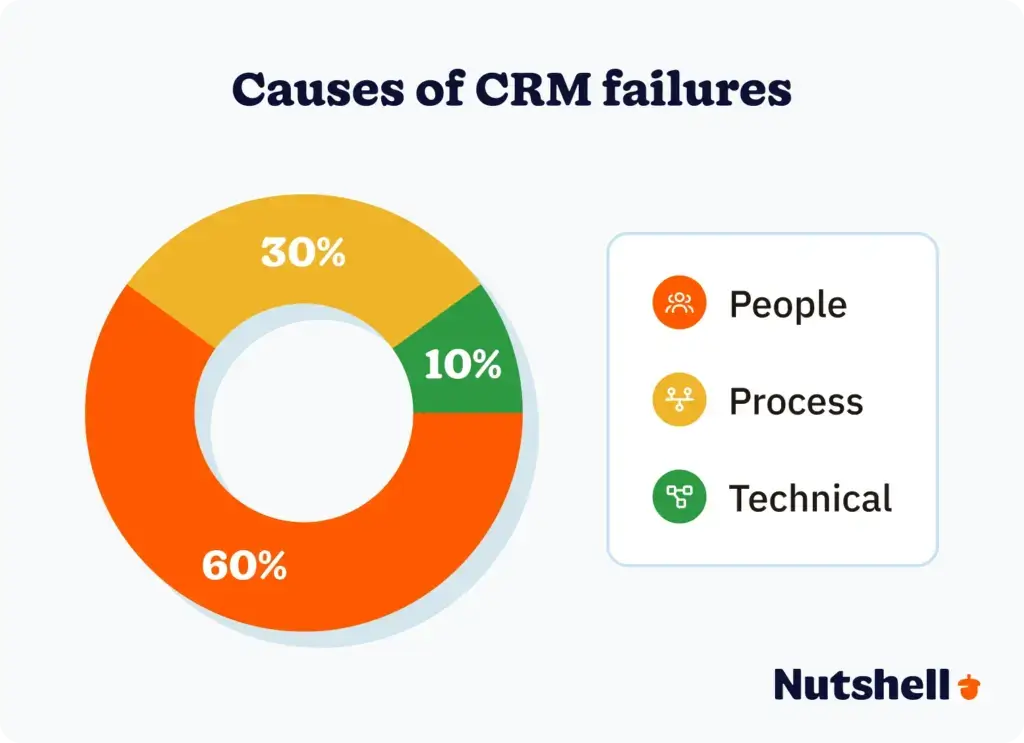
Source: Vantage Point, 2025
How we identified these CRM issues: We combined industry research on implementation failure rates, feedback patterns from Nutshell’s 5,000+ customer base, and analysis of the most common pain points reported by sales teams across B2B, professional services, manufacturing, and technology sectors.The most significant failure patterns include:
- Lack of clear strategy: Teams implement a CRM before defining what success looks like, which metrics they’ll track, or how the tool fits their sales process. Without that foundation, even the best CRM becomes a very expensive contact list.
- Insufficient change management: When leadership doesn’t communicate the “why” — or doesn’t model using the tool themselves — adoption stalls. Research from Vantage Point found that 52% of organizations lack internal CRM champions to drive adoption from within.
- Wrong vendor selection: Choosing a CRM built for enterprise teams when you have a 15-person sales organization creates friction at every turn. Complexity designed for someone else’s problems creates problems of your own.
The businesses that beat these odds consistently share one trait: they treat CRM selection and implementation as a people initiative first and a technology initiative second.
1. Poor user adoption
A CRM that your reps don’t open is just expensive shelf decoration. Poor user adoption is the single biggest reason CRM implementations fail — research from Radin Dynamics found that over half of CRM systems collapse due to this issue alone.
When adoption is low, the downstream effects pile up fast:
- Incomplete data makes pipeline reporting unreliable
- Missed follow-ups slip through the cracks with no system to catch them
- Team misalignment grows as reps maintain their own shadow spreadsheets
- ROI evaporates — you’re paying for a tool nobody’s using
Why does adoption fail? Usually, it’s one of three things: the CRM is too complicated for daily use, leadership never made a compelling case for it, or reps see it as a management surveillance tool rather than something that makes their jobs easier.
Biotech company Genoskin ran into exactly this challenge before switching to Nutshell. Their VP of Business Development, Guillaume Ghibaudo, put it plainly: “CRM shouldn’t be a burden.” After switching, their entire sales organization — including the CEO, who now logs his own activities — adopted Nutshell within a single week. In the year that followed, Genoskin’s revenue roughly doubled.
How to prevent poor user adoption:
- Involve your team early: Get feedback from your sales reps during the selection process, not after you’ve already signed a contract. Their buy-in starts the moment they feel heard.
- Choose a tool designed for the rep, not the boardroom: If your team needs a manual to add a contact, it’s the wrong tool. Prioritize interfaces that feel intuitive from day one.
- Communicate the “why” clearly: People adopt tools they understand. Explain how the CRM makes their specific job easier — fewer missed follow-ups, better visibility into their pipeline, and less time on administrative work.
- Set clear expectations from the start: Which fields are required? When should activities be logged? What triggers moving a deal to the next stage? Define this before launch, not after confusion sets in.
- Leverage ongoing support: Choose a CRM vendor that offers real, accessible support — not a ticketing system with a three-day response time.
Nutshell is built from the ground up to solve the adoption problem. Our platform is intuitive enough that most users are productive within hours, and every customer — including trial users — gets free, unlimited support from a team that’s genuinely invested in your success.
There’s also a more personal reason reps resist, and it’s worth naming honestly: switching tools means giving up a system they’ve already mastered, and admitting a new one might do the job better. That’s not laziness, it’s the same reason anyone puts off learning a new process at work.
Acknowledging that up front, instead of just mandating adoption from the top down, tends to go a lot further than another training session.
2. Inaccurate or outdated data
Your CRM is only as good as the data inside it. And in 2026, bad CRM data isn’t just an operational nuisance — it actively undermines your AI-powered features. As CX Today notes, AI is only as good as the data it touches. If your data is messy, AI will scale the mess.
Inaccurate or outdated data leads to:
- Poor insights that send your sales strategy in the wrong direction
- Embarrassing errors when reps reference stale information in customer conversations
- Missed opportunities when duplicate records hide the full picture of a relationship
- AI recommendations and forecasts that are confidently, systematically wrong
The root cause is almost always one of two things: manual data entry is too cumbersome, so reps skip it, or nobody owns the ongoing task of keeping data clean.
How to keep your CRM data accurate:
- Enter data immediately: The longer a rep waits to log a call or update a deal stage, the less accurate and complete the record becomes. Make same-day entry the standard.
- Run regular data audits: Schedule a quarterly review to catch duplicates, fix formatting inconsistencies, and flag outdated records. It’s less exciting than closing deals — but critical.
- Automate wherever possible: Manual data entry is the enemy of data quality. Every field your CRM can populate automatically is one less opportunity for human error.
- Own the data governance: Assign someone — even part-time — to own data quality standards. Clear policies beat good intentions every time.
Nutshell takes a lot of the manual burden off your team. Our CRM automatically pulls in data from your website forms, enriches contact records with job titles, social media profiles, and location data, and syncs interaction history across your connected tools. Our mobile business card scanner creates contacts on the spot. And if you’re migrating from another system, our support team will handle the data import for you — white-glove, at no extra charge.
3. Integration issues
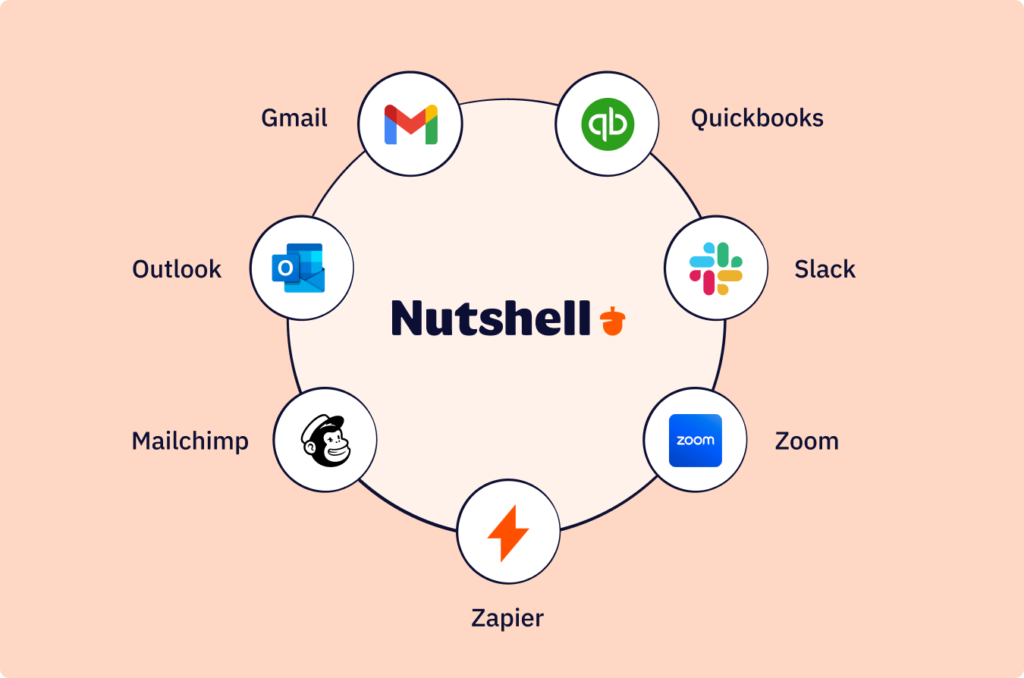
Most growing teams run five to ten tools simultaneously — email, calendar, accounting software, marketing platforms, and communication apps. When your CRM doesn’t talk to those tools, you end up with data silos, manual re-entry, and a team that spends more time managing software than managing relationships.
In 2026, the expectation has shifted from “nice to have” integrations to connected data models, where systems link together through shared identifiers so the right customer information appears in the right place at the right moment (CX Today, 2026).
Common integration pain points for lean teams:
Tool category Common issue Email (Gmail / Outlook) Switching between apps to log conversations Accounting (QuickBooks / Xero) Manually reconciling sales and invoicing data Marketing (Mailchimp / Constant Contact) Leads and campaign data out of sync Calendar (Google / Outlook) Meetings not linked to deals or contacts Communication (Slack / Zoom) No record of calls or messages in the CRM How to avoid integration headaches:
- Audit your tech stack first: Before evaluating any CRM, list every tool your team uses daily. Don’t commit to a platform until you’ve confirmed it integrates with each one.
- Prioritize native integrations: A direct, built-in integration is almost always more reliable than a workaround through a third-party connector.
- Test integrations during your trial: Don’t take integration claims at face value. Actually run data through the connection during your free trial period.
- Plan for future tools: Make sure your CRM has a robust API and Zapier support for tools you might add down the road.
Nutshell offers an extensive library of native integrations — including Gmail, Outlook, QuickBooks, Mailchimp, Slack, Zoom, and Google Calendar — and makes it straightforward to build custom integrations through Zapier or our open API. Our integrations are designed for how small and growing teams actually work, not for enterprise IT departments.
4. Overwhelming complexity
There’s a reason so many sales teams end up back in spreadsheets after a CRM rollout: most enterprise-grade platforms were built for IT departments to configure, not for sales reps to use. When a CRM requires months to implement, a consultant to customize, and a manual to navigate, it’s not solving your problems — it’s creating new ones.
Signs a CRM might be too complex for your team:
- Setup takes months, not days — every configuration requires a specialist
- Reps complain constantly — not because they resist change, but because simple tasks genuinely take too long
- You’re paying for features nobody uses — the platform covers every use case imaginable except the ones you actually need
- New hires need weeks of onboarding — just to do basic tasks like adding a contact or moving a deal
Wayne McFarland, a software CEO who tested Salesforce, SugarCRM, and several other platforms before choosing Nutshell, summed up the problem well: most CRMs “seemed to be written more for management than salespeople,” requiring endless data entry that served reporting needs rather than day-to-day selling.
How to right-size your CRM:
- Match the tool to your team size: Don’t choose enterprise software when you have 15 people. The features you’ll never use will slow you down.
- Have reps test it, not just decision-makers: The people who’ll use the CRM every day should have the loudest voice in the evaluation. If they find it confusing in a trial, adoption will be a constant battle.
- Prioritize time-to-productivity: Ask vendors how long it takes a new user to become fully productive. If the answer is “weeks,” keep looking.
- Look for flexible simplicity: The goal isn’t a stripped-down tool — it’s a powerful one that doesn’t feel powerful to use.
Nutshell was built specifically to solve the complexity problem. Most customers are up and running within days, new users typically reach full productivity within hours, and our interface is designed so that the next action on any deal is always obvious — no training required to figure out what to do next.
5. Lack of customization
Every business has a unique sales process. A CRM that forces you into its default structure — rigid pipeline stages, fixed fields, predetermined workflows — will create friction at every step. Your team ends up working around the system instead of with it, and important data never gets captured because there’s nowhere to put it.
Common customization gaps:
- Pipeline stages that don’t match your actual sales process
- Missing custom fields for industry-specific data your team needs to track
- Reports that don’t answer your real questions because they’re built around generic metrics
- Automation that doesn’t fit your specific triggers and sequences
How to ensure your CRM fits your process:
- Document your sales process before evaluating tools: Know your stages, required data fields, and reporting needs before you start demos. Don’t let a vendor show you their process — show them yours and ask if their tool supports it.
- Test customization hands-on during trials: Don’t rely on a demo. Build an actual pipeline stage, create a custom field, and run a custom report yourself during the trial period.
- Balance flexibility with focus: More customization options aren’t always better. Look for a CRM that gives you the right level of flexibility without creating its own complexity.
Nutshell offers deep customization — custom fields, multiple pipelines, automated workflows, and customizable reports — all built to be configured by a sales manager, not a developer. You can tailor Nutshell to your process in an afternoon without touching a line of code.
6. Cost and ROI concerns
CRM cost comes in two flavors: the obvious subscription fee, and the hidden costs that catch teams off guard. Implementation consulting, onboarding fees, data migration charges, and contracts that lock you in even when you’re not getting value — these can turn an affordable-looking tool into a significant sunk cost.
For lean sales teams, the conversation isn’t just “can we afford this?” — it’s “will this pay for itself?” The data says yes, decisively. Companies with well-implemented CRMs see an average return of $8.71 for every $1 spent, according to Nucleus Research. CRM users see a 17% increase in lead conversions, a 16% boost in customer retention, and a 21% rise in agent productivity (industry research, 2026).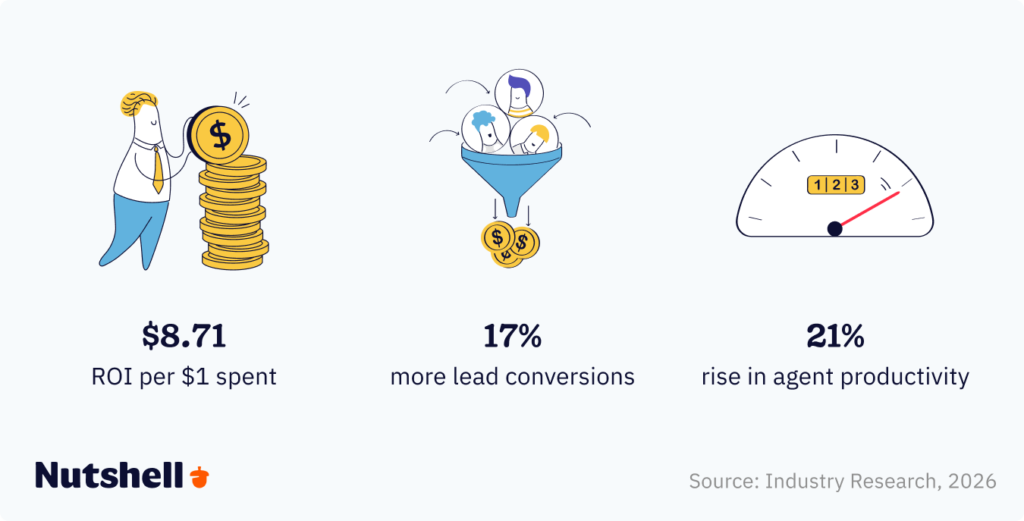
The problem isn’t CRM investment — it’s wasted CRM investment. A platform your team won’t adopt, locked behind a multi-year contract, delivers a return of exactly $0.
What to watch for when evaluating cost:
- Implementation and onboarding fees: Some vendors charge thousands of dollars just to get started. Factor this into the total cost, not just the monthly subscription.
- Restrictive contracts: Month-to-month flexibility matters, especially for growing businesses whose needs change quickly.
- Per-user pricing that punishes growth: Watch out for pricing models where adding a new rep significantly spikes your bill.
- Support costs: Some CRMs charge extra for phone or chat support. If something breaks or your team has questions, you shouldn’t have to pay to get help.
- Contact and data caps: Platforms that charge more as your database grows can create unexpected costs at exactly the wrong time.
Nutshell is built around transparent, affordable pricing — no restrictive contracts, no data caps, no surprise fees. Free customer support is included in every plan, even during your 14-day free trial. We believe the cost of your CRM should be predictable, and getting help with it should never cost extra.
Try Nutshell today
Try Nutshell free for 14 days or let us show you around before you dive in.

7. Limited reporting and analytics
In 2026, revenue leaders aren’t asking “how are we doing?” — they’re asking “which activities actually drive revenue, and where are deals getting stuck?” That’s a harder question, and it requires a CRM with real reporting depth, not just a dashboard that shows pipeline value and a close rate.
Common reporting limitations that hold teams back:
- Pre-built reports only — you’re stuck with standard views that don’t answer your specific questions
- No real-time data — reports lag behind what’s actually in the pipeline
- Limited visualization — tables of numbers with no charts or trend lines that make data interpretable at a glance
- No forecasting — the system shows you what happened but can’t help you predict what’s coming
- Poor export options — you can’t easily share data with stakeholders or run deeper analysis in other tools
Questions your CRM reporting should be able to answer:
Question Why it matters What’s our pipeline worth right now? Prioritize the deals that move the needle Where are deals getting stuck? Identify and fix bottlenecks in your sales process Which lead sources drive the most revenue? Allocate budget and effort where it actually pays off How is each rep performing? Coach proactively, not reactively What’s our projected revenue next quarter? Plan hiring, resources, and targets with confidence Nutshell’s reporting tools are built to answer these questions without requiring a data analyst to run them. You get customizable reports, visual dashboards with real-time data, sales forecasting based on your pipeline and historical performance, and easy export options for sharing with your leadership team.
8. Poor technical support
Even the most intuitive CRM will eventually surface a question your team can’t answer on their own. When that moment comes, the quality of your vendor’s support can mean the difference between a quick fix and a days-long productivity loss.
Poor support looks like:
- Ticketing systems with multi-day response times — you’re stuck waiting while deals sit idle
- Support gated behind premium plans — help costs extra, so teams avoid asking for it
- Generic documentation that doesn’t address your specific situation
- No phone or live chat option — you can only communicate through email threads that go nowhere
How to evaluate support quality before you commit:
- Test support during your trial: Submit a real question and measure how fast and how helpfully they respond. This is the most reliable signal you’ll get.
- Check third-party reviews: Look specifically at what users say about support quality on G2, Capterra, and similar platforms — not just overall satisfaction.
- Clarify what’s included in your plan: Free support included at every tier is a non-negotiable for lean teams who can’t afford downtime.
At Nutshell, we’re genuinely proud of our support team. Every customer — including trial users — gets free, unlimited access to our support team via phone, email, and chat. We consistently earn top marks for support quality on third-party review platforms, and we don’t believe you should ever pay extra to get help with a tool you’re already paying for.
“”Your customer service is hands-down the best I’ve seen in a long time. It is greatly appreciated. Keep up the good work!
Ryan M. Reichel Insulation
9. Limited mobile access
Another common CRM problem is limited mobile access. Sales representatives and other CRM users often Your sales team doesn’t work exclusively from desks. They’re at client sites, trade shows, and coffee meetings — and when they can’t access or update their CRM in the moment, data gets delayed, forgotten, or never logged at all.
The stakes are getting higher: nearly 81% of CRM users access their system from multiple devices, and the mobile CRM market grew from $28.43 billion in 2024 to $31.61 billion in 2025 — reflecting just how central mobile access has become to modern sales workflows.
What a genuinely useful mobile CRM looks like:
- A native app (not a mobile-optimized website) for iOS and Android
- Full feature parity — the ability to update deals, log activities, and view contact history, not just read data
- Offline capability that syncs automatically when connectivity returns
- Quick data capture — voice notes, business card scanning, one-tap logging
- Push notifications for follow-ups, new leads, and deal updates
What happens without it:
- Delayed data entry — reps wait until they’re back at their desks, and details go missing
- Missed context — no access to past conversation history during client meetings
- Lower adoption — if the CRM doesn’t support how people actually work, they stop using it
Nutshell’s fully featured iOS and Android apps give your team complete CRM access from anywhere — including offline functionality, business card scanning, and push notifications. Your data stays in sync whether your reps are at their desks or across town at a client site.
10. Data security concerns
Your CRM holds some of your most sensitive business information — customer contact details, deal values, communication history, and potentially financial data. In a world of tightening data privacy regulations and increasing cyber risk, treating security as an afterthought isn’t just risky — it can be legally and financially costly.
Key security considerations for CRM buyers:
- Data encryption: All data — at rest and in transit — should be encrypted. Ask vendors specifically about their encryption standards.
- GDPR and CCPA compliance: If you have customers in the EU or California, your CRM must support data privacy compliance. Check what tools the platform provides for managing data subject requests.
- Access controls and permissions: Different team members need different levels of visibility. Your CRM should make it easy to control who sees what.
- Data ownership: You should always own your data — and be able to export it in full, at any time, without restriction.
- Audit trails: The ability to see who accessed or changed what data is critical for both security and accountability.
Nutshell is committed to the security and privacy of your data. We use encryption to protect your information, comply with applicable data privacy laws, and you always retain full ownership of your data. We’ll never hold your data hostage or make it difficult to export.
The stakes are higher than many small businesses realize: The average global cost of a data breach reached $4.99M in 2026, and small businesses are frequently targeted because attackers assume, often correctly, that they have weaker defenses than larger companies.
11. Lack of a clear CRM strategy
Here’s a CRM challenge that has nothing to do with software: starting without a plan. More than 70% of CRM projects experience cross-functional misalignment during planning and rollout — and in most cases, it’s because teams skipped the strategy step entirely and went straight to selecting a tool.
A CRM without a strategy is just a database. Data goes in, sits there, and nobody trusts it enough to act on it.
What a clear CRM strategy actually includes:
- Defined objectives: Not “use the CRM more” — specific, measurable goals. “Reduce our average sales cycle from 45 days to 35 days.” “Increase lead-to-customer conversion rate from 18% to 25%.” Goals you can track.
- A mapped sales process: Document every stage from first contact to closed deal. Identify where leads currently fall through the cracks. Your CRM should reflect your actual process — not a generic one.
- Data governance rules: What fields are required? Who enters what data, and when? What triggers moving a deal to the next stage? Ambiguity here is where data quality goes to die.
- Cross-functional alignment: Sales, marketing, and customer support should all agree on how the CRM will be used before the first contact is created — not after they’re fighting over whose leads are whose.
- Success metrics: Define how you’ll know the CRM is working. User adoption rate, pipeline accuracy, time-to-close, lead source attribution — pick the metrics that matter to your business.
For most small and growing businesses, a CRM strategy doesn’t need to be a 50-page document. A clear one-page plan that answers “what are we trying to achieve, how will we measure it, and who’s responsible for what” is enough to dramatically improve your odds of success.
12. Data migration challenges
Switching CRMs — or moving off spreadsheets — means bringing your customer history with you. That sounds simple. It rarely is. Poor data migration is one of the most common reasons new CRM implementations stumble right out of the gate: you import a mess, and now your shiny new system is full of duplicates, missing fields, and contact records that look like they were assembled by several different people using several different conventions.
Common data migration obstacles:
- Inconsistent formatting: Phone numbers in four different formats, addresses missing state codes, company names with and without “Inc.” — all small things that create big downstream confusion
- Duplicate records: The same customer appearing three times with slightly different names or emails
- Missing critical fields: Data that lived in a notes column in your old system has nowhere to go in your new one
- Historical activity decisions: How much past call and email history do you migrate? What’s the cutoff?
- Custom field mapping: Translating your old system’s unique data structure into your new CRM’s architecture
How to migrate cleanly:
- Clean before you migrate — not after: Deduplicate, standardize formatting, and fill in critical missing fields before you import anything. Moving clean data into a new CRM is smooth. Cleaning it afterward is miserable.
- Run a test batch first: Import 50 to 100 records, check how they appear, and fix any mapping issues before migrating your full database.
- Map every field carefully: Work through exactly how each field in your old system translates to your new one. Don’t assume — verify.
- Choose a CRM with migration support: White-glove data import assistance at no extra charge means you don’t have to figure this out alone.
At Nutshell, our support team handles data imports for every new customer. We’ll work with you to clean, map, and import your data correctly — so you launch with confidence, not with a week of cleanup work ahead of you.
13. Lack of proactive pipeline visibility
Even CRMs with strong reporting tools don’t solve this on their own. Most teams only look at pipeline data after something’s gone wrong, a deal falls through, a quarter comes up short, when it’s too late to do anything but explain it after the fact.
Common signs of this issue:
- Deals sit stalled in the same stage for weeks before anyone notices
- Forecasts consistently miss because stuck deals were counted as healthy
- Reps only review their pipeline right before a 1:1 with their manager, not proactively
- Leadership finds out about a slipping deal in a status meeting instead of a dashboard
The root cause: having reporting capability isn’t the same as building a habit of using it. Without a regular review cadence, even the best dashboards go unopened.
How to build proactive pipeline visibility:
- Schedule a recurring pipeline review, weekly for reps, monthly for managers, not just before board meetings
- Set a “days in stage” threshold that flags stalled deals automatically
- Track conversion rate by stage, not just overall win rate, to catch exactly where deals stall
- Make “next action” a required field on every open deal, not an afterthought
Nutshell tie-in: reporting and forecasting tools (see Issue #7) make this data visible, but turning visibility into results depends on the review habit. For the full weekly/monthly pipeline review framework, see How to Manage a Sales Pipeline for an SMB.
CRM issues at a glance
CRM issue Primary cause Key fix Poor user adoption Tool too complex; no rep buy-in Choose intuitive software; involve team early Inaccurate data Manual entry burden; no data ownership Automate data capture; assign data governance Integration issues Poor pre-purchase audit; limited native integrations Audit tech stack first; test integrations in trial Overwhelming complexity Enterprise tool for SMB needs Match tool to team size; prioritize ease of use Lack of customization Rigid default structure Require custom fields, pipelines, and workflows Cost and ROI concerns Hidden fees; poor adoption Transparent pricing; prioritize adoption over features Limited reporting Pre-built reports only Test reporting during trial with real questions Poor technical support Support gated or slow Verify free, live support is included Limited mobile access No native app; poor feature parity Test mobile app during trial with real workflows Data security Weak encryption; no compliance features Confirm encryption, GDPR compliance, data ownership No CRM strategy Skipping planning phase Define goals and process before selecting a tool Data migration Dirty source data; no import support Clean data first; choose vendor with migration help The right CRM removes the obstacles — it doesn’t create them
Most CRM problems aren’t inevitable. They’re the predictable result of choosing the wrong tool, skipping the strategy phase, or implementing without your team’s buy-in. And they’re fixable — often without a massive overhaul.
If you’re dealing with any of the issues in this guide, start by asking one honest question: is the problem the tool, the process, or the people? The answer shapes everything that comes next.
We built Nutshell to be the answer to all 12 of the challenges above — an all-in-one CRM that’s genuinely easy to use, deeply integrated with the tools your team already relies on, and backed by free, unlimited support from real humans who want you to succeed. Most teams are up and running within days. And unlike the enterprise platforms that dominate the market, Nutshell is designed so that the next action on every deal is always obvious — because helping your team close more deals is the whole point.
Ready to see what CRM without the headaches looks like? To discover for yourself what makes Nutshell different, start your free trial today.
FAQs
-
1. How long does CRM implementation typically take?
Small businesses using Nutshell can be up and running in just 1-3 weeks with basic features, while mid-sized companies typically need 1-3 months for full implementation. The timeline depends on data complexity, customization needs, and team size. Nutshell’s user-friendly design and free support significantly reduce implementation time compared to complex CRMs that can take 6-12 months.
-
2. What are the signs it’s time to switch CRM systems?
Key warning signs include: your team rarely uses the current system, data lives in spreadsheets instead of the CRM, you lack visibility into your sales pipeline, integration with other tools is problematic, and you’re not seeing revenue growth despite CRM investment. If fixing these issues would cost more than switching, it’s time for a change.
-
3. How do you measure CRM success?
Track these essential metrics: user adoption rate (target 80%+ within 30 days), customer retention rate, average deal size, sales cycle length, and pipeline visibility. Nutshell’s built-in reporting makes monitoring these metrics simple. Most businesses see positive ROI within 3-6 months when adoption rates stay high.
-
4. What’s the difference between CRM implementation issues and ongoing operational challenges?
Implementation issues are one-time setup problems like data migration, initial training, and system configuration. Operational challenges are ongoing concerns like maintaining data quality, user adoption, and process optimization. While implementation issues resolve after launch, operational challenges require continuous attention—which is why Nutshell’s free, ongoing support is so valuable.
-
5. How can small businesses avoid CRM failure?
Start with a clear strategy before selecting a tool. Involve your sales reps in the evaluation process. Clean your data before migrating it. Choose a CRM designed for your team size — not one built for a Fortune 500 company. Launch with core features and expand gradually as adoption solidifies. And choose a vendor that offers free, accessible support so your team can get help without friction when they need it.
-
6. How do I get stakeholder buy-in for a new CRM system?
Getting buy-in from leadership, sales teams, and other departments is critical for CRM success. Here’s how to build that consensus:
For leadership: Focus on ROI metrics, time savings, and competitive advantages. Share data showing that properly implemented CRMs deliver $8.71 for every dollar spent and can reduce sales cycle time by 10% to 30%.
For sales teams: Emphasize how the CRM makes their jobs easier through automation, mobile access, and better visibility into their pipeline. Involve sales reps in the selection process so they feel ownership over the decision.
For marketing: Highlight integration capabilities with marketing automation tools, better lead tracking, and clearer attribution for campaign ROI.
For customer support: Show how centralized customer information improves service quality and reduces time spent searching for information.
The key is demonstrating specific benefits for each stakeholder group rather than generic “it’s better” promises. Real-world examples, like how The CyberWire used Nutshell to create board-level metrics reports, can be particularly persuasive.
-
7. What are the biggest mistakes businesses make when implementing a CRM?
Based on research showing that 55% of CRM implementations fail, here are the most critical mistakes to avoid:
Choosing based on features, not usability: A CRM with 500 features you never use is worse than one with 50 features your team actually adopts. Prioritize user-friendliness over feature counts.
Skipping the data cleanup phase: Migrating messy data into a new CRM just gives you organized mess. Clean, deduplicate, and standardize before you import.
Inadequate training: One training session isn’t enough. Plan for ongoing education, refresher courses, and support resources.
No clear success metrics: Without defined goals and KPIs, you can’t measure ROI or know if you’re on track.
Trying to do everything at once: Start with core features (contact management, pipeline tracking) and add complexity gradually as adoption solidifies.
Ignoring mobile needs: If your team works in the field or remotely, mobile access isn’t optional—it’s essential.
For small to medium-sized businesses, the biggest mistake is often choosing an enterprise-level CRM that’s far more complex than your team needs. Systems designed for Fortune 500 companies require extensive implementation support, ongoing administration, and significant training—resources most small businesses don’t have.
-
8. What are the most common CRM issues?
The most common CRM issues are poor user adoption, inaccurate or outdated data, integration problems, overwhelming complexity, and lack of a clear CRM strategy. Research consistently shows that over 60% of CRM failures trace back to people and process problems — not technology. Choosing an intuitive CRM and involving your team in the selection process are the two most effective ways to prevent these issues.
-
9. Why do so many CRM implementations fail?
According to research from Johnny Grow, 55% of CRM implementations fail to achieve their planned objectives — and CRM projects fail at nearly double the rate of other IT initiatives. The leading causes are low user adoption (38% of failures), inadequate change management (22%), and poor data quality (18%). Technical problems account for only 6 to 10% of failures. The fix isn’t better technology — it’s a people-first approach to implementation.

Let’s Talk
Have a question? Need a volume discount? Send us a message or book a meeting with a Sales rep to start the conversation.
 BACK TO TOP
 Written by
Will Gordon Sr. Director of MarketingEdited by
Andy Fowler Co-FounderReady to try
Nutshell for Free?Thank you! Your submission has been received!Oops! Something went wrong while submitting the form.







What Is Revenue Intelligence? An All-Encompassing Guide
Published on: January 24, 2024Highly Effective Strategies for Elevating Sales Team Performance
Published on: November 10, 2022Join 30,000+ other sales and marketing professionals. Subscribe to our Sell to Win newsletter!










