Introducing Company Hierarchy in Nutshell
-
Last updated on: October 23, 2025
Does your company need to track leads across a large organization with multiple child companies?
Introducing company hierarchy in Nutshell! Now you can create a company hierarchy and designate multiple child companies within a larger organization’s structure.
This new feature simplifies lead and sale tracking, giving you better insight into your leads across subsidiaries of a parent company.
How do parent/child companies work?
Nutshell lets you create relationships between parent and child companies, then connects their data to give you an overarching view of leads and sales across all your client relationships.

How can I create child companies?
Here’s a quick guide for utilizing the new company hierarchy feature:
Easily add parent or child companies from any company page
You can add new parent-child relationships in just a few clicks.
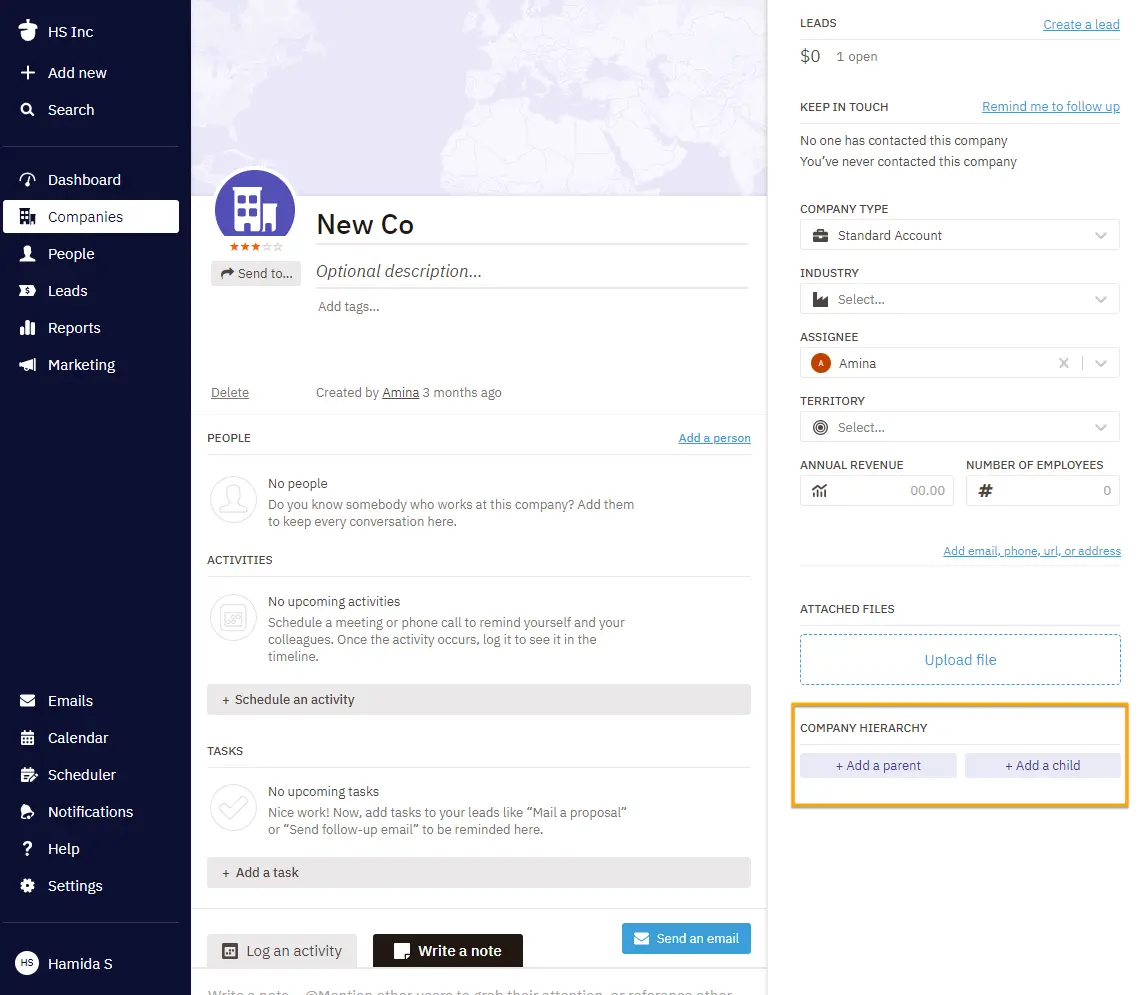
To include any company in a parent-child hierarchy, navigate to that company’s record page. Under the ‘Company Hierarchy’ section in the right column, use the ‘Add’ buttons to associate a parent or child entity with the company. You can select from the companies you’ve already added to Nutshell.
When adding a parent or child company, you can input the company’s name, location, and a description.

See all your leads at a glance
Want to see all the leads in your pipelines—across all locations of an organization? Use the lead roll-up section!
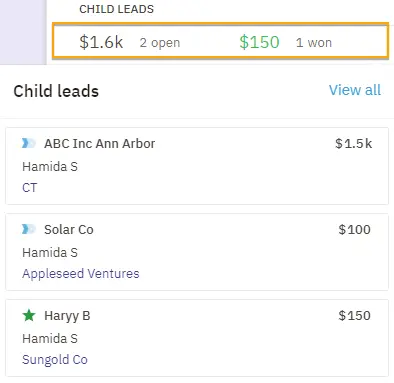
Higher up in the right column on the parent company’s page, click on ‘Leads’ to view all related leads associated with a parent company’s child companies, their value, and status. Then click ‘View all’ to dive into the data.

Use filters to get the information you need
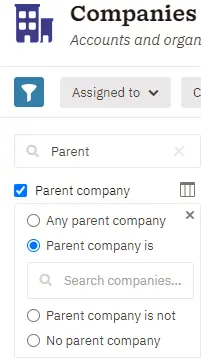
You can also use new filters to get a better view of parent and child companies you have in Nutshell. Wherever you see a parent or child company, the icons will also indicate whether it’s a parent or child for your quick reference.

Improve lead tracking and customer management with company hierarchy
This new company hierarchy feature will enhance your team’s ability to track leads and manage client relationships across all your opportunities, whether it’s a small business or one location of a much larger organization.
Nutshell provides even more ways to help your team track and work leads to close more deals. Want to try Nutshell for yourself? Start your 14-day free trial!
Frequently asked questions about parent/child companies
If you’re looking for more information about company hierarchy, check out these FAQs:
-
1. Who can use parent/child organization?
The company hierarchy feature is available for Nutshell customers on Pro plans and above.
-
2. How many parent and child companies can be included in one organization?
Each organization can only have one parent company. You can add as many child companies to that organizational structure as you want.
-
3. Can I create company hierarchies en masse?
Yes, Nutshell’s CSV / spreadsheet importer allows you to connect and create company hierarchies, matching existing companies by name.
-
4. What happens when I remove a parent/child relationship?
You can easily unassociate a parent and child company, and don’t worry—your individual company records will remain in Nutshell.

-
5. What are the benefits of using company hierarchy in Nutshell?
Company hierarchy helps you track sales across multiple locations, view consolidated lead data from all subsidiaries, improve reporting accuracy, and simplify account management. You’ll get better visibility into your entire customer relationship while maintaining detailed records for each location or subsidiary.
-
6. When should I use company hierarchy vs. creating separate company records?
Use company hierarchy when managing franchises, multi-location businesses, or subsidiaries under one parent organization. Create separate records for unrelated companies. If you need to track combined sales performance across locations or roll up reporting data, company hierarchy is the right choice.
-
7. How does company hierarchy affect reporting in Nutshell?
Company hierarchy lets you view aggregated data at the parent level while maintaining individual child company metrics. You can filter reports by parent or child companies, see rolled-up lead values on parent company pages, and track performance across your entire organizational structure.
-
8. Can I change a child company to a parent company later?
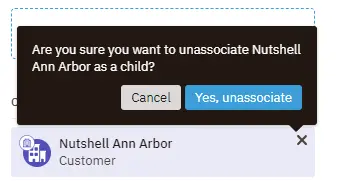
Yes, you can restructure your company hierarchy anytime. Simply remove the existing parent-child relationship by clicking the ‘x’ on the company card, then reassign the company as a parent. Your company records remain intact—only the hierarchical relationships change.
-
9. Does company hierarchy work with Nutshell’s other features like territories, teams, or automation?
Yes, company hierarchy integrates seamlessly with Nutshell’s features. You can filter by parent or child companies in reports, use hierarchy in custom views, and apply territories or team assignments. The hierarchy structure enhances your existing workflows without disrupting current processes.
See Nutshell in action
Give our powerful, easy-to-use CRM a try for free for 14 days! START YOUR FREE TRIAL
BACK TO TOPWritten by
Chris Cain VP of Product Development, NutshellReady to try
Nutshell for Free?Thank you! Your submission has been received!Oops! Something went wrong while submitting the form.
The 10 Best CRMs for iOS: Which iPhone CRM App Has the Features You Need?
Published on: November 10, 2022Sales Performance Reviews: 9 Tips to Make Them Valuable
Published on: November 10, 2022Highly Effective Strategies for Elevating Sales Team Performance
Published on: November 10, 2022What Are the Top 3 Go-To-Market Strategies?
Published on: November 10, 2022Join 30,000+ other sales and marketing professionals. Subscribe to our Sell to Win newsletter!
- Product
- Nutshell Overview
CRM & Sales
Our powerful and easy-to-use flagship product.Marketing
Email marketing, forms, landing pages, and more.Engagement
Your omni-channel inbox in your CRM.Prospecting
Prospect for new leads and new contacts in your CRM.Quotes & Invoices
Quickly create quotes & invoices in your CRM.
AI
See why Nutshell is the leading AI CRM.Integrations
Connect to Google/Microsoft and over 5,000 Apps.
ReportingCreate reports and forecasts in an instant.CRM Advisor
Get a dedicated point of contact to get the most out of Nutshell.Partner Marketplace
Find trusted partners to help optimize your Nutshell CRM.
- Pricing
Nutshell AI
- Resources
- Contact Us
Contact Sales
Send us your questions or book a 1-on-1 demo.Join a Demo
Join a group demo for a general overview of Nutshell.
Contact Support
Contact our support team via live chat in app or via email.Become a Partner
Refer businesses to Nutshell & earn commissions.
Contact Marketing
Questions about our website or our marketing opportunities?Careers
Join our growing team! See current openings.