Bring the Power of Nutshell to Your Inbox With the Nutshell for Outlook Add-In!

-

Great news for Office 365 Outlook users: The Nutshell for Outlook add-in is now available, giving you one more way to stay organized and productive wherever you are.
When you launch the Nutshell sidebar in Outlook, you can log activities, upload files from emails, write a note, schedule a new activity, and more.
Extending the integration foundation we built with Microsoft to sync email and calendar activities, you can now use Nutshell’s most important contact management features without leaving your inbox.
Work where you work with Nutshell’s latest Outlook power-up.
The Nutshell for Outlook add-in delivers the power of Nutshell to your inbox so you can save time, stay organized, and manage your deals without having to switch between applications.
With Nutshell for Outlook you can…
- Create contacts and tasks
- View saved contact data and scheduled activities
- See open and closed leads associated with a contact
- Track communication timelines
- Write notes
- Open the contact’s page in Nutshell
- Use your Nutshell email templates from the Outlook email composer
…and much more, directly from Office 365 Outlook.
Work the deal without leaving Outlook
You already live in the inbox. The call you just finished, the contract on the thread, and the meeting you still need to book all start there, then usually send you back to the CRM to write them down. We rebuilt the Nutshell sidebar in Outlook so that work can stay on the thread without needing to leave your inbox
What’s in Nutshell’s email sidebar?
When you have an email open with a Person, it shows all of the information that you have in your CRM on that person, including Company and Lead information, with their tasks, scheduled activities, leads, and timeline. It’s essentially everything you have in your CRM that is tied to that contact record without the need to open your CRM.
After a call or email, you can log what happened, save an attached file onto the deal, and offer meeting times while you write the reply. Open any record in Nutshell when you need the full page.
What can I do with Nutshell’s email sidebar?
See who you are emailing
Open a thread and the sidebar lists who is on it. Click a person for their open tasks, upcoming activities, leads, and recent timeline. Click the company name for that company’s people and deals, and log work on the company itself. People who are not in Nutshell yet can be added from the thread, with their name and email filled in. If a name or phone number needs fixing, open Details, then Edit, on the person.
Log the call before you close the thread
Log an activity or write a note on the person or company you are viewing. Record a call or meeting that already happened, or schedule the next one. Save from Outlook, and the entry is on the timeline in Nutshell. You can also see all scheduled activities in the sidebar’s Activities list.
File the attachment on the right record
If someone emails you an image or a pdf, you can save it right to a lead, a company, or a person. In Gmail, use the Save to Nutshell badge on the attachment itself, or click Save or Save all in the sidebar. Nutshell skips files it already has, and it leaves signature images off the list.
Offer times while you write
From the Outlook compose window, open “Book a time”.
Propose up to three open times, or insert a booking link. Each time becomes a button in the email, with a link to the rest of your availability. When the recipient books, the calendar event and the Nutshell activity are created.
This uses Nutshell Scheduler and a connected calendar. If either is missing, the panel tells you what to connect.
How do I get started?
- Add the Nutshell Outlook add-in
- Log into Nutshell to verify your account
- Reload your Outlook inbox
The sidebar is available on every Nutshell plan.
- In order to send email templates from Gmail, you’ll need Nutshell Business and above.
- The “Book a time” feature requires Nutshell Scheduler, available on Nutshell Pro and above.
Not a Nutshell customer yet? Start a free 14-day trial and see what Nutshell can do for your team.
BACK TO TOPWritten by
Will Gordon Sr. Director of MarketingEdited by
Sam Poole Associate Content MarketerReviewed by
Chris Cain VP of Product Development, NutshellReady to try
Nutshell for Free?Thank you! Your submission has been received!Oops! Something went wrong while submitting the form.
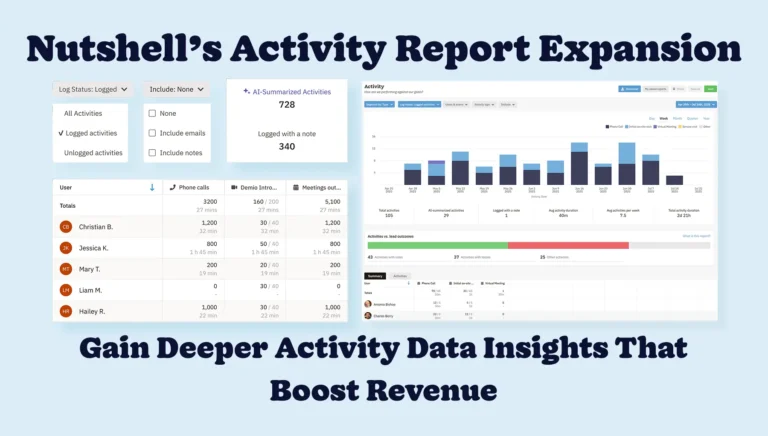
Gain Deeper Activity Data Insights That Boost Revenue with Nutshell’s Enhanced Activity Report
Published on: July 30, 2025

A Comprehensive Guide to Customer Profiles With 4 Free Template Examples
Published on: November 20, 2024Highly Effective Strategies for Elevating Sales Team Performance

Published on: November 10, 2022Introducing Nutshell Forms Spam Prevention
Published on: April 22, 2024Join 30,000+ other sales and marketing professionals. Subscribe to our Sell to Win newsletter!
- Product
- Nutshell Overview
CRM & Sales
Our powerful and easy-to-use flagship product.Marketing
Email marketing, forms, landing pages, and more.Engagement
Webchat, SMS, WhatsApp & more in your Omni-Channel Inbox.Prospecting
Prospect for new leads and new contacts in your CRM.Proposals & Invoices
Create & send quotes, invoices and contracts in your CRM.
AI
See why Nutshell is the leading AI CRM.Integrations
Connect to Google/Microsoft and over 5,000 Apps. Reporting
Create reports and forecasts in an instant.Mobile App
Take your CRM with you wherever you go.CRM Advisor
Get a dedicated point of contact to get the most out of Nutshell.
- Pricing
Nutshell AI
- Marketplace
- Resources
- Contact Us
Contact Sales
Send us your questions or book a 1-on-1 demo.Join a Demo
Join a group demo for a general overview of Nutshell.
Contact Support
Contact our support team via live chat in app or via email.Become a Partner
Refer businesses to Nutshell & earn commissions.
Contact Marketing
Questions about our website or our marketing opportunities?Careers
Join our growing team! See current openings.