Skip to main content ↓

How to Send Personalized Sales Emails That Actually Convert: 9 Proven Strategies

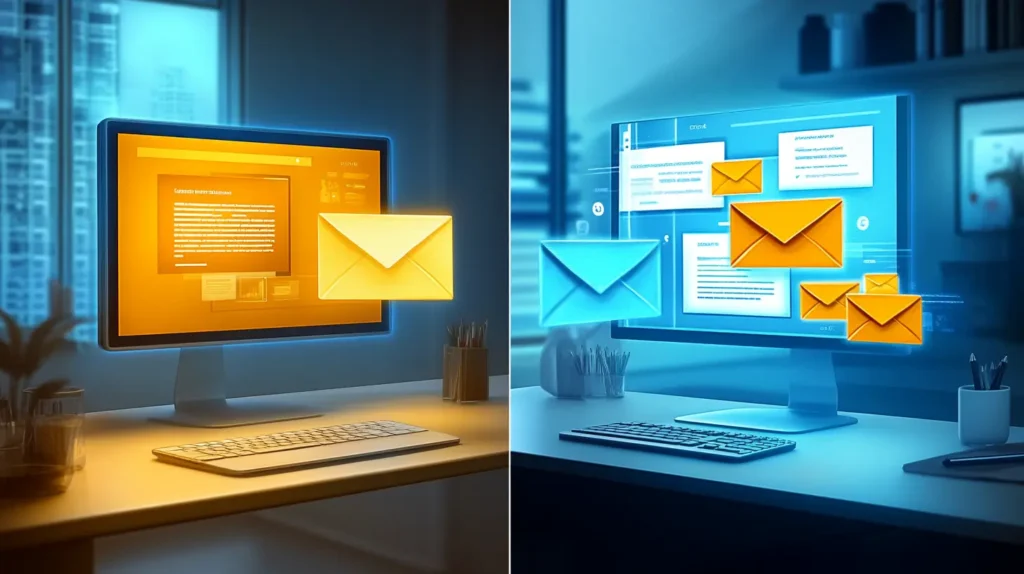
An image depicting a split screen, which visually illustrates the contrast between generic and personalized email marketing.

Key Takeaways

Personalized sales emails deliver significantly better results than generic outreach, with studies showing they can achieve up to six times higher transaction rates.

This guide outlines 9 actionable strategies for crafting personalized emails that actually convert, from advanced segmentation techniques to AI-powered automation. 

You’ll learn how to personalize beyond basic name fields, leverage behavioral triggers, implement dynamic content, and scale your efforts with CRM automation.

Whether you’re sending 10 emails or 10,000, these proven tactics will help you connect with prospects on a deeper level and drive meaningful conversations that lead to closed deals.

Email campaigns deliver $36 to $40 for every $1 spent and can increase revenue by up to 760%, according to recent data. Yet most sales teams still struggle with generic emails that achieve only 5.1% response rates. The difference between success and failure in email outreach often comes down to one critical factor: personalization.

If you’re tired of sending emails that disappear into the void, you’re not alone. The good news is that implementing personalized sales emails doesn’t require a complete overhaul of your approach. With the right strategies and tools, you can transform your email outreach from ignored to irresistible.

In this guide, we’ll share 9 proven personalization strategies that top-performing sales teams use to achieve response rates as high as 40-50%—and show you exactly how to implement them in your own campaigns.

P.S. There are more sales tips where these came from. Sign up for our Sell to Win newsletter to get the latest sales advice from our team delivered to your inbox for free!

Why email personalization matters more than ever 

The days of spray-and-pray email campaigns are officially over. Today’s buyers expect—and demand—personalized communication. In fact, 72% of consumers only engage with personalized messaging, making it clear that generic outreach is no longer just ineffective—it’s actively harmful to your brand.

The impact on key metrics tells the whole story. Personalized emails deliver 29% higher open rates and 41% higher click-through rates compared to generic messages. Most importantly, they generate 6x higher transaction rates, directly impacting your bottom line. This shift from mass marketing to 1:1 conversations at scale isn’t just a trend—it’s the new baseline for successful sales outreach.

Modern CRMs have made this transformation possible by automating the heavy lifting of personalization. What once required hours of manual research can now happen automatically. Sales teams can send hundreds of personalized emails while maintaining that crucial human touch. The question isn’t whether to personalize your sales emails—it’s how to do it effectively at scale.

Pro tip: Use Nutshell’s hassle-free customer relationship management (CRM) software to send automated, personalized emails to your entire email list with ease. With Nutshell’s powerful email features you can help your sales team spend less time typing up emails and more time closing deals. 

9 effective strategies for sending high-converting personalized emails

Here’s how to send personalized sales emails that convert your prospects with these seven tips: 

Strategy 1: Personalize beyond the first name

Let’s be honest—starting an email with “Hi {{FirstName}}” isn’t personalization anymore. It’s table stakes. Today’s buyers see right through this basic tactic, and they expect much more. True personalization means demonstrating that you understand their specific situation, challenges, and goals.

Advanced personalization incorporates multiple data points to create a message that feels genuinely crafted for the recipient.

Consider including their:

  • Company name and industry context 
  • Specific job title and departmental challenges 
  • Recent company news or achievements
  • Mutual connections you share
  • Geographic location when relevant

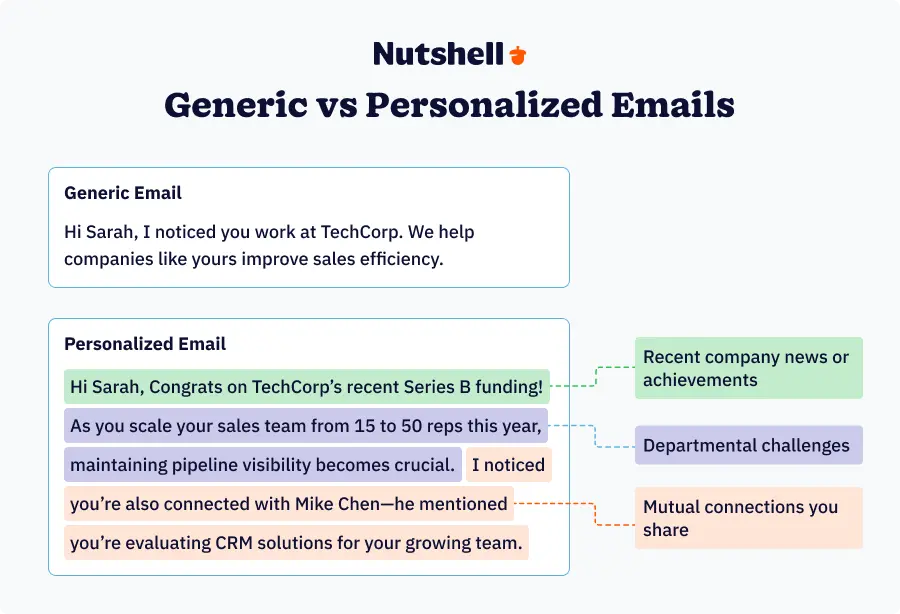
Here’s a before-and-after example that shows the difference:

Side-by-side comparison of generic vs personalized sales email templates with highlighted improvements

Generic: “Hi Sarah, I noticed you work at TechCorp. We help companies like yours improve sales efficiency.”

Personalized: “Hi Sarah, Congrats on TechCorp’s recent Series B funding! As you scale your sales team from 15 to 50 reps this year, maintaining pipeline visibility becomes crucial. I noticed you’re also connected with Mike Chen—he mentioned you’re evaluating CRM solutions for your growing team.”

Pro Tip: Nutshell’s custom fields and company insights features automatically pull in relevant data about your leads, making this level of personalization scalable. You can create unlimited custom fields to track industry-specific information, funding rounds, technology stack, or any other data points that matter to your sales process. This data can then power personal email sequences that feel truly customized.

Strategy 2: Reference recent interactions or triggers

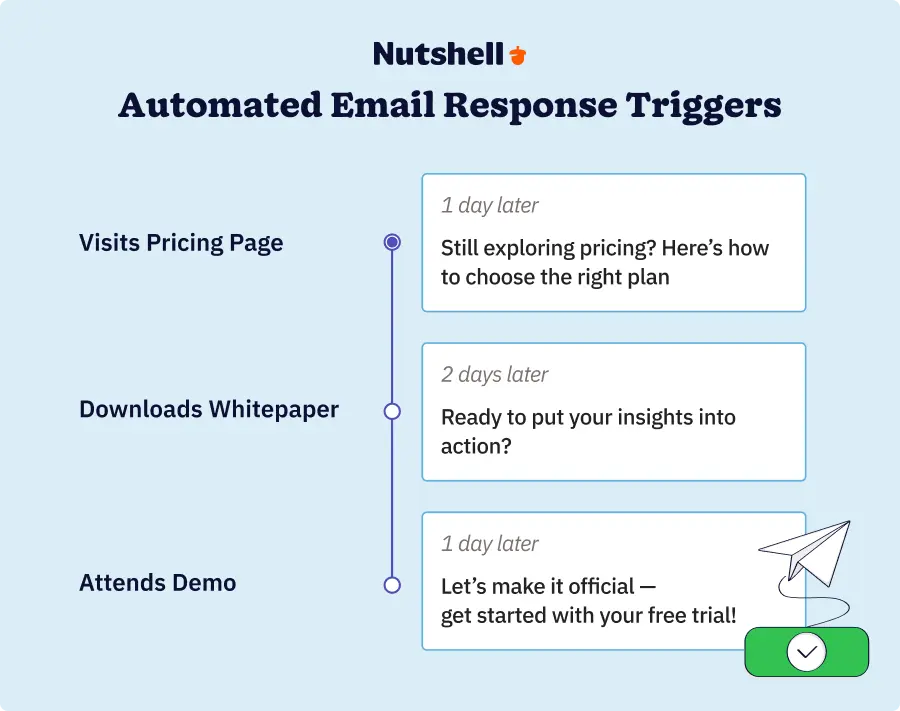
Timing is everything in sales, and behavioral triggers give you the perfect moment to reach out. When someone takes a specific action—like visiting your pricing page or downloading a whitepaper—they’re actively thinking about solving a problem. Emails sent based on these triggers see 3x higher response rates because they arrive when leads are most engaged.

Key triggers to track include demo attendance (follow up within 24 hours), pricing page visits (indicate buying intent), content downloads (show interest in specific topics), email opens and clicks (reveal engagement level), and social media interactions (LinkedIn profile views or post engagements).

Here’s a post-demo follow-up template that converts:

“Hi {{FirstName}},

Thanks for joining our demo yesterday! I noticed you had great questions about our reporting features, especially around pipeline forecasting.

Based on what you shared about needing better visibility into your team’s activities, I’ve attached a quick video showing how three of our customers in {{Industry}} use our custom dashboards to track similar metrics.

Would you like to explore how this could work with your specific sales process? I have time Thursday at 2 PM or Friday at 10 AM.”

Pro Tip: Nutshell’s activity timeline automatically logs every interaction with your leads, from email opens to website visits. You can set up automated trigger campaigns that send personalized follow-ups based on specific behaviors, ensuring you never miss a hot lead.

Timeline showing behavioral triggers and corresponding automated email responses with optimal timing

Strategy 3: Segment your audience strategically

Market segmentation is the secret weapon of high-performing sales teams. Instead of treating all leads the same, strategic segmentation enables you to craft personalized marketing emails that address the unique challenges and goals of specific groups. This approach delivers 14% higher open rates and significantly better engagement.

Effective segmentation goes beyond basic demographics. 

Consider segmenting by:

  • Industry vertical – SaaS companies face different challenges than manufacturers
  • Company size – a 10-person startup has different needs than a 500-person enterprise
  • Sales cycle stage – awareness vs. evaluation vs. decision
  • Engagement level – highly engaged vs. dormant contacts
  • Specific pain points – efficiency, visibility, automation needs

For example, here’s how the same product benefit might be positioned for different segments:

  • For SaaS startups: “Close deals 23% faster with automated follow-up sequences that ensure no lead falls through the cracks during your rapid growth phase.”
  • For manufacturing companies: “Track complex, multi-stakeholder deals with visual pipelines that show exactly where each opportunity stands in your 6-month sales cycles.”
  • For professional services: “Bill more hours by spending less time on admin work—our CRM automates client communications so you can focus on deliverables.”

Pro Tip: Nutshell’s tagging and list-building features make it easy to create dynamic segments that update automatically. You can build lists based on any combination of criteria, from industry and company size to engagement level and lead score, ensuring your messages always reach the right audience.

Ready to segment your audience for better personalization?

Experience firsthand how Nutshell’s dynamic lists and tagging features make it easy.

Strategy 4: Use dynamic content blocks

Dynamic content takes personalization to the next level by automatically adjusting entire sections of your email based on recipient attributes. Instead of creating dozens of separate templates, you create one master template with variable content blocks that change based on the recipient.

Types of dynamic content that drive results include:

  • Industry-specific case studies – show a retail case study to retail leads
  • Role-based value propositions – emphasize different benefits for sales managers vs. CEOs
  • Personalized CTAs – invite SMBs to a webinar while offering enterprises a private demo
  • Custom pricing information – display tier-appropriate pricing without manual editing

Here’s how dynamic content might work in practice:

  • For a VP of Sales in Software: “See how Acme Software increased qualified leads by 47% using our lead scoring features. [Read the Case Study]”
  • For a Sales Manager in Healthcare: “Discover how MedTech Corp reduced their sales cycle by 3 weeks with our HIPAA-compliant CRM. [View Success Story]”

Always include fallback content for when specific data isn’t available. This ensures every recipient gets a relevant message, even if you don’t have complete information about them.

Pro Tip: Nutshell’s email template builder includes powerful merge fields that go beyond basic personalization. You can insert dynamic content based on any field in your database, creating truly personalized messages at scale without the complexity of enterprise marketing automation platforms.

Strategy 5: Personalize your email signature

Your email signature gets 100% visibility—every recipient sees it—yet most salespeople use generic, static signatures that waste this valuable real estate. A personalized signature can be the difference between a deleted email and a booked meeting.

Dynamic signature elements that drive engagement include:

  • Location-based information – mention you’re in their city for a local connection
  • Recent content you’ve published – blog posts or industry insights
  • Industry-specific certifications or awards
  • Personalized meeting links with their company name
  • Social proof relevant to their industry – testimonials from similar companies

Here’s an example of a dynamic signature:

Sarah Johnson
Senior Account Executive | Nutshell
📍 Based in Chicago (2 hours from your Milwaukee office)
📅 Book time with Sarah about {{Company}}’s CRM needs

“Nutshell helped us increase sales productivity by 34% in just 3 months”

    • Jennifer Chen, VP Sales at TechStartup (SaaS, 50 employees)

P.S. Just published: “5 Ways SaaS Companies Can Shorten Sales Cycles” [Read here]

Remember to optimize signatures for mobile viewing, where over 50% of emails are now opened. Keep formatting simple and links thumb-friendly.

Pro Tip: Nutshell’s centralized signature management ensures your entire team maintains consistent, professional signatures while still allowing for personalization. You can create signature templates with variable fields that automatically populate based on the sender and recipient.

Strategy 6: Time your emails based on recipient behavior

Sending the perfect email at the wrong time wastes all your personalization efforts. Data shows that emails sent at optimal times see 23% higher open rates, yet most sales teams still blast emails whenever it’s convenient for them, not their leads.

The key is analyzing engagement patterns to identify when your specific audience is most likely to engage. While general best practices suggest sending B2B emails on Tuesday through Thursday mornings, your audience may be different. Consider timezone differences (a 9 AM email in New York arrives at 6 AM in California), industry-specific patterns (retail buyers might check email in the evening), and role-based preferences (C-level executives often check email early in the morning or late in the evening).

Here’s a timing matrix to guide your outreach:

IndustryBest DaysOptimal Times
SaaS/TechTue-Thu10-11 AM, 2-3 PM
HealthcareMon-Wed6-7 AM, 12-1 PM
Financial ServicesTue-Thu8-9 AM, 4-5 PM
RetailWed-Fri11 AM-12 PM, 7-8 PM

Pro Tip: Nutshell’s email scheduling features include timezone detection, ensuring your 10 AM email arrives at 10 AM in your prospect’s timezone, not yours. You can also analyze your email performance data to identify the optimal send times for different segments of your audience.

Strategy 7: A/B test your personalization elements

Even the best personalization strategies can be improved through systematic testing. A/B testing your personalization elements helps you understand what resonates with your specific audience, leading to continuous improvement in your response rates.

Elements worth testing include subject line personalization depth (company name vs. personal name vs. pain point), opening line variations (question vs. statement vs. compliment), CTA personalization (generic “learn more” vs. specific “see how {{Company}} can save 5 hours weekly”), and signature elements (with or without photo, testimonials, meeting links).

Here’s an example test you might run:

  • Version A Subject: “Quick question about {{Company}}’s sales process”
  • Version B Subject: “How {{Company}} can reduce CRM data entry by 70%”

Results after 500 sends:

  • Version A: 24% open rate, 3% response rate
  • Version B: 31% open rate, 7% response rate

Testing methodology matters. Ensure you have sufficient sample size (at least 100 sends per variation), test for an appropriate duration (minimum 1 week to account for daily variations), and only test one element at a time to isolate variables.

Pro Tip: Nutshell’s built-in A/B testing capabilities let you test different versions of your emails without complex setup. You can automatically send winning variations to the remainder of your list, ensuring you’re always using the most effective approach.

Want to A/B test your personalized emails without the complexity?

Nutshell’s built-in email A/B testing capabilities make it simple. Sign up for a free 14-day trial today to put our email personalization tools to the test (no credit card required).

Strategy 8: Scale personalization with CRM automation

Manual personalization works great for 10 leads. But what about 100? Or 1,000? This is where CRM automation becomes essential. With the right automated email campaigns setup, you can maintain highly personalized outreach while increasing your volume by 10x or more.

Effective CRM email personalization relies on three key principles. 

First, design trigger-based sequences that respond to specific actions (demo request triggers a 5-email nurture sequence). Second, use conditional logic to adapt messages based on engagement (if email 1 isn’t opened, email 2 has a different subject line). Third, leverage merge fields and placeholders throughout to maintain the human touch.

Here’s an example automated nurture sequence:

  • Email 1 (Immediately after trigger): Acknowledge their specific action with relevant resource
  • Email 2 (Day 3): Share a case study from a similar company with personalized insight
  • Email 3 (Day 7): Offer specific help based on their industry/role
  • Email 4 (Day 14): Provide valuable tool or template related to their pain point
  • Email 5 (Day 21): Final value-add with soft CTA to reconnect

The key to maintaining authenticity in automated emails is to write like a human, not a robot. Use conversational language, reference specific details about their company, and always provide value before asking for anything in return.

Pro Tip: Nutshell’s workflow builder lets you create sophisticated automation sequences without needing a technical degree. You can build multi-step campaigns with branching logic, automatic task creation, and personalization throughout—all with an intuitive drag-and-drop interface.

Strategy 9: Measure and optimize personalization ROI

What gets measured gets improved. Yet many sales teams implement personalization tactics without tracking their actual impact. To maximize your ROI, you need to monitor specific metrics and use that data to continuously refine your approach.

Key metrics to track include:

  • Open rates by personalization type – which personalization elements drive the most opens
  • Click-through rates by segment – which audiences engage most with your content
  • Response rates by trigger type – which behaviors indicate the highest intent
  • Conversion rates by industry – where are you seeing the most success
  • Revenue attribution – which personalization strategies actually drive deals

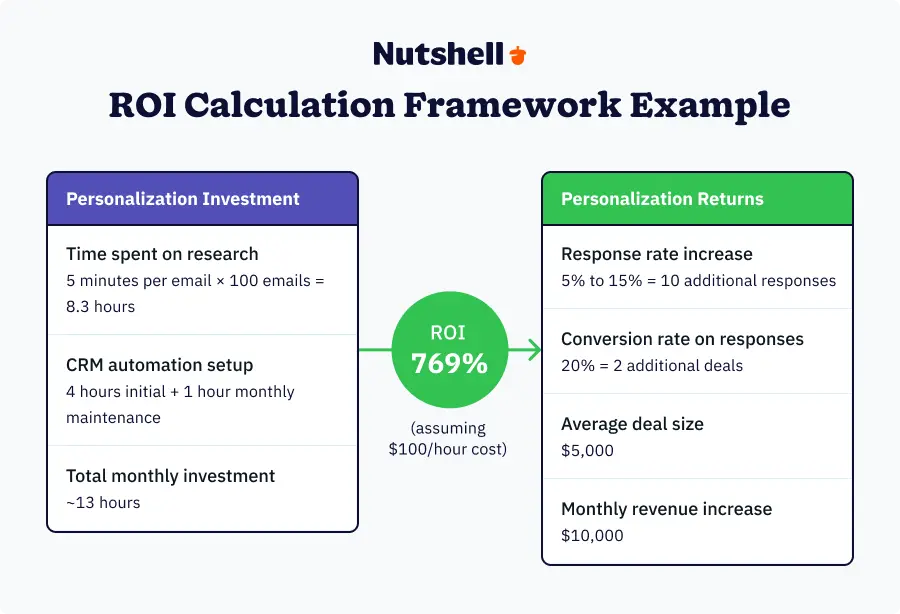
Here’s a simple ROI calculation framework:

Personalization Investment:

  • Time spent on research: 5 minutes per email × 100 emails = 8.3 hours
  • CRM automation setup: 4 hours initial + 1 hour monthly maintenance
  • Total monthly investment: ~13 hours

Personalization Returns:

  • Response rate increase: 5% to 15% = 10 additional responses
  • Conversion rate on responses: 20% = 2 additional deals
  • Average deal size: $5,000
  • Monthly revenue increase: $10,000
  • ROI: 769% (assuming $100/hour cost)
ROI calculator infographic showing 769% return on investment from email personalization efforts

Use this data to create an optimization framework that continuously improves your results. Review metrics weekly to identify trends, test new personalization elements based on what’s working, eliminate tactics that don’t move the needle, and document successful templates and approaches for team-wide use.

Pro Tip: Nutshell’s email analytics and conversion tracking give you complete visibility into your personalization efforts. You can see which emails drive the most engagement, track revenue attribution back to specific campaigns, and identify patterns that lead to closed deals—all from a single dashboard.

How the right CRM transforms email personalization

The strategies we’ve covered are powerful, but implementing them manually across hundreds or thousands of leads is simply unsustainable. This is where having the right CRM makes all the difference between personalization that scales and personalization that stalls.

Essential CRM features for effective personalization include:

  • A unified contact database that centralizes all prospect information
  • Custom fields and properties to track unique data points
  • Email template management with dynamic content capabilities
  • Automation tools that maintain the personal touch at scale
  • Comprehensive analytics to measure what’s working

The benefits of an integrated approach far outweigh using separate tools. When your email personalization lives within your CRM, every interaction is automatically logged, your entire team has visibility into outreach efforts, and you can track the complete journey from first email to closed deal.

Nutshell is specifically designed for growing teams that need powerful personalization without enterprise complexity. Unlike bloated systems that require months of training, Nutshell gets you up and running in days. Our affordable pricing means you can invest in growth, not software licenses. And our sales-first design ensures every feature actually helps you close more deals.

Ready to see how Nutshell can transform your email personalization? Start your free 14-day trial and experience the difference for yourself.

Real success story: How an author achieved “explosive” bookstore sales

Sometimes the best personalization stories come from unexpected places. Take Wayne McFarland, an author who needed to get his books into over 1,200 independent bookstores nationwide. His challenge? Reaching out to each store with a personalized pitch that didn’t feel mass-produced.

Having previously used Nutshell at his software company, Wayne knew the platform could handle his unique needs. His solution was brilliantly simple. He uploaded an Excel list containing all bookstore data, used tags to organize stores by region and type, created personalized email templates with merge fields, and sent hundreds of tailored emails in seconds rather than hours.

The implementation was remarkably straightforward. Wayne spent just a few hours setting up his campaigns, organizing his data, and creating templates that felt personal despite being automated. Each bookstore received an email that referenced their specific location, mentioned relevant local angles for his book, and included personalized reasons why his title would resonate with their customers.

The results speak for themselves. As Wayne put it: “Sales with bookstores exploded.” His total investment over two months was just $38—the cost of Nutshell’s starter plan. This incredible ROI proves that you don’t need expensive enterprise software to achieve professional results. Sometimes the most powerful solutions are also the most accessible.

Read Wayne’s complete success story to learn more about how he leveraged affordable tools to drive significant results.

Perfect your email personalization action plan

The potential impact of personalized sales emails is clear: 6x higher transaction rates, dramatically improved response rates, and stronger relationships with leads. But knowing what to do and actually doing it are two different things.

Here’s your 3-step action plan to get started:

  1. Audit your current email performance. Look at your open rates, response rates, and conversion rates. This baseline will help you measure the impact of personalization.
  2. Implement 2-3 strategies immediately. Don’t try to do everything at once. Start with the tactics that make the most sense for your sales process. Maybe that’s better segmentation, behavioral triggers, or dynamic signatures.
  3. Set up proper tracking and testing. You can’t improve what you don’t measure. Ensure you have systems in place to track the performance of your personalized campaigns.

Remember, having the right tools makes all the difference. Manual personalization might work for a handful of leads, but scaling your efforts requires a CRM that can automate the heavy lifting while maintaining that personal touch.

Ready to transform your email outreach? Try Nutshell free for 14 days and see how easy it is to send personalized sales emails that actually convert. No credit card required, no complex setup—just powerful personalization tools that help you close more deals.

Want to dive deeper? Check out these additional resources:


Frequently asked questions about personalized emails

  • 1. How much personalization is too much?

    The key is striking a balance between relevance and respect for privacy. Stick to professional information that’s publicly available or that prospects have shared with you directly. Mentioning their recent LinkedIn post about sales challenges? Great. Referencing their vacation photos from Instagram? Creepy. Focus on business value and how you can help solve their professional challenges.

  • 2. What if I don’t have time to personalize every email?

    Start by prioritizing high-value leads who warrant the extra effort. Use templates and automation to handle the heavy lifting—you can create personalized emails at scale with the right tools. Focus on 2-3 key personalization points rather than trying to customize everything. Even small touches, such as mentioning their industry or recent company news, can make a big difference.

  • 3. How do I personalize cold emails without coming across as creepy?

    Transparency is key. Be upfront about your research: “I noticed on your company blog that…” or “Your recent LinkedIn post about X resonated with me because…” Stick to publicly available information and always tie your personalization back to business value. The goal is to show you’ve done your homework, not that you’re stalking them.

  • 4. What’s the best CRM for email personalization?

    Look for a CRM with robust custom fields, email template management, automation capabilities, and detailed analytics. Integration is crucial—your CRM should be your single source of truth for all prospect data. Nutshell excels in all these areas while remaining intuitive and affordable, making it ideal for growing teams that need powerful features without complexity.

  • 5. How do I maintain personalization at scale?

    Success at scale requires effective data hygiene, intelligent automation, and streamlined template management. Regularly clean and update your contact database. Use merge fields and dynamic content to automate personalization. Create template libraries for different scenarios and set up workflows that trigger based on specific behaviors or attributes.

  • 6. What personalization elements have the biggest impact?

    Based on response rate data, the most impactful elements are company-specific pain points (showing you understand their challenges), recent triggers (demonstrating timeliness and relevance), and relevant case studies (proving you can deliver results). Focus on these three areas first before expanding to other personalization tactics.

See Nutshell in action!

Try Nutshell free for 14 days or let us show you around before you dive in.

BACK TO TOP

Join 30,000+ other sales and marketing professionals. Subscribe to our Sell to Win newsletter!