Skip to main content ↓

How CRMs Are Using AI to Improve Customer Relationship Management

a man is standing in front of a computer screen with lots of green text

Key takeaways

  • AI in CRM is revolutionizing B2B sales and marketing by streamlining workflows, improving customer insights, and enabling more proactive business approaches through technologies like generative, predictive, and conversational AI.
  • AI-powered CRMs enhance reporting, predictive analytics, writing, and automation, allowing for more accurate lead scoring, sales forecasting, personalized email campaigns, and efficient task management.
  • By leveraging AI for segmentation, customer insights, and personalization, B2B professionals can better understand customer needs, tailor their approaches, and ultimately drive increased customer satisfaction and loyalty.


If you’re still manually logging customer interactions, scoring leads by gut feeling, or spending hours crafting individual outreach emails, you’re working harder than necessary.

AI-powered CRM systems have moved beyond simple automation. They analyze customer behavior, predict which leads will convert, generate personalized content, and surface insights that would take human teams weeks to uncover. 

The results speak for themselves. Companies using AI in CRM have reported: 

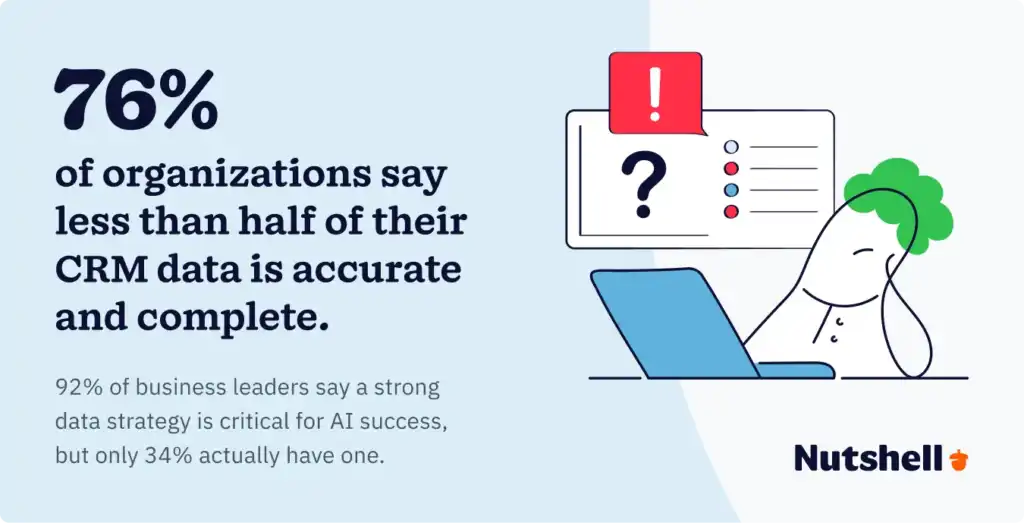
But here’s the reality check: 76% of organizations say less than half of their CRM data is accurate and complete, creating a shaky foundation for AI implementation. And while 92% of business leaders believe a strong data strategy is critical for AI success, only 34% have a formal data strategy in place.

This guide cuts through the hype. You’ll learn what AI in CRM actually does, which types of AI deliver the most value, how to choose the right platform, and whether your business is ready to make the investment. We’ll also examine real-world results, including how Salesforce saved 50,000 hours in a single quarter using AI-powered tools, and explore the 2026 trends reshaping the CRM landscape.

Summarize with AI:

💬 ChatGPT
🔍 Perplexity
🤖 Claude
🔮 Google AI Mode
🐦 Grok


Supercharge your CRM with the power of AI!

Work smarter, not harder. Nutshell’s AI features summarize timelines and call or meeting transcriptions, take speech-to-text notes, help you craft emails, and generate insights so your team closes deals faster.

What is AI in CRM?

CRM AI is the integration of artificial intelligence (AI) into customer relationship management (CRM) systems. The combination of AI and CRM has the power to transform how businesses interact with customers by interpreting and learning from customer data and predicting future needs.

Bringing AI into your CRM gives you the tools to take a more proactive business approach, fostering deeper and more meaningful customer relationships. It also allows you to automate several processes, helping your team increase its productivity levels.

Types of AI in CRM: Use cases and applications

AI Powered CRMs come in various forms, offering different solutions to help you and your team. These are the different types of AI you’re bound to find in modern CRM systems today:

  • Generative AI: This CRM AI type uses machine learning to generate various forms of content—like emails, blog posts, etc. With generative AI, you can create sales and marketing communications and materials faster than ever, increasing team efficiency.
  • Predictive AI: Sales forecasting, lead scoring, and trend spotting are just a few nifty uses of predictive AI in your CRM. This CRM AI variety can help teams identify leads most likely to convert and give you insights for more effective planning and decision-making. 
  • Conversational AI: Think chatbots and virtual agents, and you have conversational AI—a form of artificial intelligence that can understand and respond to conversations when humans interact with it. You can use this form of CRM AI to enhance customer experiences and gather data when your prospects and customers engage with it.

How are CRMs using AI?

Using AI and CRM together is useful for lots of tasks, like automation, data analytics, and prediction-making. Because AI imitates the way humans learn from our knowledge and experiences, it can produce insights and make decisions based on what it learns.

Machine learning is one subset of AI that’s useful for CRMs. ML applications improve themselves through the data that’s given to them — they analyze historical data and identify patterns and trends to make decisions, forecasts, and predictions about future data trends. For businesses, machine learning systems are a game-changer for sales, revenue, and marketing forecasting, and just about anything else that involves data analysis. 

CRMs are leveraging these abilities in a number of ways.

Reporting and predictive analytics 

Because AI can quickly analyze large quantities of data, it can generate accurate and understandable reports with ease, saving your team time and effort. AI can also generate predictions based on the information you’ve been storing on customers, leads, and sales. Whether you want to score your leads or forecast sales, AI is a great tool for predicting trends and empowering organizations to make better data-driven decisions.

Integrating machine learning software into your CRM processes allows for constant sales, marketing, and customer behavior forecasting. With automated data collection through your CRM, you’ll have a continuous flow of real-time, high-quality data being funneled straight to your machine-learning tool.

Writing and email

Generative AI accelerates everyday writing—from sales outreach to nurture sequences and newsletters. Pair an email‑capable CRM with features like 1-click AI email campaign generation or AI email reply starters to draft context‑aware responses in seconds, or use an email sequence writer to create multi‑touch campaigns that match your tone. Even marketing teams benefit from built‑in assistants for newsletters and content tweaks via the AI writing assistant.

Note‑taking is another time sink AI eliminates. Voice‑to‑text and summarization can transcribe and condense conversations automatically with AI meeting summaries and seamless Zoom transcriptions + AI summaries, so key points land in the right timeline without manual effort.

Skip the blank template—generate email campaigns with AI

Go from prompt to polished first draft in minutes with the 1-click AI email campaign builder!

Automation 

While automation and AI are two different tools, AI can be used to improve automation within your CRM. Automation is highly valuable for streamlining certain repeatable processes, like moving leads along your sales pipeline and sending marketing emails.

In addition, patterns found in customer engagement levels, purchase history, demographics, and other online behaviors can inform businesses’ creation of effective automated marketing and drip sequences that drive a higher ROI.

Segmentation

Segmenting leads and customers allows you to generate more precise reports, target marketing campaigns with greater accuracy, and use the right sales approach with each lead. AI’s natural language processing (NLP) and machine learning (ML) capabilities allow CRM customers to segment leads and customers more accurately based on their interactions and data.

Through customer data analysis, machine learning tools can identify patterns in customer behavior and common characteristics among customers. Through machine learning, businesses can identify customer segments based on criteria like:

  • Demographics
  • Lead and customer engagement with marketing efforts
  • Customer behavior on your business’s site
  • And more

Machine learning tools can even give insight into the likelihood of conversions with new leads and automate customer segmentation and customer profile creation.

Customer insights 

Conversation and timeline data are goldmines—if you can parse them quickly. AI can analyze emails, chats, calls, and meetings to reveal sentiment and intent, then distill years of activity into a concise brief with timeline summarization. Pair that with meeting summarization to keep every rep aligned on history, blockers, and next steps.

AI and ML can also analyze conversations with prospects (whether through email, customer support chat, phone call, or video) and generate an analysis of how the customer was feeling during the interaction, providing insights into the customer’s view of your products, services, and company. 

Personalization

Just like customer segments, identifying customer needs through machine learning means you can create more effective campaigns that directly address customer pain points.

The CRM AI analyzes your customer data to determine the ideal products and services for their individual needs. Using AI in this way allows you to anticipate and address each customer’s specific needs, leading to increased customer satisfaction and loyalty.

Additionally, identifying customer needs through machine learning opens up opportunities for more effective cross-selling efforts and more positive customer experiences.

The 6 best AI CRM platforms with advanced tools compared

More and more CRM providers are adopting AI in various aspects of their platforms. Here are the six best AI-powered CRMs and how they’re bringing their customers the power of artificial intelligence:

CRMKey AI features
Nutshell• Timeline summarization
• AI Chatbot
• Nutshell’s AI Agents 
• Zoom transcription summarization
• Voice‑to‑text notetaker
• AI email writing assistant; data enrichment (“Intelligence”) 
• MCP server integration to gather data insights
Coming soon: AI sales coach to accelerate your processes 
Salesforce• Einstein GPT, a generative AI tool providing data insights across the Salesforce platform that will also route service requests based on customer tone
HubSpot• Breeze Assistant, a prompt‑based assistant that writes/sends emails, creates reports, and generates insights (plus CRM actions/navigation).
Zoho• Zia, a conversational assistant to find CRM data, provide  suggestions/insights, score leads, and offer workflow suggestions
Freshworks• Freddy AI, a customer‑service chatbot that automates support conversations, analyzes sentiment and sales trends and provides recommendations
Pipedrive• AI Sales Assistant identifies most valuable leads, offers data‑based recommendations and sends notifications to keep teams aligned

1. Nutshell – Sales Business

A screenshot of the webpage for Nutshell's Next Action AI Sales Coach feature, which analyzes leads to surface the highest-impact action that will keep deals moving

Rating: 4.8/5
Best for: Small to medium-sized teams seeking affordable, comprehensive AI automation with exceptional ease of use

Nutshell’s Sales Business plan delivers enterprise-grade AI features without enterprise-level complexity or cost. The platform combines timeline summarization, AI chatbots, voice-to-text transcription, and email writing assistance in an intuitive interface that requires minimal training. Businesses can deploy Nutshell within days and see immediate productivity gains.

Key features include:

  • Timeline summarization: Your Nutshell timelines are thorough records of every interaction you’ve had with a person, company, or lead, which can become unwieldy over time. The timeline summarization feature will provide a summary of your relationship with the contact, including important information like who they’ve interacted with the most, what tends to come up in discussions, and what products or services they’re interested in. Use these insights to better understand customers.
  • AI Chatbot: With Nutshell’s AI Chatbot, you can engage website visitors, answer questions, book meetings, and capture details—all while your team is offline. Train your chatbot on your site’s URLs, uploaded PDFs, and more, so it always delivers the correct answer. 
  • Nutshell’s AI Agents: Design sales pipelines, draft AI-generated email replies, beat objections, and surface insights using AI Agents in your Nutshell sidebar.
  • Zoom transcription summarization: Zoom meeting transcripts are helpful for catching team members up on how a demo, sales pitch, or other meeting went. Use AI to summarize Zoom meeting transcriptions at the click of a button, helping you keep track of conversations.
  • Notetaker for voice-to-text transcriptions: With Nutshell’s Notetaker feature, you can skip the keyboard and take notes, write emails, comment on logged activities, and more using voice-to-text.
  • Email writing assistant: Craft engaging email messaging fast with the AI writing assistant available to users on Nutshell’s Marketing plans.
  • Data enrichment: With Nutshell Intelligence, you can automatically gather additional data related to your contacts from publicly available resources across the web.
  • MCP server integration: Hey, ChatGPT. Can you tell me what sales activities are most commonly logged for our closed won sales over $5,000? The MCP server integration in Nutshell lets you link your CRM to your AI assistant with a single click, so you can uncover rich insights into your CRM data that help drive growth.
  • Next Action AI Sales Coach (coming soon): With the Next Action AI Sales Coach, you’ll always know the next best action to take with a lead and why. Eliminate guesswork, save time, and transform your pipeline.

Pricing: Sales Business plan starts at $49 per user per month (billed annually) with core AI features included. A 14-day free trial is available, no credit card required. Larger teams can contact Nutshell for volume discounts.

See Nutshell in action. No credit card required

2. Salesforce – Einstein GPT

Salesforce AI Einsten GPT website page

Rating: 4.6/5
Best For: Large enterprises needing deep customization, scalability, and integration with complex business systems

Salesforce Einstein GPT represents the enterprise-grade AI powerhouse, combining generative AI with Salesforce’s massive ecosystem of features, integrations, and customization capabilities. The platform offers unmatched scalability and flexibility but requires significant investment in both cost and implementation resources. Best suited for organizations with dedicated CRM administrators and complex requirements.

Key features include:

  • Creating AI-generated emails and conversations
  • Delivering data insights
  • Making predictions and recommendations for sales reps
  • Routing customer service requests to the right representative based on the customer’s tone

Einstein GPT is available in prebuilt solutions for sales, marketing, service, commerce, and data, each of which is priced as a separate add-on to your current Salesforce plan. If you have developers on staff, you can also customize your AI.  

Pricing: While pricing for Einstein GPT specifically is not listed on Salesforce’s website, CRM pricing starts at $25 per user per month. A free plan is also available with limited capabilities.

3. HubSpot – Breeze Assistant

A screenshot of the main webpage for HubSpot's Breeze Assistant tool

Rating: 4.5/5
Best for: Inbound marketing teams prioritizing ease of use, integrated marketing automation, and content management alongside sales CRM

HubSpot’s Breeze Assistant is an AI-powered assistant that responds to prompts. Breeze Assistant is designed to help sales, service, and marketing professionals automate tasks.

Key features include:

  • Write and send emails
  • Create reports
  • Generate other insights 

Pricing: Sales Hub Starter, the lowest paid tier that includes Breeze Assistant, starts at $20 per month per seat. Advanced AI features through Breeze—such as content generation—require a subscription to Marketing Hub Professional, which starts at $800 per month for three core seats and 2,000 contacts. Pricing increases as you add users and contacts.

4. Zoho – Zia

Zoho AI CRM website page

Rating: 4.2/5
Best for: Budget-conscious businesses wanting conversational AI assistance and comprehensive feature sets without premium pricing

Zoho’s Zia AI assistance provides conversational interface, predictive analytics, and automation features at pricing significantly below enterprise competitors. The platform offers impressive breadth across sales, marketing, and customer service with AI woven throughout. However, the interface feels less polished than premium options, and some features require technical knowledge to configure effectively.

Key features include:

  • Find CRM data on command
  • Provide suggestions and insights
  • Score leads
  • Enrich customer data 
  • Create workflow suggestions

Pricing: Zoho CRM Standard starts at $14 per user per month (billed annually), which includes Zia and other basic AI features. More advanced features like forecasting and conversation summaries require a subscription to the Professional tier or higher, which starts at $23 per user per month.

5. Freshworks – Freddy AI

Freshworks Freddy AI CRM

Rating: 4.1/5
Best for: Customer service teams focused on chatbot automation, ticket management, and support workflow optimization

Freshworks’ Freddy AI emphasizes customer service and support automation more than pure sales CRM functionality. The platform excels at intelligent chatbots, ticket routing, knowledge base management, and support team productivity—making it ideal for businesses where customer service interactions drive retention and growth. While sales features exist, they feel secondary to the service focus.

Key features include: 

  • Automate customer support conversations
  • Analyze customer sentiment 
  • Provide sales trend analysis, revenue forecasts, and other recommendations 

Freshworks customers can also customize Freddy AI to give it the same look and feel as the rest of their site. 

Pricing: While basic AI chatbot capabilities are included with all Freshsales subscriptions, advanced features like Freddy AI Insights are only available at the Pro and Enterprise tiers ($47 and $71 per user per month, respectively).

6. Pipedrive – AI Sales Assistant

Pipedrive AI Sales Assistant website page

Rating: 4.0/5
Best for: Sales-focused teams needing strong pipeline visualization, deal management, and AI-powered lead prioritization in a sales-first interface

Pipedrive built its reputation on visual pipeline management and sales process simplicity.  The Sales Assistant adds intelligent deal forecasting, activity recommendations, and email assistance while maintaining the clean, uncluttered interface sales teams love. The platform lacks marketing automation depth and advanced customization but excels at helping sales teams track and close deals efficiently.

Key features include:

  • Identify the most valuable leads
  • Generate data-based recommendations
  • Send notifications to keep everyone on the same page

Sales Assistant is most helpful for sales teams, as it uses automation to save time when completing everyday sales tasks. People with a paid or trial Pipedrive account can try the feature for free.

Pricing: Pipedrive offers basic AI features with all plans, starting at $14 per user per month. Advanced features like email creation and AI notifications are only available at the Premium and Enterprise tiers ($59 and $79 per user per month, billed annually).

The age of experimenting with AI in CRMs is officially ending. Now, businesses are looking to scale deployment of AI-based solutions that integrate directly with their CRM platforms. 

Here are some trends we’re likely to see as the industry continues to move forward.

Agentic AI: From assistant to autonomous operator

The biggest shift happening in 2026 is CRM AI moving from tools that assist humans to agents that operate independently. Early AI features required human direction—you asked the system to draft an email, score a lead, or generate a report. Agentic AI systems make decisions and take actions without waiting for instructions.

Gartner predicts that by the end of 2026, 40% of enterprise applications will include task-specific AI agents, up from less than 5% in 2025. This represents CRM transforming from “AI-assisted” to “AI-operated” for routine workflows.

Practical examples include AI agents that: 

  • Automatically update deal stages when specific conditions occur.
  • Proactively reach out to customers showing churn risk signals.
  • Generate and send personalized follow-up sequences without human approval.
  • Reschedule meetings when conflicts arise.
  • Route leads to appropriate sales reps based on real-time availability and performance.

Salesforce’s Agentforce 2.0 demonstrates this trend, with customers automating 70% of tier-one support inquiries. Pipedrive’s agentic ecosystem features specialized agents for different sales tasks, working around the clock as digital teammates. The question is shifting from “how can AI help?” to “what can AI handle on its own?”

Data infrastructure as the critical foundation

AI effectiveness depends entirely on data quality, yet most organizations haven’t built the foundation AI needs to succeed. The statistics are sobering: 

This data crisis creates a widening gap between AI leaders and laggards. Companies investing in data quality, governance, and infrastructure are pulling ahead while others struggle with AI implementations built on faulty foundations.

The focus in 2026 is shifting toward critical data management practices such as: 

  • Data cleansing processes
  • Governance frameworks
  • Integration architectures
  • Quality monitoring systems

To summarize: Organizations that fix their data infrastructure early will capture AI value. Those that layer AI atop bad data will see initiatives fail and investments wasted.

Measurable ROI becoming the standard

AI in CRM has moved beyond the experimentation phase into accountability. In 2025, 72% of organizations formally measured Gen AI ROI—that’s a dramatic increase from the minimal tracking in 2023. Three out of four leaders now see positive returns on AI investments, with 88% anticipating budget increases in the next 12 months.

Businesses are measuring specific outcomes: 

  • Hours saved on routine tasks, 
  • Increases in deals closed, 
  • Reductions in customer churn, 
  • Improvements in forecast accuracy
  • Faster response times

The “AI will transform everything” hype is being replaced by concrete questions: how much time does this save my team? How much faster do deals close? What’s the payback period?

The data offers some compelling answers. Companies implementing AI-powered CRM saw 30 to 40% improvements in forecast accuracy, and 82% of professionals now use Gen AI at least weekly with 46% using it daily.

Voice-first and conversational interfaces

Traditional CRM interfaces built around forms, fields, and clicks are giving way to conversational interactions. Stanford studies show voice entry is nearly three times faster than typing—a massive efficiency gain for field sales teams who can log meetings, update deals, and add notes while driving or walking between appointments.

Voice-to-CRM adoption increased 340% in 2025, becoming a standard feature in modern CRM strategies. Organizations combining traditional CRM with voice data capture achieved 85-95% data completeness versus the 40-50% industry average for manual entry.

The shift extends beyond simple dictation. AI agents are becoming voice- and text-enabled, allowing sales teams to delegate routine tasks through spoken commands. Instead of clicking through menus to create a follow-up task, reps simply say “remind me to call this prospect next Tuesday at 2pm” and the system handles the rest.

Security and privacy as competitive differentiators

As AI capabilities expand, data privacy and security concerns have become the primary barrier to adoption. Data privacy and security concerns are the #1 barrier to purchasing generative AI for CRM. Enterprise buyers specifically seek AI vendors that prioritize security and data protection.

As of 2025, 84% of organizations report integrating data sovereignty into their AI strategy, ensuring customer data remains within specified geographic boundaries and complies with regional regulations like GDPR, CCPA, and industry-specific requirements.

The competitive landscape is shifting toward “privacy-first CRM”—platforms that balance AI-powered personalization with robust data protection, transparent AI decision-making, and customer control over information usage. Companies that demonstrate trustworthy AI practices are winning enterprise deals while those with unclear data policies face increasing buyer resistance.

Frequently asked questions about AI-powered software

Hungry for more about AI for CRM platforms? Check out these frequently asked questions:

  • How can AI be used in customer relationship management?

    As in many industries, applying AI in customer relationship management can help teams save time, make sense of large quantities of information, and streamline time-consuming tasks like researching contacts online.

  • Do you need AI in your CRM?

    Although you don’t need AI in your CRM to gain the benefits of a CRM platform, AI can certainly enhance your experience and even help you do business better. In fact, businesses are reporting that using AI saves them up to 13 hours of productive time per week and almost $5,000 in operational costs per month.

    Whether you want to improve your customer support, streamline workflows for your team, or get reporting insights faster, AI’s features can provide your organization with several powerful benefits. When determining whether to implement AI features in your CRM, consider your organization’s unique needs and situation.

  • Which companies use AI in their CRM?

    Major CRM providers like Nutshell, Salesforce, Pipedrive, and HubSpot all incorporate AI in their CRMs. As AI becomes more accessible, more CRMs will likely start developing their capabilities to help customers streamline their workflows and save time.


  • Are there any drawbacks to using AI in your CRM?

    While we’ve already seen all the great ways CRMs are using AI, there is definitely potential for some disadvantages to arise from its use:

    • Data bias: AI’s predictions and insights are only as helpful as the data they’re based on. Using inaccurate or incomplete data will lead to suboptimal insights.
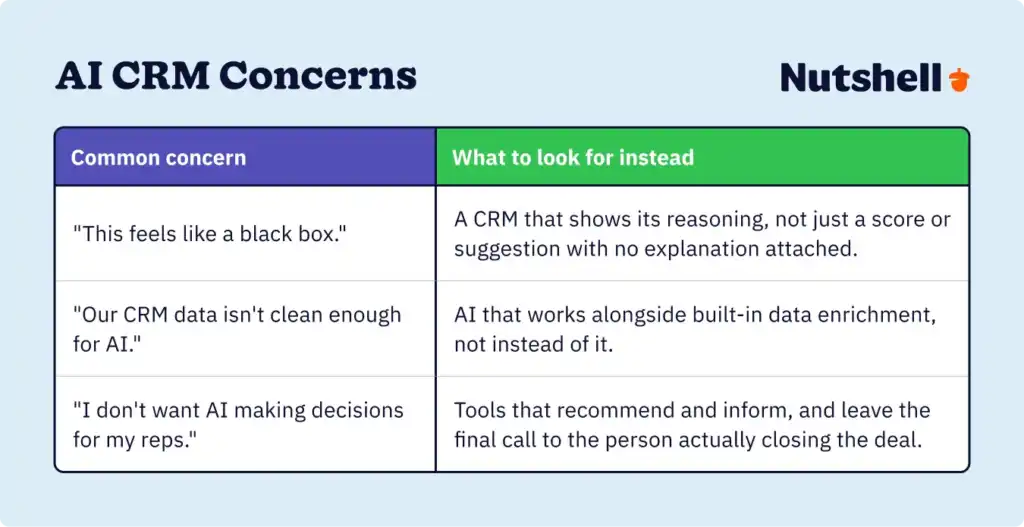
    • Lack of human interaction: While it might be sufficient in some areas of business, like creating reports, relying on AI to sustain relationships with customers likely isn’t a good idea. Carefully consider how using a chatbot for customer support and relying on AI-generated insights about customers might impact the customer experience and use a human touch when necessary.

  • What should I look for in a CRM with AI integration?

    When looking for a system that combines CRM and AI, search for a tool that isn’t just using AI as a buzzword but provides real value through capabilities like:

    • Phone call and virtual meeting summaries and transcriptions
    • Summaries of contact records and client relationships
    • Voice-to-text that streamlines email writing, note-taking, and more
    • Intelligence gathering that provides details you can use to strengthen business relationships

  • How do I get high-quality CRM data?

    The quality of your data can impact all aspects of your business, from sales to marketing and customer service efforts. High-quality data is identified by four key indicators:

    • Timeliness: Your customer data should be up-to-date and timely, or else you risk inaccurate or false industry predictions and sales forecasts.
    • Accuracy: Error-free data improves the accuracy of sales, customer behavior, and industry forecasting.
    • Reliability: High-quality data collected by your CRM should be reliable and trustworthy. Make sure you’re collecting data from sources you know and trust to be reliable.
    • Consistency: To ensure quality, you need consistent data that doesn’t contradict other timely data

    With a CRM like Nutshell, data collection is headache-free. CRM systems pull data from various sources and organize it all in one central location.

  • What’s the difference between AI CRM and traditional CRM?

    Traditional CRMs are sophisticated filing cabinets—great for organizing data, but they require manual effort to extract insights. AI-powered CRMs actively analyze your data, predict outcomes, and automate actions. Instead of just logging that a prospect opened an email, AI calculates conversion likelihood, suggests optimal follow-up timing, and drafts the message for you.

  • How long does it take to implement AI in your CRM?

    It depends on your platform and data quality. Small to medium-sized businesses using Nutshell typically deploy within days to two weeks. Enterprise platforms like Salesforce can take six months to over a year. The real variable? Data quality. Clean data means faster activation; messy data requires upfront cleanup before AI works reliably.i

  • Can small businesses afford AI-powered CRM?

    Absolutely. AI CRM pricing is now accessible across all business sizes. Nutshell offers comprehensive AI features starting at $49 per user per month—dramatically lower than enterprise platforms. Most businesses see ROI within the first quarter through productivity gains and time savings. Plus, you can try Nutshell free for 14 days with no credit card required.

Take AI for a test-drive in your CRM

By using AI-powered CRMs, businesses can stay competitive by leveraging predictive analytics, automation, and customer insights. If your CRM platform offers AI features and tools, it could be worthwhile to try them out. Whether you’re part of a small team or a large organization, utilizing AI in your CRM can provide you with several benefits, from predictive analytics and reporting to better customer insights. 

AI continues to transform the way the world conducts business, and your CRM needs to be able to keep up. With Nutshell, you can take advantage of AI, sales automation, team collaboration, and more CRM features to gain better insights into your customers and leads, improve your efficiency, and enhance your customer relationships. Try Nutshell for free to see CRM AI at work!

See Nutshell in action!

Try Nutshell free for 14 days or let us show you around before you dive in.

BACK TO TOP

Join 30,000+ other sales and marketing professionals. Subscribe to our Sell to Win newsletter!