New in Nutshell: Light a Fire Under Your Most Important Deals With Hot Leads!

-
Sometimes, you see a lead come through and immediately know it’s special. It’s just a feeling you get.
Maybe it’s an important repeat customer, maybe it’s a potential whale from a big-name company, or maybe it’s a client who was personally referred to you by your CEO. The bottom line is, you want to make absolutely sure you give the lead your best effort, and fast.
Nutshell has offered several ways to prioritize leads, including lead confidence and tags, but we heard from a lot of customers who wanted a tool to visually flag individual leads that needed extra attention. So, we went to the kitchen and cooked up hot leads.

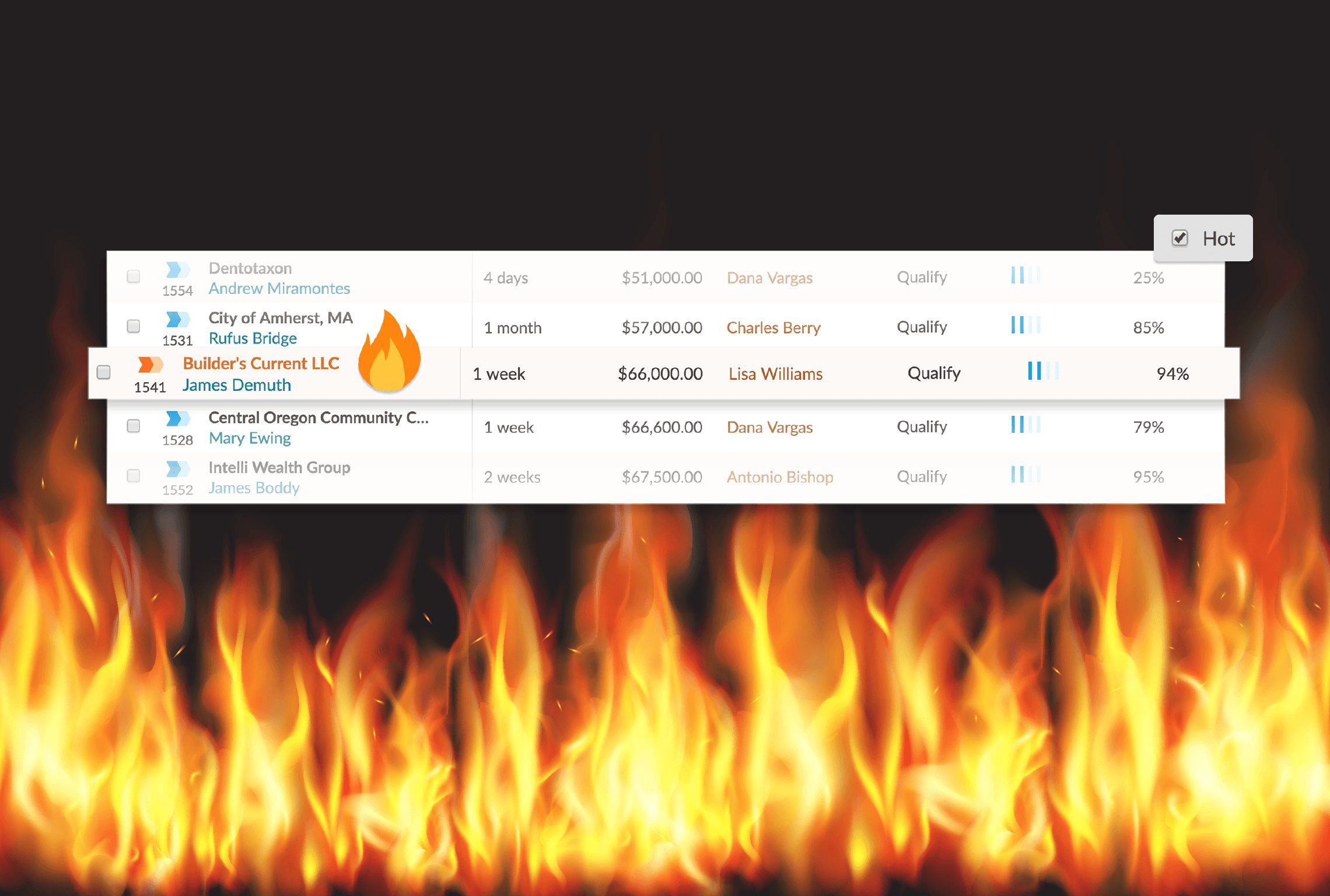
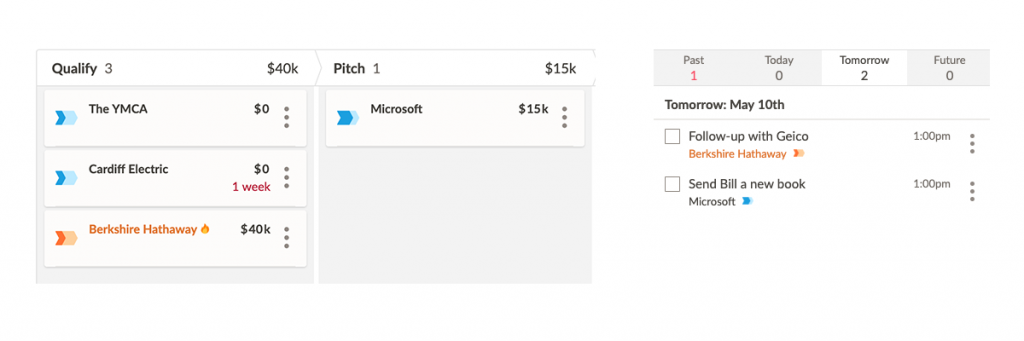
Whether a lead is brand new or already in your pipeline, you can mark it “hot” in one click and it’ll stand out from the pack wherever you see your leads: from your dashboard and lists, to your board view and map, to your activities and tasks.

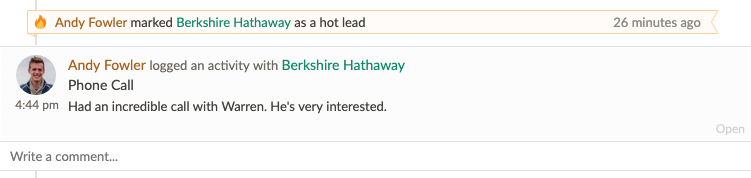
We’ll also send you a notification when a lead is marked as hot, as well as make a note in the lead’s timeline and your company’s feed.

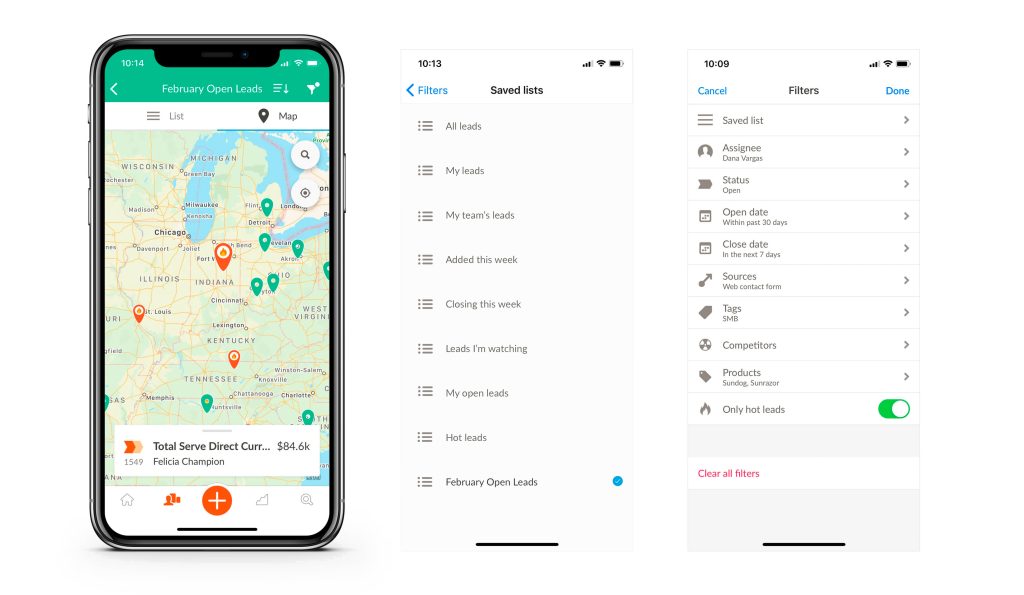
You can even find your hot leads on the go in our fully updated iPhone app.

What does a “hot lead” mean to you?
The purpose of hot leads is to give sales reps more control over how they prioritize leads, and make it as simple and intuitive as possible. We talked to a lot of our customers about what makes a lead “hot,” and heard many definitions. A hot lead could mean…
- It’s time-sensitive: Either the prospect is motivated to buy quickly or they only have a limited time to make their decision. The faster you can get to them, the better.
- It’s repeat business from one of your best clients: You already have a fruitful relationship with a particular buyer, and you want to keep it that way. Give them VIP attention and they’ll stay with you. Neglect them and they might start looking elsewhere.
- It has jackpot potential: Could a single high-value deal make your quota for the entire month? Then you’d better not let it slip away, friendo.
- It’s a personal referral: All referrals are important, but when it’s a referral that comes from your boss, best friend, father, or priest, your personal reputation is on the line. If you drop the ball, you’ll hear about it later.
- You just have a gut feeling about it: Even with the most precise sales process in place, sales reps occasionally work by sense of smell. Have you ever had a discovery call with a prospect who was such a perfect fit that you already started writing them a one-year anniversary card in your head? That’s a hot lead, too.
With Nutshell, you can now make any of these leads more visible, so that you’re focusing your attention and efforts on the opportunities that matter the most.
Looking to generate more leads for your business? Get some lead-gen advice and inspiration here…
– Lead generation masterclass: 22 ways to expand your inbound marketing net
– Buying a lead list: The pros, the cons, and the things that might land you in jail
– The 16 best sales prospecting tools that integrate with your CRM
Working on the hot leads project also inspired us to do some fine-tuning to Nutshell’s appearance and performance overall….
Farewell, pie

For nine years, we used a pie to represent leads—filling in as they move toward the sale, and turning red when overdue. We’ve designed a more intuitive icon to represent a lead. As your leads progress through your sales process, their icons reflect their stage.
Lightning-fast load times!
We’ve also been working behind the screens to introduce new technology that makes leads load much faster. Like…almost instantly. Starting today, when you click a lead from the leads list or the dashboard, you’ll see a big improvement in load time. And when you go back, it’s even faster. Let us know how it goes!
Not a Nutshell customer yet? Start a free 14-day trial and see why sales teams love, love, love us!’
Frequently asked questions
-
1. How do I mark a lead as hot in Nutshell?
When creating a new lead, check the “Hot” priority box. For existing leads, open the lead page and click the fire icon. The lead will instantly display with an orange chevron, orange name, and fire icon across all views.
-
2. What’s the difference between hot leads, lead confidence, and tags in Nutshell?
Hot leads flag urgent opportunities requiring immediate attention. Lead confidence scores likelihood to close (0-100%) based on pipeline stage. Tags organize leads by category. Use hot leads for time-sensitive deals, lead confidence for forecasting, and tags for segmentation.
-
3. Can I filter and create reports for hot leads only?
Yes. Check “Only hot” at the top of your lead list or board view to filter. For reporting, add a “Priority is Hot” filter to any report to track hot lead performance separately from your overall pipeline.
-
4. When should I use hot leads instead of lead confidence or tags?
Use hot leads for time-sensitive opportunities, VIP clients, personal referrals, or high-value deals needing immediate action. Use lead confidence for forecasting and pipeline health. Use tags for ongoing categorization like industry, product interest, or lead source.
-
5. Do hot leads work with Nutshell’s automation and email sequences?
Hot leads integrate with Nutshell’s filtering and reporting but don’t automatically trigger email sequences. However, you can filter your hot leads list and manually add them to personal email sequences or use pipeline stage automation for consistent follow-up.
NO CREDIT CARD REQUIRED
Want to kick the tires a bit?
No problem. To see if Nutshell is the right choice for your sales team, start a 14-day free trial today!
BACK TO TOPWritten by
Chris Cain VP of Product Development, NutshellReady to try
Nutshell for Free?Thank you! Your submission has been received!Oops! Something went wrong while submitting the form.
11 Digital Marketing Communication Tips From Experts to Increase Conversions
Published on: November 10, 2022Sales Performance Reviews: 9 Tips to Make Them Valuable
Published on: November 10, 2022Unify Team Meeting Processes for Increased Productivity With Nutshell Scheduler Managed Meetings
Published on: May 16, 2025What Are the Top 3 Go-To-Market Strategies?
Published on: November 10, 2022Join 30,000+ other sales and marketing professionals. Subscribe to our Sell to Win newsletter!

- Product
- Nutshell Overview
CRM & Sales
Our powerful and easy-to-use flagship product.Marketing
Email marketing, forms, landing pages, and more.Engagement
Webchat, SMS, WhatsApp & more in your Omni-Channel Inbox.Prospecting
Prospect for new leads and new contacts in your CRM.Quotes & Invoices
Quickly create quotes & invoices in your CRM.
AI
See why Nutshell is the leading AI CRM.Integrations
Connect to Google/Microsoft and over 5,000 Apps.
ReportingCreate reports and forecasts in an instant.CRM Advisor
Get a dedicated point of contact to get the most out of Nutshell.Partner Marketplace
Find trusted partners to help optimize your Nutshell CRM.
- Pricing
Nutshell AI
- Resources
- Contact Us
Contact Sales
Send us your questions or book a 1-on-1 demo.Join a Demo
Join a group demo for a general overview of Nutshell.
Contact Support
Contact our support team via live chat in app or via email.Become a Partner
Refer businesses to Nutshell & earn commissions.
Contact Marketing
Questions about our website or our marketing opportunities?Careers
Join our growing team! See current openings.